
Compress paid & free files into ZIP and upload
When listing in EX4/EX5 format, forward testing
must be measured on the developer's own live account.
Please be aware of this in advance.
You can submit in ex4/5 format with dedicated account authentication and trade history data logic included.
When listing with ex4/5 files, please compress the paid and free versions into a single zip file and upload.

01Prepare the free version
Duplicate your mq4 file (EA) and create "EA product name_free.mq4". *Please use your own EA product name.

02Insert the call code
Insert this code on the first line of your mq4 file. This is the code that calls the mqh file you downloaded earlier.
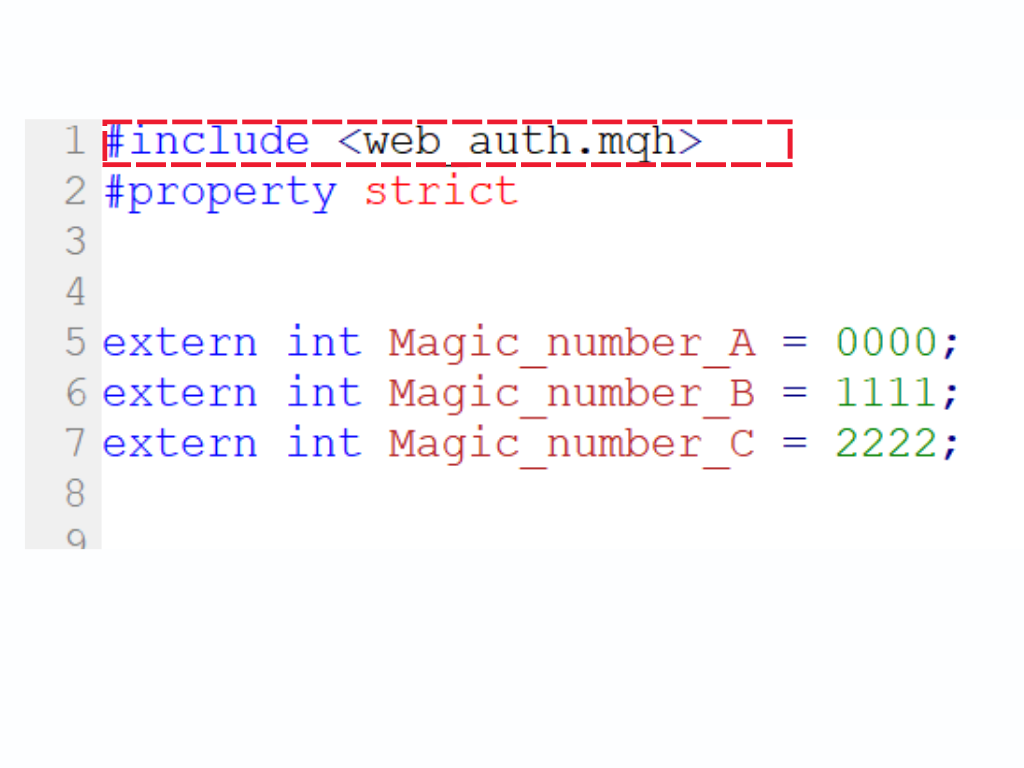
#include <web_auth.mqh>
03Hide the magic number parameter
an external parameter.
an external parameter.
Do not expose the magic number as an external parameter.
In this example, we will use the following magic number variable for the EA. You do not need to change your own magic number variable name.
Magic_number_A
Magic_number_B
Magic_number_C
•
•
•
int Magic_number_A
extern int Magic_number_A
input Magic_number_A
04 Code Addition 1
Insert the following code at the beginning of the OnInit function. (Must be inserted immediately after OnInit function)
The magic number value in ArrayResize in Example 1 specifies the size.
Enter the size according to the number of magic numbers in your EA. (Enter 1 if your EA has only one magic number)
For EAs with many magic numbers, increase the number of stored magic numbers as shown in Example 2 below.
05 Code Addition 2
After specifying the magic number, insert this code below the code you added in the previous step.
Next, insert the remaining code for the OnInit function.
					int OnInit()
 {
 ArrayResize(magic_numbers, 6);
    magic_numbers[0] = Magic_number_A;
    magic_numbers[1] = Magic_number_B;
    magic_numbers[2] = Magic_number_C;
    magic_numbers[3] = Magic_number_D;
    magic_numbers[4] = Magic_number_E;
    magic_numbers[5] = Magic_number_F;
total_magic_numbers = ArraySize(magic_numbers);
if(!IsTesting())
{
SendAccountData(AccountNumber());
if(!WebAuthenticate(AccountNumber()))
{
Alert("systre.com Account verification failed");
ExpertRemove();
}
}
EventSetTimer(6000); return(INIT_SUCCEEDED);
}
06 Code Addition 3
If you are NOT using the OnTimer function
Place the following function at the bottom of your mq4 file and it will work correctly.
If you ARE using the OnTimer function
Call the following function inside the OnTimer function.
					<!-- Bottom of source code -->
void OnTimer()
  {
   if(!IsTesting())
     {
      SendAccountData(AccountNumber());
     }
  }
					void OnTimer()
  {
   if(!IsTesting())
     {
      SendAccountData(AccountNumber());
     }
  }
07Sample Code
Please compile after adding the authentication code.
If you would like to test the authentication logic in your own environment, please provide your account number.
* For testing, please add https://sys-tre.com/ to the allowed WebRequest URL list.
Sample Code
					//Global variables
  #include <web_auth.mqh>
    int Magic_number_A = 0000;//Magic number (Free version: do not release the magic number.)
  //int Magic_number_B = 1111;
  //int Magic_number_C = 2222;
  //+------------------------------------------------------------------+
  //|                                                                  |
  //+------------------------------------------------------------------+
  //Executed first
  int OnInit()
    {
     ArrayResize(magic_numbers, 1);//Change this number if there are multiple magic numbers
     magic_numbers[0] = Magic_number_A;
   //magic_numbers[1] = Magic_number_B;
   //magic_numbers[2] = Magic_number_C;

     total_magic_numbers = ArraySize(magic_numbers);
     if(!IsTesting())
       {
        SendAccountData(AccountNumber());

        if(!WebAuthenticate(AccountNumber()))
          {
           Alert("systre.com Account verification failed");
           ExpertRemove();
          }
       }
     EventSetTimer(6000);
     return(INIT_SUCCEEDED);
    }

  //Timer
  void OnTimer()
    {
     if(!IsTesting())
       {
        SendAccountData(AccountNumber());
       }
    }
  //+------------------------------------------------------------------+

01Prepare the paid version
Duplicate your mq4 file (EA) and create (EA product name)_paid.mq4. *Please use your own EA product name.

02Insert the call code
Insert this code on the first line of your mq4 file. This is the code that calls the mqh file you downloaded earlier.
#include <paid_auth.mqh>
03 Declare the magic number
an external parameter.
an external parameter.
* Note
Unlike the free version, the paid version should expose the magic number parameter as an external parameter so users can change it.
If you have multiple magic numbers, enter the value of the first magic number.
					#include <paid_auth.mqh>
extern int MAGIC = Your EA's magic number;
04 Code Addition
Insert this code at the beginning of the OnInit function. In the code, declare int pass_magic = your EA's magic number;
					int OnInit() {
int pass_magic = Your EA's magic number;
    if (!IsTesting()) {
        if (!WebAuthenticate(AccountNumber(), pass_magic)) {
            Alert("systre.com Account verification failed");
            ExpertRemove();
        }
    }
    return INIT_SUCCEEDED;
}
05Sample Code
Please compile after adding the authentication code.
If you would like to test the authentication logic in your own environment, please provide your account number.
* For testing, please add https://sys-tre.com/ to the allowed WebRequest URL list.
Sample Code
					//Global variables
  #include <paid_auth.mqh>
    extern int MAGIC =  111;//Please release the magic number as an external parameter.
  //extern int MAGIC2 = 222;
  //extern int MAGIC3 = 333;

  //Executed first
  int OnInit() {

  int  pass_magic =111;//Enter the same value as the first magic number.
   if (!IsTesting()) {
          if (!WebAuthenticate(AccountNumber(), pass_magic)) {
              Alert("systre.com Account verification failed");
              ExpertRemove();
          }
      }
      return INIT_SUCCEEDED;
  }
     //+------------------------------------------------------------------+

01Prepare the free version
Duplicate your mq5 file (EA) and create "EA product name_free.mq5". *Please use your own EA product name.

02Insert the call code
Insert this code on the first line of your mq5 file. This is the code that calls the mqh file you downloaded earlier.
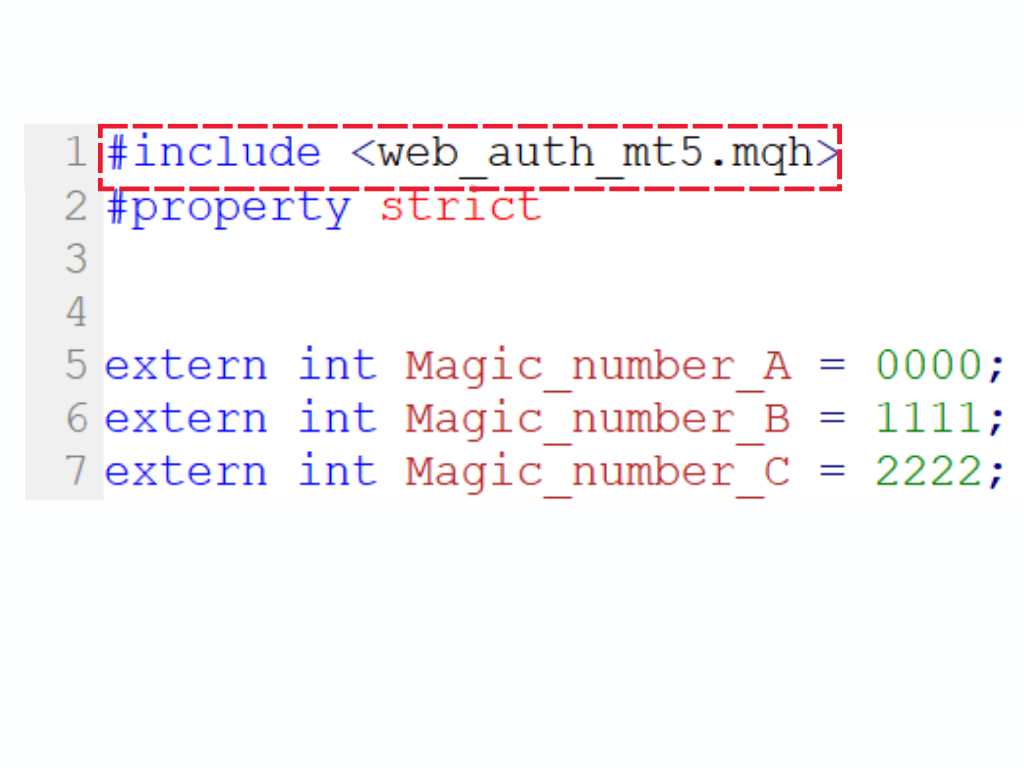
#include <web_auth_mt5.mqh>
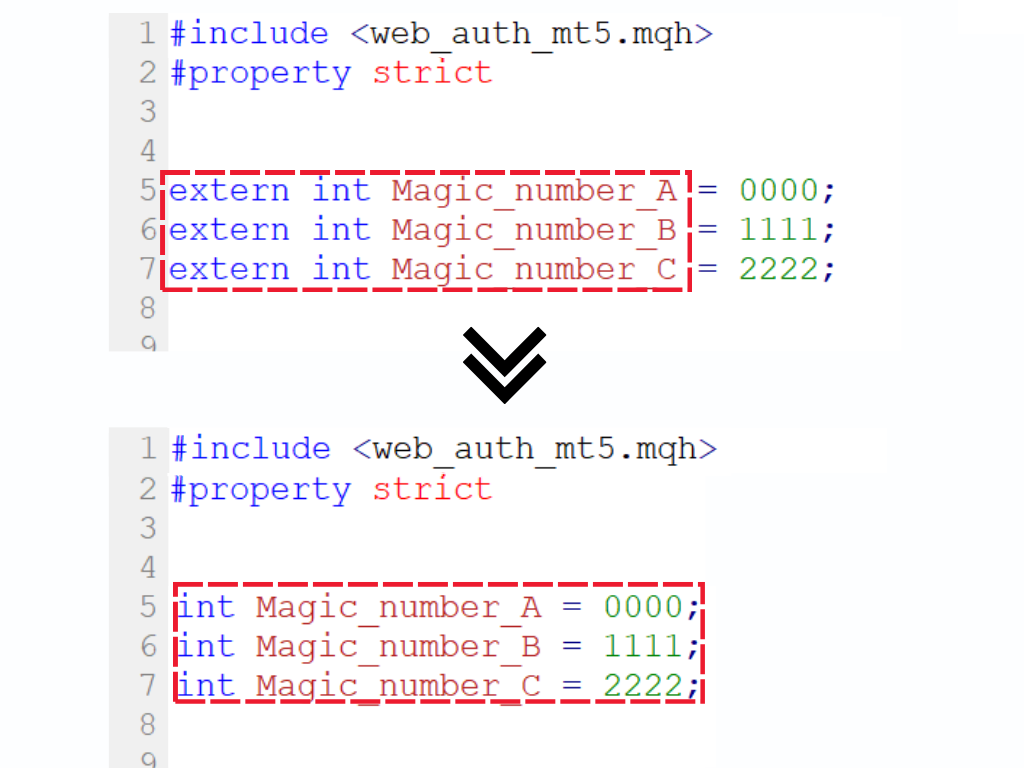
03Hide the magic number parameter
an external parameter.
an external parameter.
Do not expose the magic number as an external parameter.
In this example, we will use the following magic number variable for the EA. You do not need to change your own magic number variable name.
Magic_number_A
Magic_number_B
Magic_number_C
•
•
•
int Magic_number_A
extern int Magic_number_A
input Magic_number_A
04 Code Addition 1
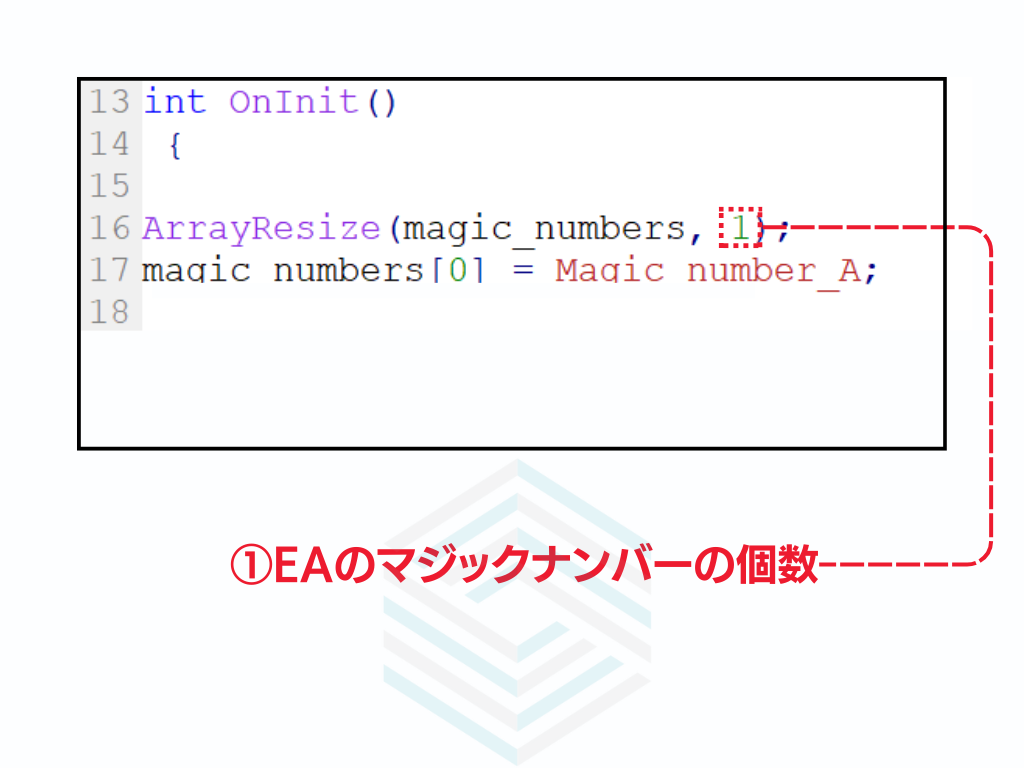
Insert the following code at the beginning of the OnInit function. (Must be inserted immediately after OnInit function)
The magic number value in ArrayResize in Example 1 specifies the size.
Enter the size according to the number of magic numbers in your EA. (Enter 1 if your EA has only one magic number)
For EAs with many magic numbers, increase the number of stored magic numbers as shown in Example 2 below.
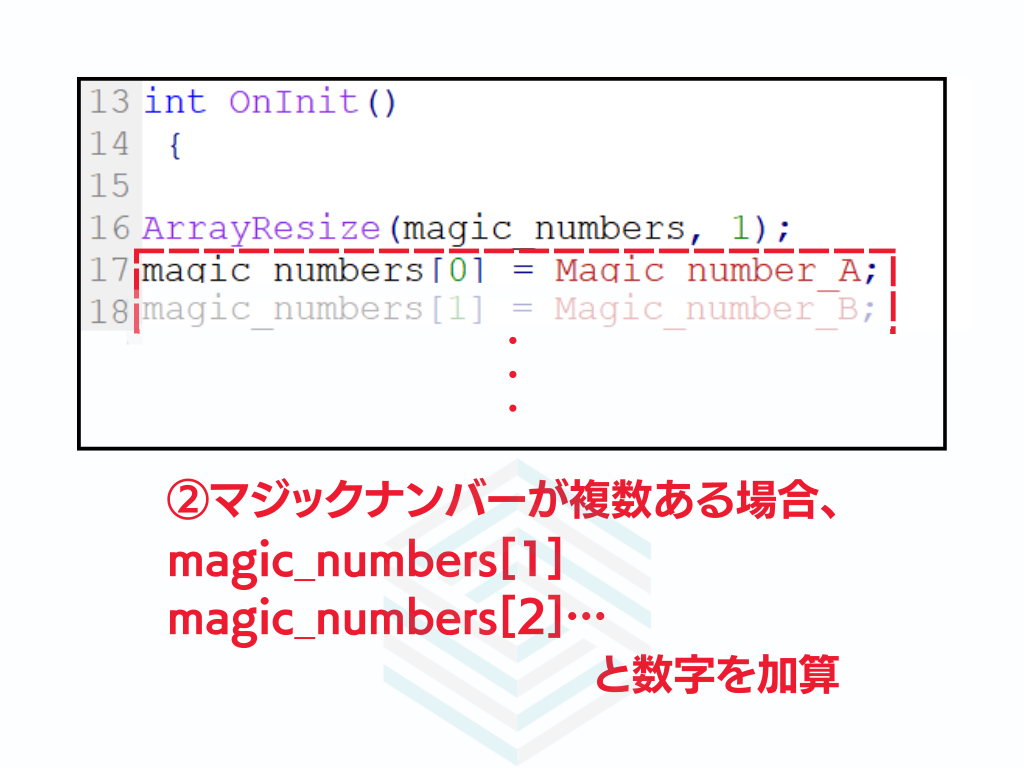

					int OnInit()
 {
 long account_number = StringToInteger(IntegerToString(AccountInfoInteger(ACCOUNT_LOGIN)));
 ArrayResize(magic_numbers, 6);
    magic_numbers[0] = Magic_number_A;
    magic_numbers[1] = Magic_number_B;
    magic_numbers[2] = Magic_number_C;
    magic_numbers[3] = Magic_number_D;
    magic_numbers[4] = Magic_number_E;
    magic_numbers[5] = Magic_number_F;
05 Code Addition 2
After specifying the magic number, insert this code below the code you added in the previous step.
Next, insert the remaining code for the OnInit function.
					int OnInit()
{
long account_number = StringToInteger(IntegerToString(AccountInfoInteger(ACCOUNT_LOGIN)));
ArrayResize(magic_numbers, 3);
magic_numbers[0] = Magic_number_A;
magic_numbers[1] = Magic_number_B;
magic_numbers[2] = Magic_number_C;

 total_magic_numbers = ArraySize(magic_numbers);

   if(!MQLInfoInteger(MQL_TESTER))
     {
      SendAccountData(account_number);
      bool authResult = WebAuthenticate(account_number);
      if(!authResult)
        {
         Print("Authentication failed. Removing Expert Advisor.");
         ExpertRemove();
        }
     }

   EventSetTimer(6000);
   return(INIT_SUCCEEDED);
  }
06 Code Addition 3
If you are NOT using the OnTimer function
Place the following function at the bottom of your mq4 file and it will work correctly.
If you ARE using the OnTimer function
Call the following function inside the OnTimer function.
					<!-- Bottom of source code -->
void OnTimer()
  {
   long account_number = StringToInteger(IntegerToString(AccountInfoInteger(ACCOUNT_LOGIN)));
   if(!MQLInfoInteger(MQL_TESTER))
     {
      SendAccountData(account_number);
     }
  }
					void OnTimer()
  {
   long account_number = StringToInteger(IntegerToString(AccountInfoInteger(ACCOUNT_LOGIN)));
   if(!MQLInfoInteger(MQL_TESTER))
     {
      SendAccountData(account_number);
     }
  }
07Sample Code
Please compile after adding the authentication code.
If you would like to test the authentication logic in your own environment, please provide your account number.
* For testing, please add https://sys-tre.com/ to the allowed WebRequest URL list.
Sample Code
					//Global variables
  #include <web_auth_mt5.mqh>
    int Magic_number_A = 111;//Magic number (Free version: do not release the magic number.)
  //int Magic_number_B = 222;
  //int Magic_number_C = 333;

  //+------------------------------------------------------------------+
  //|                                                                  |
  //+------------------------------------------------------------------+
  int OnInit()
    {
     long account_number = StringToInteger(IntegerToString(AccountInfoInteger(ACCOUNT_LOGIN)));
     ArrayResize(magic_numbers, 1);//Change this number if there are multiple magic numbers
    magic_numbers[0] = Magic_number_A;
  //magic_numbers[1] = Magic_number_B;
  //magic_numbers[2] = Magic_number_C;

     total_magic_numbers = ArraySize(magic_numbers);

     if(!MQLInfoInteger(MQL_TESTER))
       {
        SendAccountData(account_number);
        bool authResult = WebAuthenticate(account_number);
        if(!authResult)
          {
           Print("Authentication failed. Removing Expert Advisor.");
           ExpertRemove();
          }
       }

     EventSetTimer(6000);
     return(INIT_SUCCEEDED);
    }

  //Timer
  void OnTimer()
    {
     long account_number = StringToInteger(IntegerToString(AccountInfoInteger(ACCOUNT_LOGIN)));
     if(!MQLInfoInteger(MQL_TESTER))
       {
        SendAccountData(account_number);
       }
    }
  //+------------------------------------------------------------------+

01Prepare the paid version
Duplicate your own .mq5 file (EA) and create (your EA product name)_paid.mq5.
* Use your own EA product name in the file name.

02Insert the call code
Insert this code on the first line of your mq5 file. This is the code that calls the mqh file you downloaded earlier.
#include <paid_auth_mt5.mqh>
03 Code Addition
Insert this code at the beginning of the OnInit function. (Must be inserted immediately after OnInit function)
					int OnInit()
  {
   long AccountNumber = StringToInteger(IntegerToString(AccountInfoInteger(ACCOUNT_LOGIN)));
   int pass_magic = ;
   if(!MQLInfoInteger(MQL_TESTER))
     {
      if(!WebAuthenticate(AccountNumber,pass_magic))
        {
         Alert("systre.com Account verification failed");
         ExpertRemove();
        }
     }
     return(INIT_SUCCEEDED);
  }
04 Declare the magic number
an external parameter.
an external parameter.
In the code, declare int pass_magic = your EA's magic number; (Enter the actual number, not the MagicNumber variable.) *Example: int pass_magic = 1234;
Unlike the free version, the paid version should expose the magic number parameter as an external parameter so users can change it.
For EAs using multiple magic numbers, please assign the first magic number.
					int OnInit()
  {
   long AccountNumber = StringToInteger(IntegerToString(AccountInfoInteger(ACCOUNT_LOGIN)));
   int pass_magic = Your EA's magic number;
   if(!MQLInfoInteger(MQL_TESTER))
     {
      if(!WebAuthenticate(AccountNumber,pass_magic))
        {
         Alert("systre.com Account verification failed");
         ExpertRemove();
        }
     }
     return(INIT_SUCCEEDED);
  }
07Sample Code
Please compile after adding the authentication code.
If you would like to test the authentication logic in your own environment, please provide your account number.
* For testing, please add https://sys-tre.com/ to the allowed WebRequest URL list.
Sample Code
					//Global variables
  #include <paid_auth_mt5.mqh>
  input int MAGIC = 111;//Please release the magic number as an external parameter.
  //input int MAGIC2 = 222;
  //input int MAGIC3 = 333;

  //Executed first
  int OnInit()
    {

     long AccountNumber = StringToInteger(IntegerToString(AccountInfoInteger(ACCOUNT_LOGIN)));
     int pass_magic = 111;//Enter the same value as the first magic number.
     if(!MQLInfoInteger(MQL_TESTER))
       {
        if(!WebAuthenticate(AccountNumber,pass_magic))
          {
           Alert("systre.com Account verification failed");
           ExpertRemove();
          }
       }
       return(INIT_SUCCEEDED);
    }

01Prepare the mqh file
Copy the downloaded mqh file to MQL5 → Include folder.
02Insert the call code
Insert this code on the first line of your indicator's mq4 file. This is the code that calls the mqh file you downloaded earlier.
#include <indicator_auth.mqh>
03 Code Addition
Insert this code at the beginning of the OnInit function.
In the code, create int pass_magic = a unique 6-8 digit identification number.
Please avoid simple numbers to prevent duplicates within the site.
In case of duplication, we may ask you to change the number.
					int OnInit() {
   int pass_magic = 12345678;

        if (!SystreAuth(AccountNumber(), pass_magic)) {
            Alert("systre.com Account verification failed");
                 return(INIT_FAILED);
        }

return(INIT_SUCCEEDED);
}
04Compile
Please compile after adding the authentication code.
If you would like to test the authentication logic in your own environment, please provide your account number.
* For testing, please add https://sys-tre.com/ to the allowed WebRequest URL list.
Sample Code
					//Global variables
  #include <indicator_auth.mqh>


  int OnInit() {

  int  pass_magic =12345678;//Please create an identification number of 6 to 8 digits. Avoid simple numbers to prevent duplicates on the site.
  //In the unlikely event of a duplicate, you may be asked to change the number.

          if (!SystreAuth(AccountNumber(), pass_magic)) {
              Alert("systre.com Account verification failed");
                 return;
          }

  }
     //+------------------------------------------------------------------+

01Prepare the mqh file
Copy the downloaded mqh file to MQL5 → Include folder.
02Insert the call code
Insert this code on the first line of your indicator's mq5 file. This is the code that calls the mqh file you downloaded earlier.
#include <indicator_auth_mt5.mqh>
03 Code Addition
Insert this code at the beginning of the OnInit function.
In the code, create int pass_magic = a unique 6-8 digit identification number.
Please avoid simple numbers to prevent duplicates within the site.
In case of duplication, we may ask you to change the number.
					 long AccountNumber = StringToInteger(IntegerToString(AccountInfoInteger(ACCOUNT_LOGIN)));
   int pass_magic = 12345678;//examle
   if(!MQLInfoInteger(MQL_TESTER))
     {
      if(!SystreAuth(AccountNumber,pass_magic))
        {
         Alert("systre.com Account verification failed");
         return false;
        }
     }
04Compile
Please compile after adding the authentication code.
If you would like to test the authentication logic in your own environment, please provide your account number.
* For testing, please add https://sys-tre.com/ to the allowed WebRequest URL list.
Sample Code
					//Global variables
#include <indicator_auth_mt5.mqh>


  int OnInit() {

   long AccountNumber = StringToInteger(IntegerToString(AccountInfoInteger(ACCOUNT_LOGIN)));
   int pass_magic = 12345678;//examle
   if(!MQLInfoInteger(MQL_TESTER))
     {
      if(!SystreAuth(AccountNumber,pass_magic))
        {
         Alert("systre.com Account verification failed");
         return false;
        }
     }

  }
     //+------------------------------------------------------------------+
Our team can also handle the above steps on your behalf.
If you wish, simply upload your file in MQ4/5 format when listing, and we will review it.
If you have any questions, please feel free to contact us.