


NihaChi
ストア
販売開始日 2024-11-15
254
ストア
Listed Products
  • FX自動売買EA「NihaChi」の商品画像|グリッドトレード型 NihaChi
    Rated 3.50 out of 5
    Price range: ¥0 through ¥77,000

NihaChi

This is an automated trading system that utilizes Bollinger Bands and moving averages. It incorporates a nanpinning strategy, allows for flexible position management, and allows you to set entry and closing conditions for specific currency pairs and time periods.

Currency Pair
GBPUSD
Trade Type
Grid
Timeframe
M5
Max Positions
999 Positions
Max Stop Loss
0
Martingale
No
Hedge
No
Notes

Price range: ¥0 through ¥77,000

配信停止

Forward Test

LIVE DATA
0.1
D
Profitability48 / 100
Stability58 / 100
Reliability65 / 100
Total Profit
1,286,672
Max Drawdown
1,281,361
PF
1.47
Win Rate
72.39%
Total Trades : 9,664
Max Positions : 999
Monthly Avg Trades : 484.0
Expected Value : 133.14
Recovery Factor : 1.00
No open positions at this time.
取引履歴
Close Time Type Open Price Close Price Symbol Hold Time Lot Size Profit/Loss

Buy vs Sell Trade Ratio

Buy vs Sell Profit/Loss

Entries by Time of Day

パフォーマンススコアカード

P/L Calendar

フォワード計測: 停止最終データ: 2026-06-05

GBP/USD リアルタイムチャート(5分足)

GBP/USD チャート読み込み中...

GBP/USD NihaChi - リアルタイムチャート

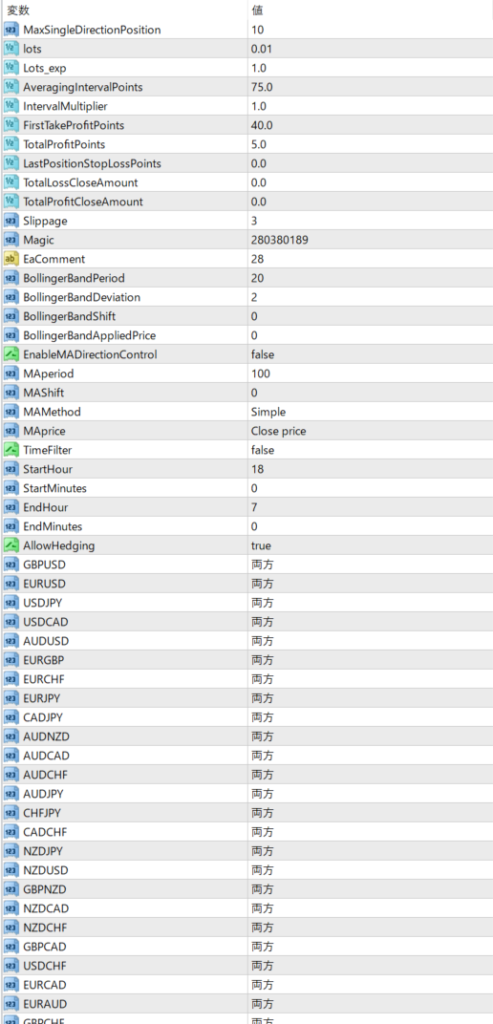
  • MaxSingleDirectionPosition Sets the maximum number of positions that can be held in one direction per currency.
  • Set the initial number of lots .
  • Lots_exp: Sets the lot increase rate. This is used when increasing trading volume through averaging down, etc. When using the Martingale method, you may be able to expect a daily interest rate of around 30%, but it is very risky.
  • AveragingIntervalPoints : Sets the interval at which to add positions. This setting is used to open the next position at the specified number of points away from the current price.
  • IntervalMultiplier sets the multiplier for expanding the nanpinning interval. For example, if left at 1, nanpinning will occur at a fixed interval, but by changing the multiplier you can flexibly change the nanpinning interval. If you want to gradually increase the nanpinning interval, you can set it to 1.2, for example.
  • FirstTakeProfitPoints – Sets the number of points for the first take profit. When this value is reached, the first position will be taken profit.
  • TotalProfitPoints Sets the total number of profit-taking points. If you have multiple positions, all positions will be closed when they have reached a certain profit.
  • LastPositionStopLossPoints Sets the number of stop loss points for the last position. If set to 0, there is no stop loss.
  • TotalLossCloseAmount: Set the total loss amount for each currency pair, when which the position will be closed.
  • TotalProfitCloseAmount: Set the total profit amount for each currency pair, and when that amount is reached, the position will be closed.
  • Slippage : Set the tolerance for slippage (the difference between the order price and the actual executed price). Even if slippage occurs, the transaction will be executed as long as it is within the set range.
  • Magic Set the EA's magic number.
  • BollingerBandPeriod Sets the period of the Bollinger Bands.
  • BollingerBandDeviation Sets the deviation (standard deviation) of the Bollinger Bands.
  • BollingerBandShift Sets the shift (shift) of the Bollinger Bands.
  • EnableMADirectionControl Sets whether to use moving average (MA) to control the major direction.
  • MAperiod: Sets the period of the moving average.
  • MAShift Sets the shift of the moving average.
  • MAMethod Sets the type of moving average to use.
  • MAprice Sets the price at which the moving average is calculated.
  • TimeFilter: Set whether to use a time filter. This is used to limit the hours during which trading is available.
  • StartHour, StartMinutes, EndHour, EndMinutes : Set the start and end times for trading. Trading will only take place within this range.
  • AllowHedging: Set whether to allow hedging. If you allow it, you can hold both a buy and a sell position for the same currency pair at the same time.
  • BuyOrSell: Sets whether to allow buying, selling, or both for each currency pair. Values include: Buy only, Sell only, Both, and Disabled. Trading symbol

Recommended Margin The default setting is 500,000 yen/0.01. If using the Martingale method, we recommend a capital amount of 1 to 2 million yen. It can be used for various strategies, such as using only your preferred currency pairs.

Frequently Asked Questions

Can I use the EA right after purchase?
Yes. The EA file (.ex4/.ex5) becomes available for download from your account page immediately after payment completes.
Does it support MT4 or MT5?
Platform compatibility varies by product. Please check the "Supported Platform" field on each product page. Many EAs support both MT4 and MT5.
Can I try EAs on a demo account?
Most EAs do not support running on demo accounts. To help you decide before purchase, every EA's backtest results are shown in the "Backtest" tab and forward test performance in the "Performance" tab on each product page.
What is the recommended margin or lot size?
Recommended settings are listed for each EA in the "Product Details" section of its product page. Excessive lot sizing can cause catastrophic losses at maximum drawdown.
Can I change my licensed account?
After purchase, go to "Licensed Account Switch" on My Page and enter the MT4/MT5 account number you want to bind. The change applies immediately. You can change once per 24 hours.
Are refunds or returns available?
Due to the nature of digital products, we generally cannot refund or accept returns after the authentication code has been issued. However, if the EA itself has a critical defect that prevents operation and the fault lies with us, we will handle the case individually. Please contact us via the inquiry page.
Do backtest results match live performance?
Backtest results are theoretical values based on historical data, while forward tests reflect live environment performance. SYSTEMTRADE.COM publishes forward test data for every EA on its product page so you can verify live performance before purchase. Spread and execution delays typically cause some divergence between backtest and live results.
Parameters
Parameters
Trading Info

Recommended Fund: $5,000 USD

Expected Monthly Return: 100%

This data is based on a 0.01 lot size. Actual performance may vary depending on your lot size.
Entry Condition
Uses entry conditions that combine Bollinger bands and moving averages. Time filters are also available.
Close Condition
Take profit or stop loss at a specified point.
Favorable Market
A range-bound market and a market with stable volatility.
Unfavorable Market
Sudden trends and large market fluctuations (especially when the trend suddenly reverses), as well as unpredictable, rapid price movements due to the release of economic indicators, etc.
Avoid Trading Timing
Before and after the release of economic indicators Times when trends may suddenly change or market conditions are unstable
Recommended Operation
Start with a small initial lot and clearly set a stop loss point to limit losses. Make proper use of averaging, avoid excessive positions, and thoroughly manage risk.

EA Backtest Analysis

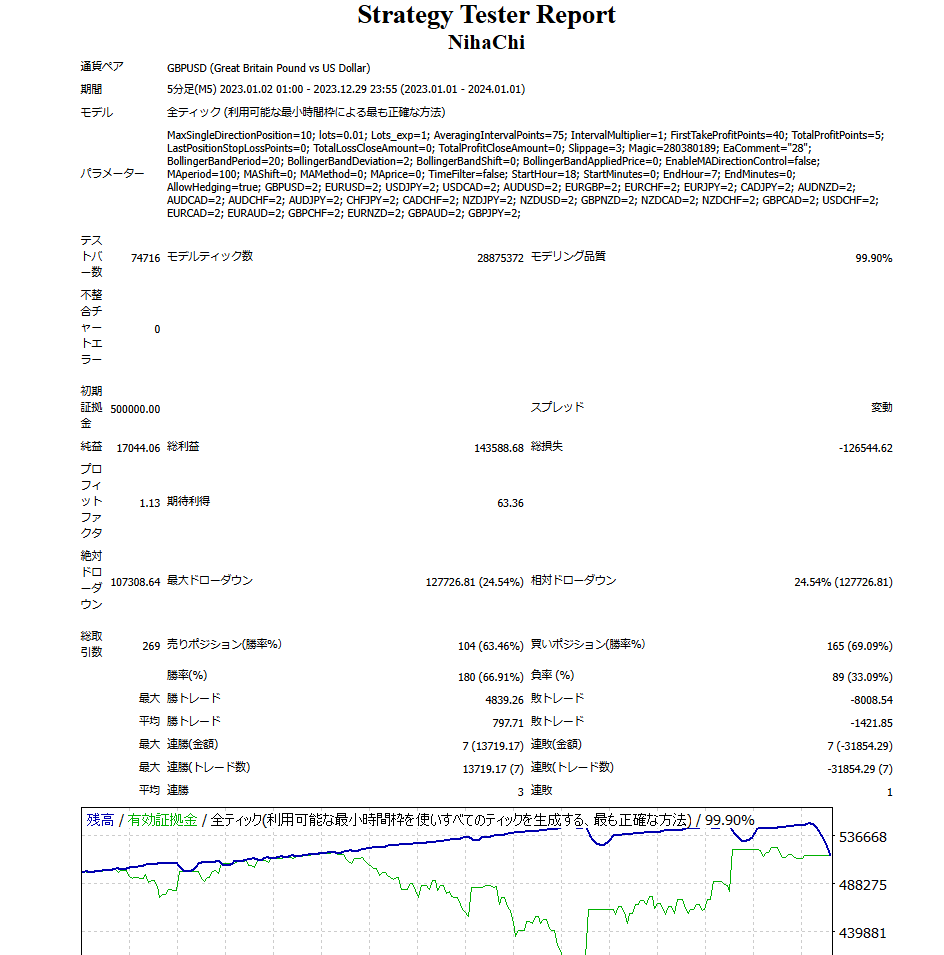
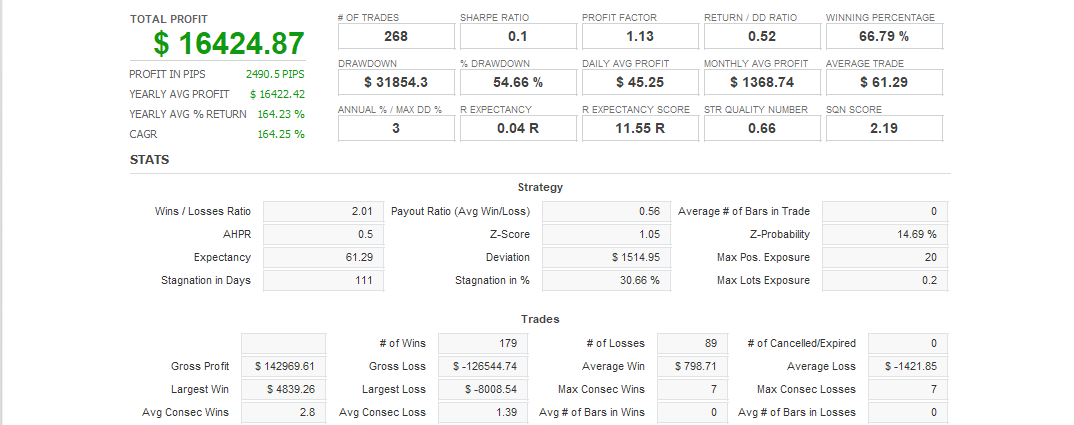
Win Rate 66.00%
Currency Pair
GBPUSD
Trade Type
Grid
Timeframe
M5
Max Positions
999 Positions
Max Stop Loss
0
Martingale
No
Hedge
No
Notes
Quant Analyzer 1
バックテスト
Quant Analyzer 2
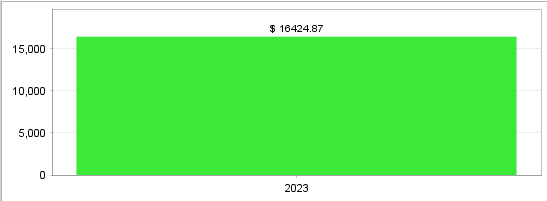
年別取引データ
×
ffund726-6997
★★☆☆☆

数か月運用しました。複数通貨運用で、ポジションすごく取ります。小さい決済をしていきますが、指値に到達しないポジションは保有したままなので、ポジション数が増えていきます。指値決済した分の利益があるので、グラフ的には上がっているように見えますが、一方で、含み損の数も増えていき、いつか破産するのではと思う危うさを感じました。運用に不安定さを感じるようになって、取引やめました。

I operated it for a few months. I operated in multiple currencies and took a lot of positions. I made small settlements, but the positions that did not reach the limit price remained held, so the number of positions increased. Since there was a profit from the limit price settlement, the graph seemed to be going up, but on the other hand, the number of unrealized losses was also increasing, and I felt the danger of going bankrupt someday. I began to feel unstable in my operation, so I stopped trading.
arata
★★★★★

最初は少額(0.01lot)から始めましたが、安定した利益を上げることができました。特にレンジ相場での動きが素晴らしく、勝率87%という高水準を実現できています。
良かった点:

グリッド戦略がうまく機能し、急激な相場変動にも耐えられる
取引時間や通貨ペアのカスタマイズが柔軟
パラメーター設定が直感的で使いやすい

気をつけるべき点:

経済指標発表時は一時的に停止した方が安全
証拠金は50万円/0.01lotが推奨だが、余裕を持って運用する方が◎
急激なトレンド転換には要注意資金管理をしっかりすれば、月利100%も十分狙える印象です。

I started with a small amount (0.01 lot), but was able to make a stable profit. The movement in the range market was particularly excellent, achieving a high win rate of 87%. Good points: The grid strategy works well and can withstand sudden market fluctuations Flexible customization of trading hours and currency pairs Intuitive and easy-to-use parameter settings Points to be careful of: It is safer to temporarily halt trading when economic indicators are announced Margin of 500,000 yen/0.01 lot is recommended, but it is better to operate with a margin of safety Be careful of sudden trend reversals With good capital management, it seems possible to aim for a monthly interest rate of 100%.
Popular Products
  • FX自動売買EA「KiwiForex」の商品画像|NZDUSD対応・ナンピンマーチン型 KiwiForex
    Rated 5.00 out of 5
    Price range: ¥0 through ¥50,000
  • FX自動売買EA「MillionScalper GBPUSD」の商品画像|GBPUSD対応・スキャルピング/朝スキャルピング型|GBPUSD専 MillionScalper GBPUSD
    Rated 5.00 out of 5
    Price range: ¥0 through ¥25,000
  • FXユーザーがシストレ.COMで無料で利用できるEAのパッケージ画像です。 GiveHapiness
    Rated 5.00 out of 5
    Price range: ¥0 through ¥34,000
  • FX自動売買EA「K_Kewl_USDJPY_SC」の商品画像|USDJPY対応・デイトレード型 K_Kewl_USDJPY_SC
    Rated 5.00 out of 5
    Price range: ¥0 through ¥24,800
  • FX自動売買EA「Market ClockRunner」の商品画像|デイトレード型 Market ClockRunner
    Rated 5.00 out of 5
    Price range: ¥0 through ¥16,000
Shopping Cart
ALL FREE

このEAを無料
使ってみませんか?

有料版と同じ性能を、0円で。
同じ性能有料版と同一ロジック
200本以上すべて無料で利用可
実績公開フォワードテスト公開中
30秒で完了メールだけで登録OK
無料ではじめる
アカウントをお持ちの方は ログイン
Scroll to Top