



SimpleTrendCADJPY
販売開始日 2026-02-11
自動売買 EA 取引手法 Tags ,
0
Listed Products

SimpleTrendCADJPY

0

Ride the trend of the weak yen era! Build your assets with Canadian Dollar/Japanese Yen EA!

Currency Pair
CADJPY
Trade Type
Martingale
Timeframe
H1
Max Positions
10 Positions
Max Stop Loss
380
Martingale
Yes
Hedge
No
Notes
【通貨ペア制限】CAD/JPY

¥20,000

配信停止

Forward Test

LIVE DATAReal Account
3.2
C
Profitability63 / 100
Stability93 / 100
Reliability29 / 100
Total Profit
32,183
Max Drawdown
21,401
PF
25.13
Win Rate
89.47%
Total Trades : 38
Max Positions : 10
Monthly Avg Trades : 5.9
Expected Value : 846.92
Recovery Factor : 1.50
No open positions at this time.
取引履歴
Close Time Type Open Price Close Price Symbol Hold Time Lot Size Profit/Loss

Buy vs Sell Trade Ratio

Buy vs Sell Profit/Loss

Entries by Time of Day

パフォーマンススコアカード

P/L Calendar

Thank you for visiting this product page.

SimpleTrendCADJPY is an Expert Advisor (EA) specifically designed for long positions on the Canadian dollar against the Japanese yen.

My trading style is a martingale strategy with stop-loss settings.

My trading style involves taking profits through day trading and swing trading, and cutting losses through swing trading.

Because it has the characteristic of high expected profit, it is less affected by spreads and slippage, and can be used with a wide range of brokers.

It features a simple design with minimal settings to make it easy for users to use.

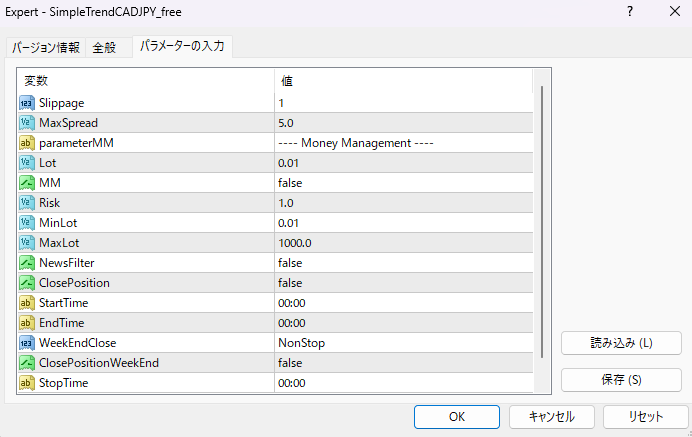
Setting items

This is the designated Magic Number. Those who have purchased this service can change it.

This is the slippage setting. No changes are necessary.

MaxSpread is the spread filter value at the time of entry. Please enter the average value for the broker you are using.

—- Money Management —-
Lot is a fixed lot size. If MM is false, a position will be opened with this value.

This is the compound interest setting for MM. Setting it to false will result in a fixed lot size, while setting it to true will open positions based on your account balance.

This value is referenced when Risk MM is true. A higher value indicates a higher risk. A value of 1.0 or less is recommended.

MinLot is the minimum lot size. A lot size lower than this value cannot be established.

MaxLot is the maximum lot size. You cannot open a lot with a value exceeding this.

Example 1)
If MM is true, the account balance is 200,000 yen, and Risk=1.0,
The lot size will be 0.02 lots.

Example 2)
If MM is true, the account balance is 1,000,000 yen, and Risk=2.0,
The lot size will be 0.2 lots.

Example 3)
If MM is true, the account balance is $2000, and Risk=1.0,
The lot size will be 0.02 lots.

When NewsFilter is set to true, new initial positions will be suppressed between StartTime and EndTime. (Averaging down positions will still be opened.)

If ClosePosition NewsFilter is true and ClosePosition is true, open positions will be closed at StartTime. Use this if you want to close your positions before important economic indicators are released.

StartTime: The start time for the NewsFilter. When running on an hourly timeframe, the minute value is not referenced, so please enter a value with sufficient margin in the "hour" portion.

EndTime NewsFilter end time

WeekendClose is the weekend closing function. To turn it off, select NonStop; to turn it on, select according to your broker's server time. For most FX brokers, Friday is New York closing day.

With ClosePositionWeekEnd set to true, open positions will be closed at the weekend close.

This is the start time for StopTime WeekendClose. New initial positions will be suppressed.

GMTOffSet: Please enter the GMT value for your broker's daylight saving time. In most cases, you can leave it as 3. You do not need to change it when you switch to standard time.
Frequently Asked Questions

Can I use the EA right after purchase?
Yes. The EA file (.ex4/.ex5) becomes available for download from your account page immediately after payment completes.
Does it support MT4 or MT5?
Platform compatibility varies by product. Please check the "Supported Platform" field on each product page. Many EAs support both MT4 and MT5.
Can I try EAs on a demo account?
Most EAs do not support running on demo accounts. To help you decide before purchase, every EA's backtest results are shown in the "Backtest" tab and forward test performance in the "Performance" tab on each product page.
What is the recommended margin or lot size?
Recommended settings are listed for each EA in the "Product Details" section of its product page. Excessive lot sizing can cause catastrophic losses at maximum drawdown.
Can I change my licensed account?
After purchase, go to "Licensed Account Switch" on My Page and enter the MT4/MT5 account number you want to bind. The change applies immediately. You can change once per 24 hours.
Are refunds or returns available?
Due to the nature of digital products, we generally cannot refund or accept returns after the authentication code has been issued. However, if the EA itself has a critical defect that prevents operation and the fault lies with us, we will handle the case individually. Please contact us via the inquiry page.
Do backtest results match live performance?
Backtest results are theoretical values based on historical data, while forward tests reflect live environment performance. SYSTEMTRADE.COM publishes forward test data for every EA on its product page so you can verify live performance before purchase. Spread and execution delays typically cause some divergence between backtest and live results.
Parameters
Parameters
Trading Info

Recommended Fund: $200,000 USD

This data is based on a 0.01 lot size. Actual performance may vary depending on your lot size.
Entry Condition
Entry decisions are made based on trend-following signals and volatility. It operates when the 1-hour chart closes.
Close Condition
The system automatically takes profits when a certain level of unrealized gain is reached across all positions. The stop-loss level is approximately 380 pips from the average purchase price (this may fluctuate slightly).
Favorable Market
Uptrend.
Unfavorable Market
Downtrend.
Avoid Trading Timing
As the Bank of Japan's Monetary Policy Meeting approaches, if you have few open positions or small unrealized gains/losses, closing your positions and stopping your EA (Expert Advisor) can help avoid significant losses. Please make your own judgment.
Recommended Operation
If you use this EA alone in your account and enable compounding, we recommend setting the Risk value to 1.0 or less. If you use multiple EAs in your account, we recommend using this EA with a fixed lot size and manually adjusting the lot size according to your account balance.

EA Backtest Analysis

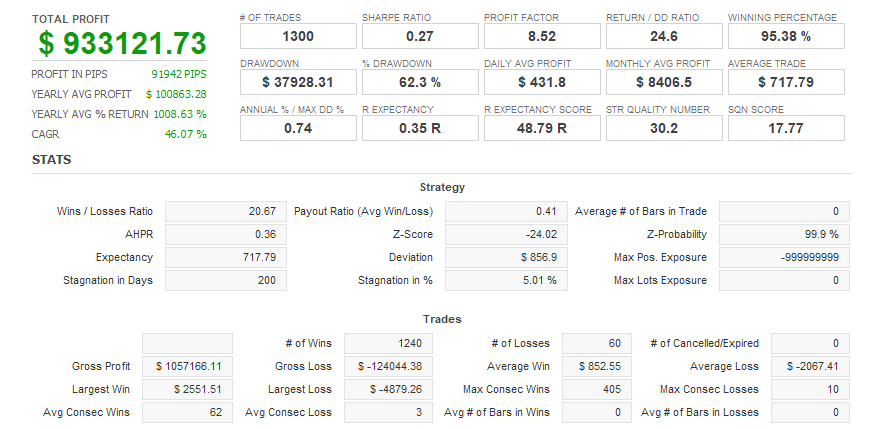
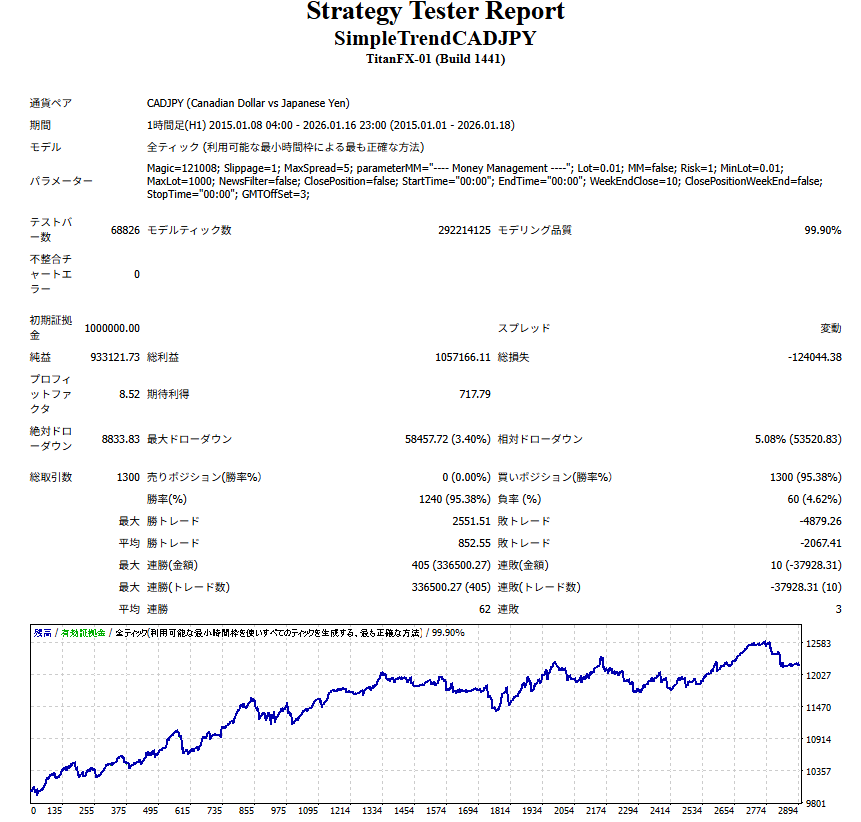
Win Rate 95.00%
Currency Pair
CADJPY
Trade Type
Martingale
Timeframe
H1
Max Positions
10 Positions
Max Stop Loss
380
Martingale
Yes
Hedge
No
Notes
【通貨ペア制限】CAD/JPY
Quant Analyzer 1
バックテスト
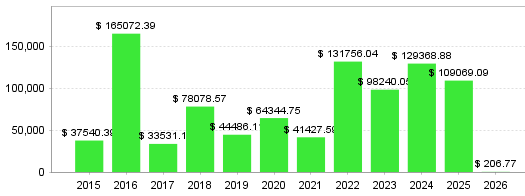
Quant Analyzer 2
年別取引データ
×

There are no reviews yet.

Popular Products
Shopping Cart
ALL FREE

このEAを無料
使ってみませんか?

有料版と同じ性能を、0円で。
同じ性能有料版と同一ロジック
200本以上すべて無料で利用可
実績公開フォワードテスト公開中
30秒で完了メールだけで登録OK
無料ではじめる
アカウントをお持ちの方は ログイン
Scroll to Top