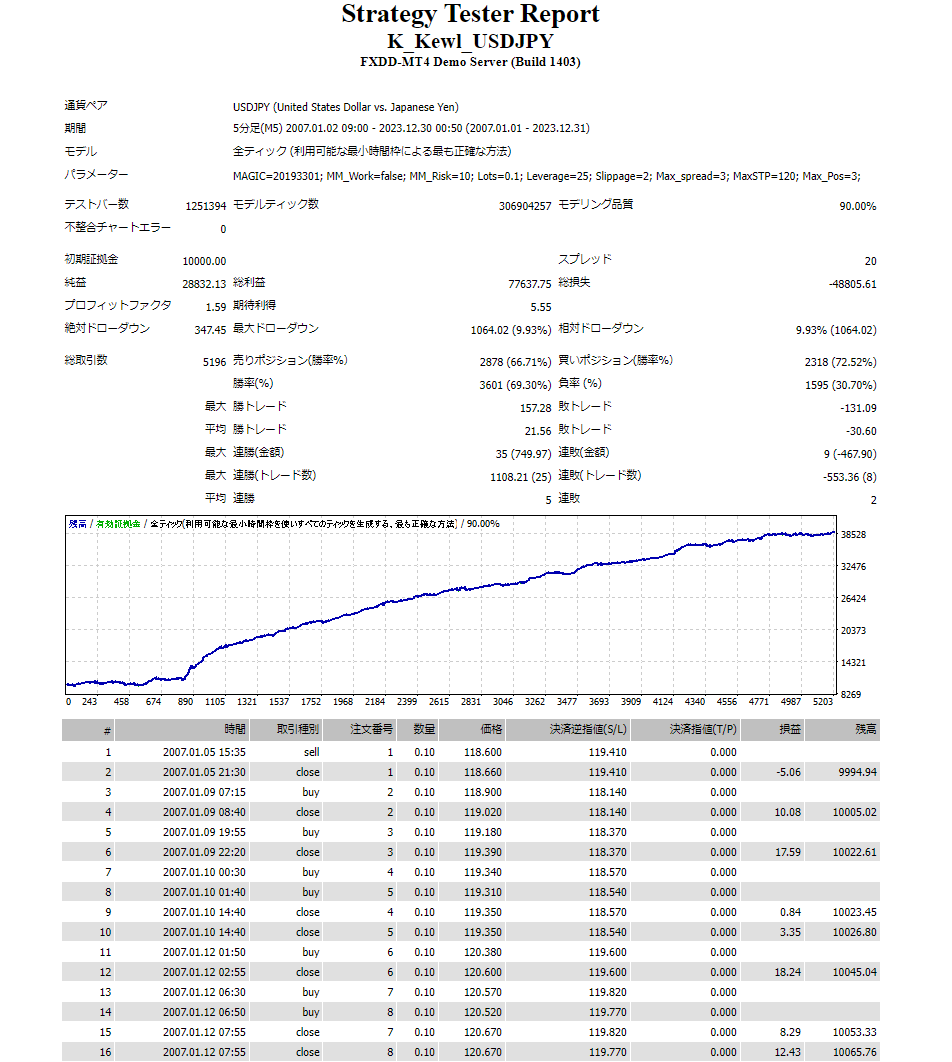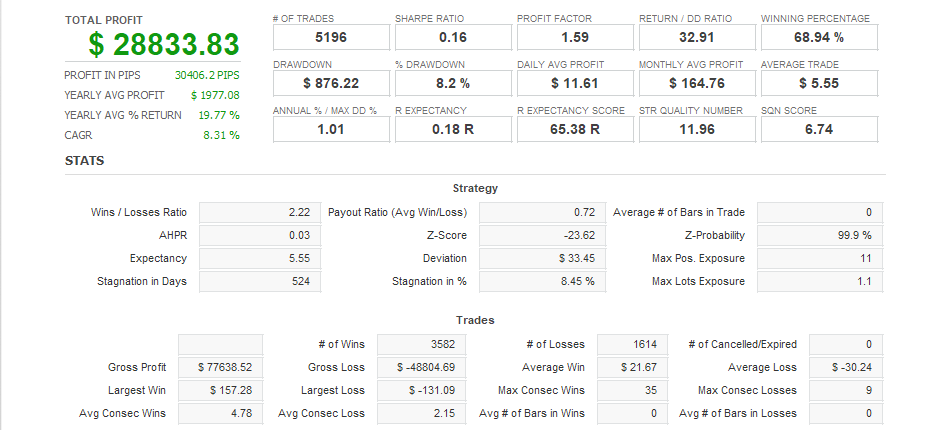




■Features of EA■・EA for 5-minute USDJPY ・Aims for markets that are neither trending nor range ・Day trading type contrarian EA ・Maximum positions are 3 ・Simple parameter settings I will briefly explain these features. ・EA for 5-minute USDJPY K_Kewl_USDJPY_SC is an EA for 5-minute USDJPY. It is not designed to work with other currency pairs or time frames. ・Aims for markets that are neither trending nor ranged The execution time frame is 5 minutes, but the chart environment recognition is based on the situation of 1 hour or more. And by targeting niche gap markets where the larger time frame is not a beautiful trend market according to Dow Theory, and is not a range market where the high and low prices are aligned, entry opportunities are increased. ・Day trading type contrarian EA In most cases, the time from entry to settlement is completed within 24 hours, so it belongs to the day trading type. Since it is not dealing with a trending market, it does not aim for large profits, but settles little by little with a certain amount of unrealized gains, or, depending on the market situation, with a certain amount of unrealized losses.・Maximum number of positions: 3 Maximum number of positions held at the same time: 3. This is not intended for averaging, and regardless of whether the positions already held are unrealized gains or losses, additional positions will be held when the internal entry logic is met. The maximum number of positions can also be changed by parameter settings. ・Simple parameter settings This EA has as few parameter items as possible so that even beginners can use it with confidence. In other words, since unnecessary parameters are internal variables, optimization work such as parameter adjustment is not required. You can use it by simply entering the minimum required items such as "magic number" and "number of lots". ■Parameter description■ [MAGIC]=20193301 (default value) Set a different value from other EAs. [MM_WORK]=false (default value) On/off of compound interest function. Set to true if you want to use compound interest function. [MM_Risk]=10.0 (default value) Risk tolerance when compound interest is enabled. What percentage of maximum leverage should the number of lots be? [Lots] = 0.1 (default) The number of lots when entering with simple interest. [Leverage] = 25.0 (default) The maximum leverage of the securities company. [Slippage] = 2 (default) Maximum slippage. If it slips more than this, you will not enter. [Max_spread] = 3.0 (default) Maximum spread. If it spreads more than this, you will not enter. [Max_STP] = 120 (default) Maximum stop width (PIPS). The stop width changes according to the chart shape, but it will not exceed the maximum value set here. [Max_Pos] = 3 (default) The maximum number of positions that can be held at the same time. * Supplementary explanation Basically, there is no need to change these parameters, but please change [MAGIC] and [Lots] as appropriate to each person's situation. [Max_Pos] is limited to a maximum of 3. If you want to reduce risk, change it to 1 or 2 and operate it. Or you can leave [Max_Pos] at 3 and reduce [Lots]. *About compound interest: If [MM_Work] is false, the entry will be made with the number of lots in [Lots]. If [MM_Work] is true, the number of lots will be calculated from the excess margin, [MM_Risk] and [Leverage]. Specifically, the number of lots = Leverage * Excess margin/100000/Price in account currency * (Risk tolerance/100). Reference example: Leverage = 25 (default value), Risk tolerance = 10.0% (default value), Excess margin = 500,000 yen, USDJPY price = 150 yen, for a yen account, the entry will be made with 25 * 500000/100000/150 * (10/100) = 0.08 lots.
Total Profit
22 146