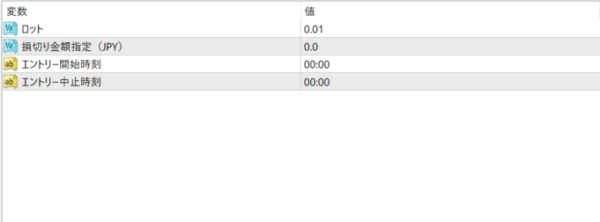
COSMOS EA Features: This EA is designed to encourage the commitment of all traders seeking high returns, focusing on rational profit-seeking. Frequent Trading: Never miss a market movement, targeting and entering multiple trading opportunities. Nanpinning Strategy: Aiming for reversal opportunities even in falling markets. Rapid Settlement: Secure profits with fast settlements and eliminate unrealized losses quickly. Utilizing Multiple Oscillators: Accurately capture short-term price movements. Filters: Equipped with slippage and spread filters. Key Point: COSMOS EA uses a nanpinning and marting strategy, but mimics the "scalping" technique, taking profits quickly after entering a position. This means traders' capital is less exposed to risk. Trading can be halted if a dangerous trend emerges or if there is an important economic indicator, allowing for quick risk management. Parameter Settings: Initial Lot Size: 0.01 lot for 300,000 yen. Recommended Stop Loss Amount: Stop losses occur when unrealized losses reach the entered amount. (JPY) Entry start time must be set in MT4 time. Example: For winter time, subtract 7 to enter. To set 9:00 Japan time, enter 2:00. Entry stop time (MT4 time). POINT: No complicated settings are required, making it easy for anyone to start trading. It also features a "slippage filter" and "spread filter," providing exceptional stability. It can withstand market reversals of approximately 400 pips, supporting traders' risk management. Regarding your environment: This EA is designed for brokers that display gold (XAUUSD) to two decimal places. Entry may not function properly with brokers that display three decimal places (e.g., OANDA Securities).
Frequently Asked Questions
Can I use the EA right after purchase?
Yes. The EA file (.ex4/.ex5) becomes available for download from your account page immediately after payment completes.
Does it support MT4 or MT5?
Platform compatibility varies by product. Please check the "Supported Platform" field on each product page. Many EAs support both MT4 and MT5.
Can I try EAs on a demo account?
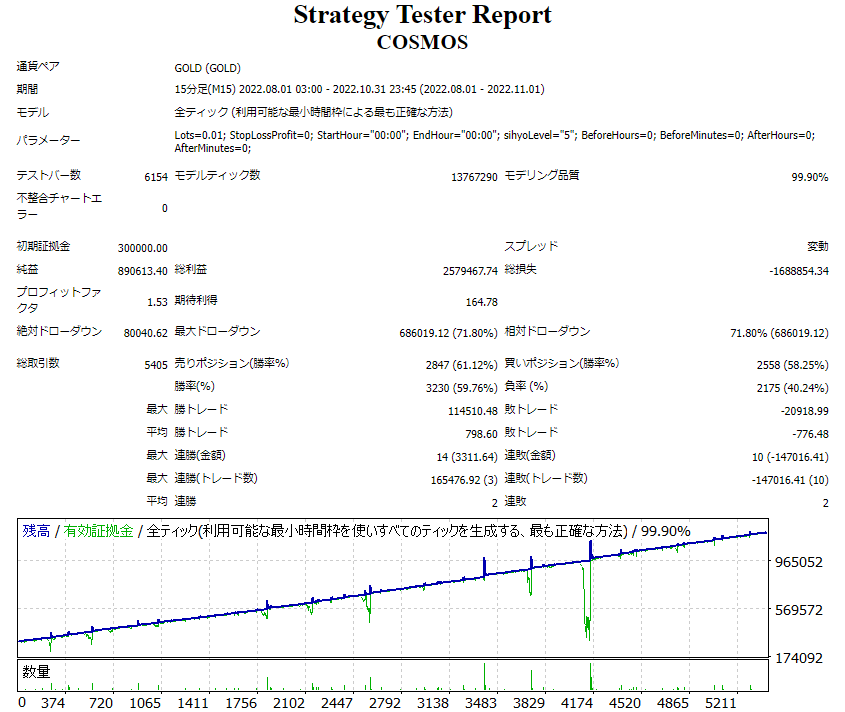
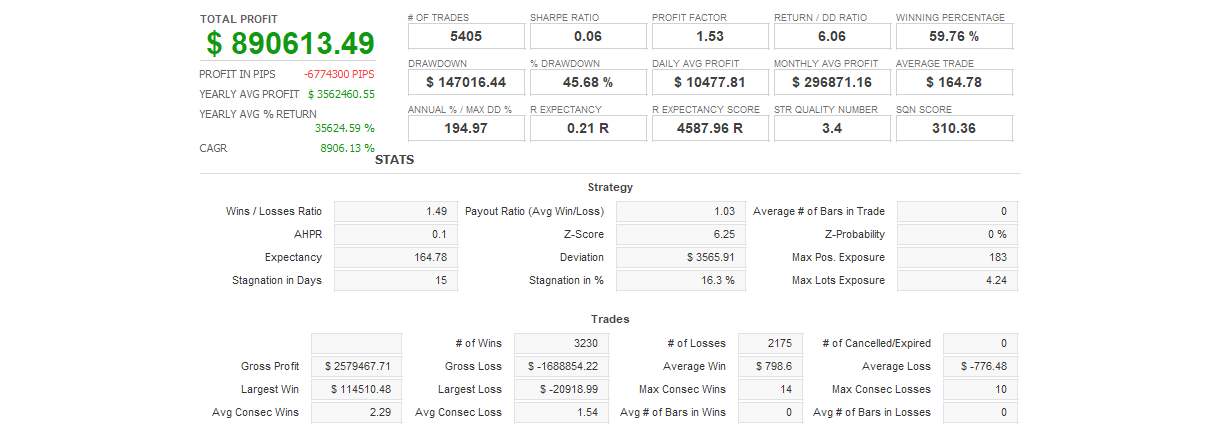
Most EAs do not support running on demo accounts. To help you decide before purchase, every EA's backtest results are shown in the "Backtest" tab and forward test performance in the "Performance" tab on each product page.
What is the recommended margin or lot size?
Recommended settings are listed for each EA in the "Product Details" section of its product page. Excessive lot sizing can cause catastrophic losses at maximum drawdown.
Can I change my licensed account?
After purchase, go to "Licensed Account Switch" on My Page and enter the MT4/MT5 account number you want to bind. The change applies immediately. You can change once per 24 hours.
Are refunds or returns available?
Due to the nature of digital products, we generally cannot refund or accept returns after the authentication code has been issued. However, if the EA itself has a critical defect that prevents operation and the fault lies with us, we will handle the case individually. Please contact us via the inquiry page.
Do backtest results match live performance?
Backtest results are theoretical values based on historical data, while forward tests reflect live environment performance. Systre publishes forward test data for every EA on its product page so you can verify live performance before purchase. Spread and execution delays typically cause some divergence between backtest and live results.