

Currency Finalis
Store
Release date 2025-04-28
Automated Trading EA Strategy Tags ,
Store
Listed Products

Currency Finalis

Multi-currency support x enhanced averaging logic

Currency Pair
Multi-Currency
Trade Type
Grid
Timeframe
M15
Max Positions
20 Positions
Max Stop Loss
300
Hedge
No

Discontinued

Charged in JPY. The USD amount is a reference only (ECB rate as of 2026-10-16).

Forward Test

Demo ForwardData Period: 2025-04-16 – 2026-09-24 / Last Closed Trade: 2026-09-24
1.3
D
Profitability39 / 100
Stability31 / 100
Reliability65 / 100
Total Profit
-250 606
Max Drawdown
265 563
PF
0.80
Win Rate
61.99%
Total Trades : 4233
Max Positions : 20
Monthly Avg Trades : 231.3
Expected Value : -59.20
Recovery Factor : 0.00
No open positions at this time.
Trade History
Close Time Type Close Price Symbol Lot Size Profit/Loss

Buy vs Sell Trade Ratio

Buy vs Sell Profit/Loss

Entries by Time of Day

Performance Scorecard

P/L Calendar

Forward test: stoppedLast data: 2026-09-16

Currency Finalis supports up to 30 currency pairs, monitoring multiple pairs at the same time.


Key Features

Averaging-down (recovery logic) built in
Adds positions with automatically increasing lot sizes as price moves away from the entry. Up to 20 levels are supported, letting you build a portfolio with strong recovery power.

Trailing stop
Once a position is carrying a certain amount of profit, the stop-loss line is moved up automatically, locking in gains while keeping risk to a minimum.

Time-of-day filter
Entries can be limited to any time window you choose, so you can stay out of the late-night session or steer clear of economic announcements.

Auto-close
Based on the number of open positions and the price-deviation conditions, positions are closed automatically once the take-profit condition is met.


Entry Logic

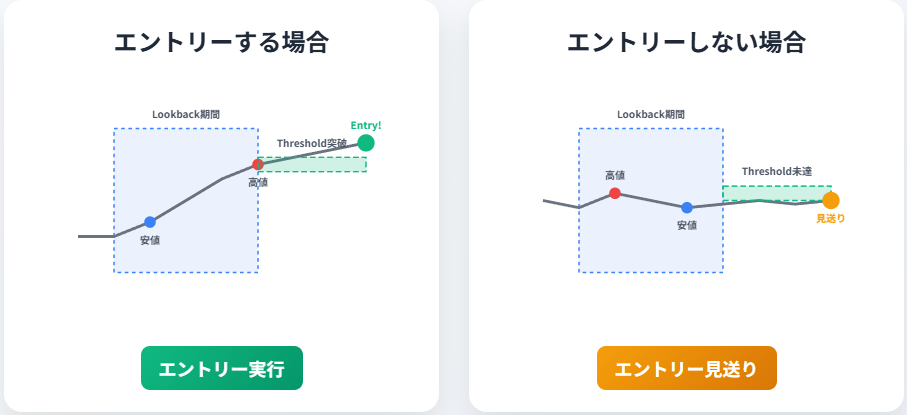
The entry logic uses the relationship between the highs and lows over a specified period (Lookback × Threshold) as its indicator, aiming to build positions at the start of a trend or at a reversal.
In other words, it analyses past price movement to decide when to enter.

First it identifies the highest high and lowest low within the set period, then applies a threshold to them.
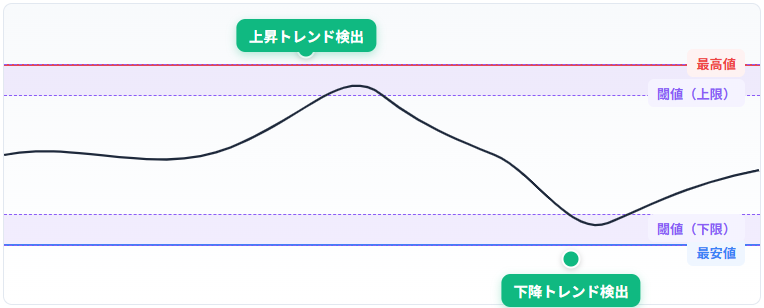

This is how it picks out the points where a trend is starting to form or where the direction is turning.

And when no clear buy or sell signal can be confirmed, it stays out of the market, keeping risk down and trading efficiently.
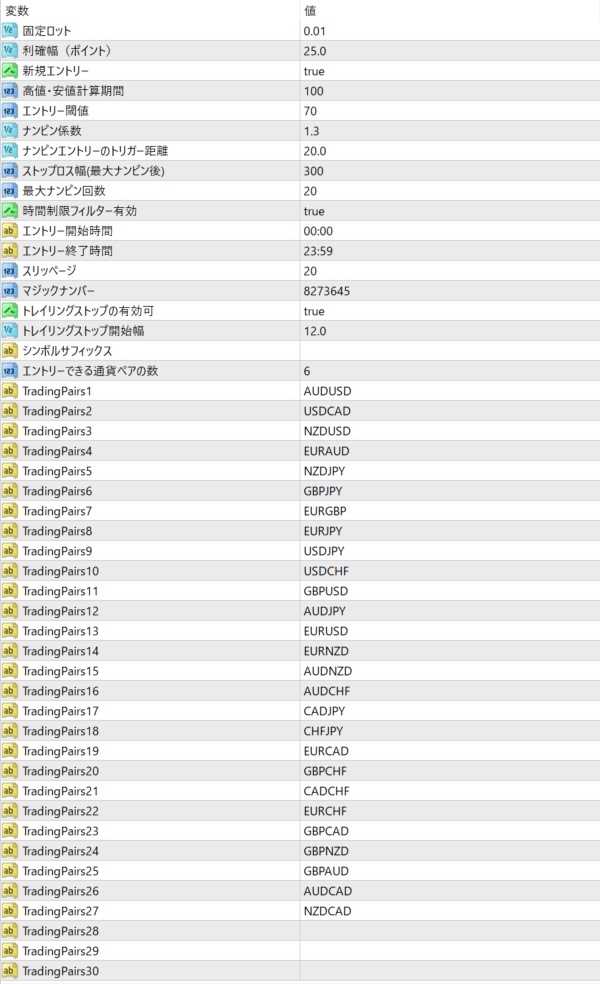
Settings (example)

  • Lot: fixed 0.01 (UseAutoLot=false)

  • Take profit: 25 points

  • Stop loss: 300 points

  • Averaging-down step: 20.0 points

  • Maximum averaging-down levels: 20

  • Entry hours: 00:00–23:59 (no restriction)

  • Trailing stop / auto-close: enabled

  • Chart setup: one-chart setup


① Stability-focused portfolio (mainly majors)

USDJPY / EURUSD / AUDUSD / EURGBP / USDCAD / AUDCAD

  • Recommended margin: JPY 500,000

  • Recommended timeframe: M15

  • MaxActivePairs (number of symbols allowed at the same time): 3

Relatively low volatility, so the risk while averaging down is mild.
Easy to handle even if this is your first averaging-down EA, and ideal for stable long-term operation.


② Balanced portfolio (includes medium-volatility pairs)

EURJPY / GBPUSD / NZDJPY / EURAUD / GBPAUD / AUDCHF

  • Recommended margin: JPY 700,000

  • Recommended timeframe: M15

  • MaxActivePairs: 3–4

Built mainly around pairs with a medium trading range.
Lets you run the EA with an eye on the balance between profitability and stability.


③ High-yield portfolio (mainly high-volatility pairs)

GBPJPY / GBPNZD / EURNZD / CHFJPY / CADJPY / GBPCAD

  • Recommended margin: JPY 1,000,000

  • Recommended timeframe: M15

  • MaxActivePairs: 2

Spare margin to absorb sudden moves is a must.
A configuration that targets short-term profits but also carries higher risk.
Recommended for intermediate traders and above.


④ Diversified minor-pair portfolio (medium to high spread)

NZDCAD / NZDCHF / CADCHF / EURNZD / AUDNZD / GBPAUD

  • Recommended margin: JPY 800,000

  • Recommended timeframe: M15

  • MaxActivePairs: 2–3

Spreads are wider, but the pairs are chosen for their tendency to move within a range.
Avoids correlated currencies — a design built for diversification.


⑤ Simple setup (single or dual pair)

USDJPY / EURUSD

  • Recommended margin: JPY 300,000 and up

  • Recommended timeframe: M15–M30

  • MaxActivePairs: 1–2

Runs with a minimal configuration.
For anyone who wants to simply confirm how it behaves, and ideal for starting small.
Also suits adding pairs gradually as you get to know how the EA works.

About the default currency-pair configuration

Currency Finalis lets you register up to 30 currency pairs as entry targets, and the 26 pairs below are pre-registered by default. Managing multiple currencies from a single chart gives you simple, flexible portfolio operation.


Default registered currency pairs (TradingPairs1–26)
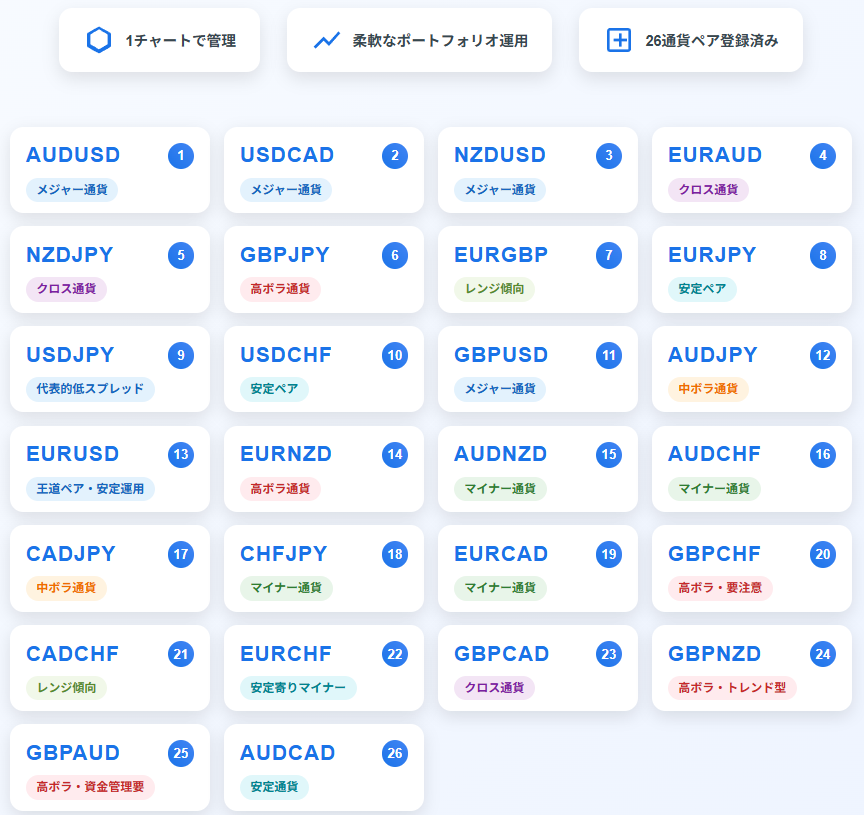
No. Currency pair Notes
1 AUDUSD Major pair
2 USDCAD Major pair
3 NZDUSD Major pair
4 EURAUD Cross pair
5 NZDJPY Cross pair
6 GBPJPY High volatility
7 EURGBP Tends to range
8 EURJPY Stable pair
9 USDJPY Typical low-spread pair
10 USDCHF Stable pair
11 GBPUSD Major pair
12 AUDJPY Medium volatility
13 EURUSD Classic pair, suited to stable operation
14 EURNZD High volatility
15 AUDNZD Minor pair
16 AUDCHF Minor pair
17 CADJPY Medium volatility
18 CHFJPY Minor pair
19 EURCAD Minor pair
20 GBPCHF High volatility, watch the spread
21 CADCHF Tends to range
22 EURCHF Minor pair on the stable side
23 GBPCAD Cross pair
24 GBPNZD High volatility, trending
25 GBPAUD High volatility, money management required
26 AUDCAD Stable pair

Operating notes

  • These pairs form a candidate list of up to 26 currency pairs; in live operation the number running at once is controlled by MaxActivePairs (for example, 3–6 pairs is recommended).

  • To disable a pair, simply leave the corresponding TradingPairsX field blank.

  • The recommended timeframe is M15.
    It can also run on M5, but be aware that it becomes more sensitive to spreads and server latency.

CurrencyFinalis_Parameter_List
Frequently Asked Questions

Can I use the EA right after purchase?
Yes. The EA file (.ex4/.ex5) becomes available for download from your account page immediately after payment completes.
Does it support MT4 or MT5?
Platform compatibility varies by product. Please check the "Supported Platform" field on each product page. Many EAs support both MT4 and MT5.
Can I try EAs on a demo account?
Most EAs do not support running on demo accounts. To help you decide before purchase, every EA's backtest results are shown in the "Backtest" tab and forward test performance in the "Performance" tab on each product page.
What is the recommended margin or lot size?
Recommended settings are listed for each EA in the "Product Details" section of its product page. Excessive lot sizing can cause catastrophic losses at maximum drawdown.
Can I change my licensed account?
After purchase, go to "Licensed Account Switch" on My Page and enter the MT4/MT5 account number you want to bind. The change applies immediately. You can change once per 24 hours.
Are refunds or returns available?
Due to the nature of digital products, we generally cannot refund or accept returns after the authentication code has been issued. However, if the EA itself has a critical defect that prevents operation and the fault lies with us, we will handle the case individually. Please contact us via the inquiry page.
Do backtest results match live performance?
Backtest results are theoretical values based on historical data, while forward tests reflect live environment performance. Systre publishes forward test data for every EA on its product page so you can verify live performance before purchase. Spread and execution delays typically cause some divergence between backtest and live results.
Parameters
Parameters
Trading Info

Recommended Fund: 10,000

Expected Monthly Return: 20%

This data is based on a 0.01 lot size. Actual performance may vary depending on your lot size.
Entry Condition
Based on the positional relationship between the high and low prices of the past 100 candlesticks, an entry signal will light up when the "upward/downward pressure threshold (70%)" is exceeded. The time period must be within the setting (e.g. 00:00-23:59). A new entry will only be made if there are no open positions for the same currency pair.
Close Condition
When the profit margin (default 25 points) or the stop loss margin after maximum averaging (300 points) is reached When the trailing stop is activated (after a certain profit margin is reached, the stop loss line is automatically adjusted) When the automatic closing condition (closing trigger) is met, a bulk close is performed depending on the number of positions and unrealized profit.
Favorable Market
Markets that form small to medium trends or gentle ranges. Pairs that tend to have a certain degree of recovery after averaging down (USDJPY, EURUSD, AUDCAD, etc.). "Stable multi-currency management" using currency pairs with relatively narrow spreads.
Unfavorable Market
High volatility and sudden rises and falls (especially at the beginning of a week or immediately after an index is released) Volatility bias that does not allow for overlapping averaging down Market with extremely low volatility, making it difficult to reach trailing and profit taking conditions
Avoid Trading Timing
Immediately before or after the release of economic indicators (employment statistics, FOMC, etc.) Early Monday morning, late Friday night, etc., when spreads tend to temporarily widen When there is a shortage of margin and it is determined that new averaging cannot be safely sustained
Recommended Operation
Manage all currency pairs on one chart: Register TradingPairs 1 to 26, then limit the number of simultaneous active pairs with MaxActivePairs (recommended 3 to 6 currencies) Utilize time restrictions: Recommended settings are to avoid times when spreads are wide and index announcements Create a portfolio for each operating capital: Use a margin of around 500,000 to 1,000,000 yen as a guideline, and adopt combinations according to currency correlation and volatility

EA Backtest Analysis

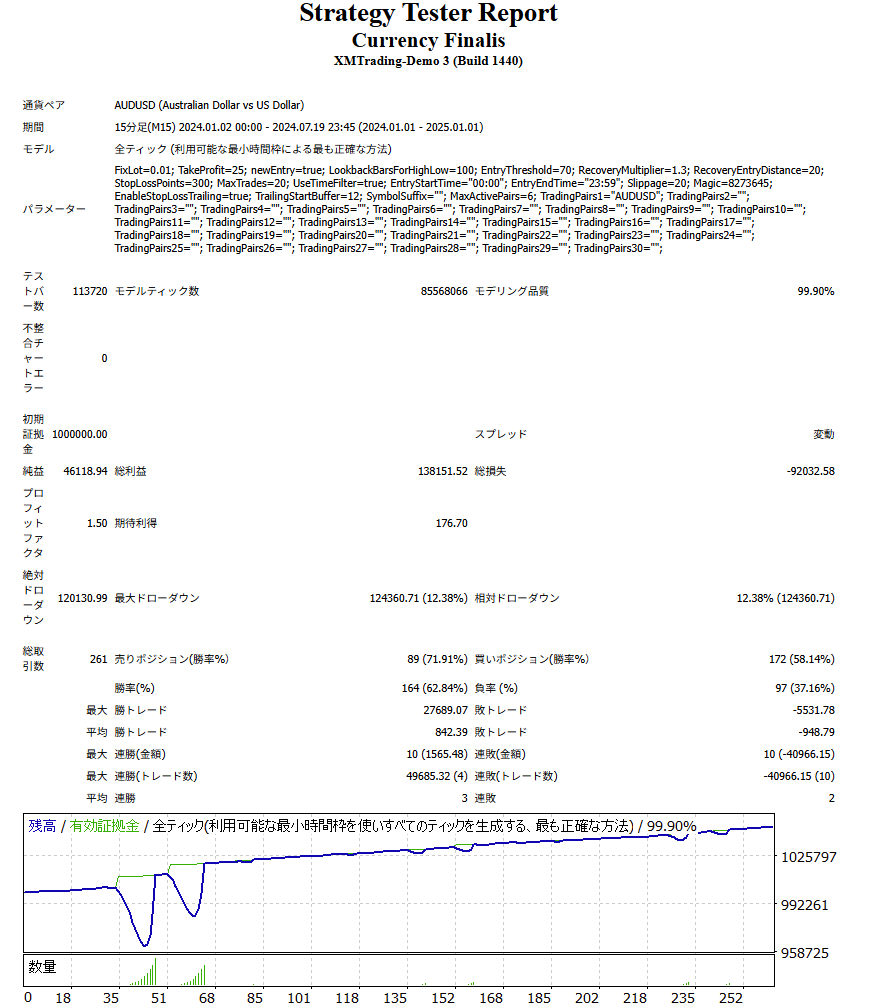
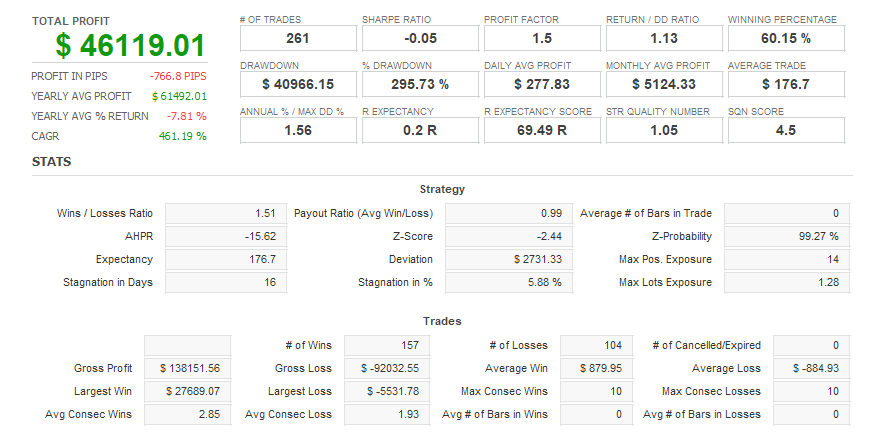
Win Rate62.00%
Quant Analyzer 1
Backtest
Quant Analyzer 2
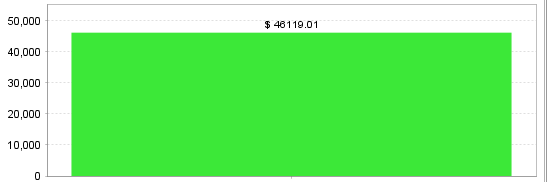
Yearly trade data
×

There are no reviews yet.

Popular Products
Shopping Cart
ALL FREE

Want to use this EA
for free?

The same performance as the paid version, at zero cost.
Same performanceIdentical logic to the paid version
200+ EAsAll available for free
Results publishedForward test results are public
Done in 30 secondsSign up with just an email
Start for free →
Already have an account? Log in
Scroll to Top