




FigureGold
Store
Release date 2026-09-07
Automated Trading EA Strategy Tags , , , ,
Store
Listed Products

FigureGold

Anti over-optimisation. Simple logic, stable trades. TP:SL = 1:1. No averaging or martingale. Single position. Statistically significant across multiple pairs.

Currency Pair
XAUUSD
Trade Type
Day Trading
Timeframe
H1
Max Positions
1 Positions
Max Stop Loss
50
Hedge
No
Notes
Pair restriction: XAUUSD

? There is no difference in EA performance between the free and paid versions.
The free version requires a deposit into an eligible account opened through sys-tre.com, and verification of that account.
See How to Use for details.
✅ Added to cart!

Charged in JPY. The USD amount is a reference only (ECB rate as of 2026-10-23).

Forward Test

Demo ForwardData Period: 2026-09-02 – 2026-10-23 / Last Closed Trade: 2026-10-23
Total Profit
-8105
Max Drawdown
3712
PF
0.73
Win Rate
44.44%
Total Trades : 18
Max Positions : 1
Monthly Avg Trades : 10.4
Expected Value : -450.28
Recovery Factor : 0.00
No open positions at this time.
Trade History
Close Time Type Close Price Symbol Lot Size Profit/Loss

Buy vs Sell Trade Ratio

Buy vs Sell Profit/Loss

Entries by Time of Day

P/L Calendar

  •  About the FigureGold EA


This EA is designed exclusively for the XAUUSD (gold) 1-hour chart.

It detects moments when price approaches a specific level and places a stop order just ahead of it, then waits. It uses no technical indicators such as moving averages, RSI or Bollinger Bands at all; decisions are based solely on price action and ATR (volatility).

It was developed and verified with long-term backtests on every-tick data spanning more than a decade.


★Long-term every-tick backtesting

★Always a single position – no averaging down, no martingale

★TP:SL = 1:1 symmetric design


  • Features of this EA

<Single position>
Only one position is ever held at a time. No averaging down, no martingale, no hedging.

<ATR-linked take profit and stop loss>
Both take profit and stop loss are linked to ATR with a symmetric 1:1 ratio. The TP/SL width changes with volatility. When used with LotMode=1 (risk percentage), the lot size is automatically adjusted to the SL width, so the EA runs with the same amount of risk in both low- and high-volatility periods.

<Orders are skipped in low volatility>
A built-in mechanism automatically skips orders when the take-profit width falls below a certain level relative to the spread. In low-volatility periods the number of trades drops and the EA may appear to have stopped, but this is by design.

<Time-based exit>
If a trade is not resolved within 24 hours, it is closed at market.


  • How to use this EA
    <Symbol>
    – XAUUSD (gold)

* This EA is for XAUUSD only. It will not run on other symbols.

<Timeframe>
– H1 (1-hour chart)
* Always use it on H1 (1-hour chart). It will not run on other timeframes.


<Parameters>

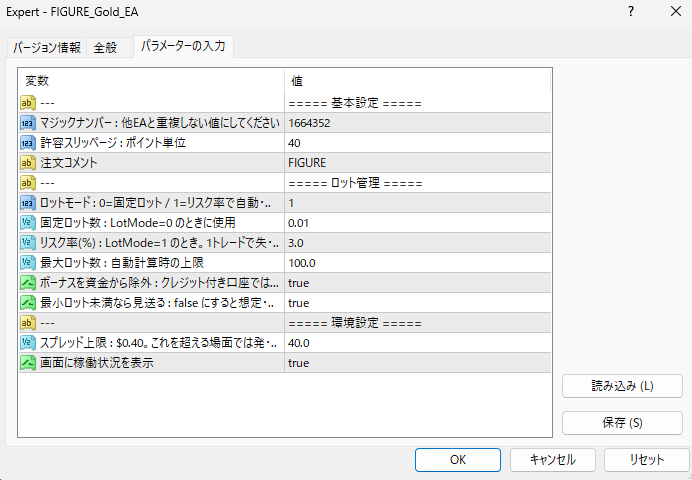
  • MagicNumber: Magic number. Set a value that does not overlap with other EAs.
  • Slippage: Allowed slippage, specified in points.
  • TradeComment: Order comment.
  • LotMode: Lot mode. 0 = fixed lot / 1 = automatic calculation from risk percentage.
  • FixedLots: Fixed lot size. Used when LotMode=0.
  • RiskPercent: Risk percentage (%). When LotMode=1, this is the maximum loss per trade.
  • MaxLots: Maximum lot size. Upper limit for automatic calculation.
  • ExcludeCredit: Excludes bonus credit from the capital. Recommended true for accounts with credit.
  • SkipIfBelowMinLot: Skips the order if the calculated lot is below the minimum lot. Setting it to false means taking more risk than intended.
  • MaxSpreadPips: Spread limit. No orders are placed when the spread exceeds this value.
  • ShowPanel: Displays the operating status on the chart.


<Recommended way to run it>

  • [Account] A tight-spread account is recommended. Performance deteriorates on accounts with wide spreads.
  • [Lot settings] Start with LotMode=0 (fixed lot) at 0.01 to get a feel for the size of price swings and losses. Once you are comfortable, switch to LotMode=1 (risk percentage) with RiskPercent=0.5 as a guide. The lot size adjusts automatically as your capital grows or shrinks.
  • [Running alongside other EAs] Because it holds a single position and trades infrequently, it is easy to combine with other EAs. Make sure the magic numbers do not overlap.


<Notes>

  • Please understand in advance that the EA developer cannot compensate users for losses, including losses caused by bugs or defects.
  • If no trades are being opened, first check that authentication succeeded, that automated trading is allowed, that the symbol (XAUUSD) and timeframe (H1) are correct, and that your margin is sufficient for the lot size.
  • Please calculate the required capital and lot size yourself based on the maximum stop loss, the average loss and the maximum drawdown from backtests and forward tests.
  • This EA does not guarantee profits. Backtests and forward tests may differ from actual trading, and results also vary depending on your broker, account and environment.
  • The price of this EA may change without notice.
Frequently Asked Questions

Can I use the EA right after purchase?
Yes. The EA file (.ex4/.ex5) becomes available for download from your account page immediately after payment completes.
Does it support MT4 or MT5?
Platform compatibility varies by product. Please check the "Supported Platform" field on each product page. Many EAs support both MT4 and MT5.
Can I try EAs on a demo account?
Most EAs do not support running on demo accounts. To help you decide before purchase, every EA's backtest results are shown in the "Backtest" tab and forward test performance in the "Performance" tab on each product page.
What is the recommended margin or lot size?
Recommended settings are listed for each EA in the "Product Details" section of its product page. Excessive lot sizing can cause catastrophic losses at maximum drawdown.
Can I change my licensed account?
After purchase, go to "Licensed Account Switch" on My Page and enter the MT4/MT5 account number you want to bind. The change applies immediately. You can change once per 24 hours.
Are refunds or returns available?
Due to the nature of digital products, we generally cannot refund or accept returns after the authentication code has been issued. However, if the EA itself has a critical defect that prevents operation and the fault lies with us, we will handle the case individually. Please contact us via the inquiry page.
Do backtest results match live performance?
Backtest results are theoretical values based on historical data, while forward tests reflect live environment performance. Systre publishes forward test data for every EA on its product page so you can verify live performance before purchase. Spread and execution delays typically cause some divergence between backtest and live results.
Parameters
Parameters
Trading Info

Recommended Fund: 150,000

Expected Monthly Return: 2%

This data is based on a 0.01 lot size. Actual performance may vary depending on your lot size.
Entry Condition
It detects when price approaches a specific level and waits with a stop order placed just ahead of it.
No technical indicators such as moving averages, RSI or Bollinger Bands are used at all.
Only one position at a time, always. No averaging, no martingale, no hedging.

[Why it calls itself anti over-optimisation]
- The logic is simple
- It looks only at price; no indicator other than ATR, no extra filtering
- The logic as first conceived was tested on 2010-2019 and rose steadily on the initial parameters
- A small parameter tweak made the curve even cleaner
- Tested on 2020 onward, it still rises cleanly!
-> No over-optimisation risk!!!

- Take-profit (TP): ATR-linked at entry
- Stop-loss (SL): ATR-linked at entry
- Time exit: closed at market if not resolved within 24 hours
Close Condition
Both take-profit and stop-loss are linked to ATR (volatility), with a symmetric 1:1 ratio.
With compounding enabled, lot size adjusts automatically to the SL width (when volatility is high and the SL is wide, the lot becomes correspondingly smaller), so it runs at the same risk in both low- and high-volatility periods.
With a fixed lot, a wider SL in high volatility means correspondingly more risk. Gold volatility has been high in recent years, so compounding is recommended. Please verify thoroughly in backtesting.
Favorable Market
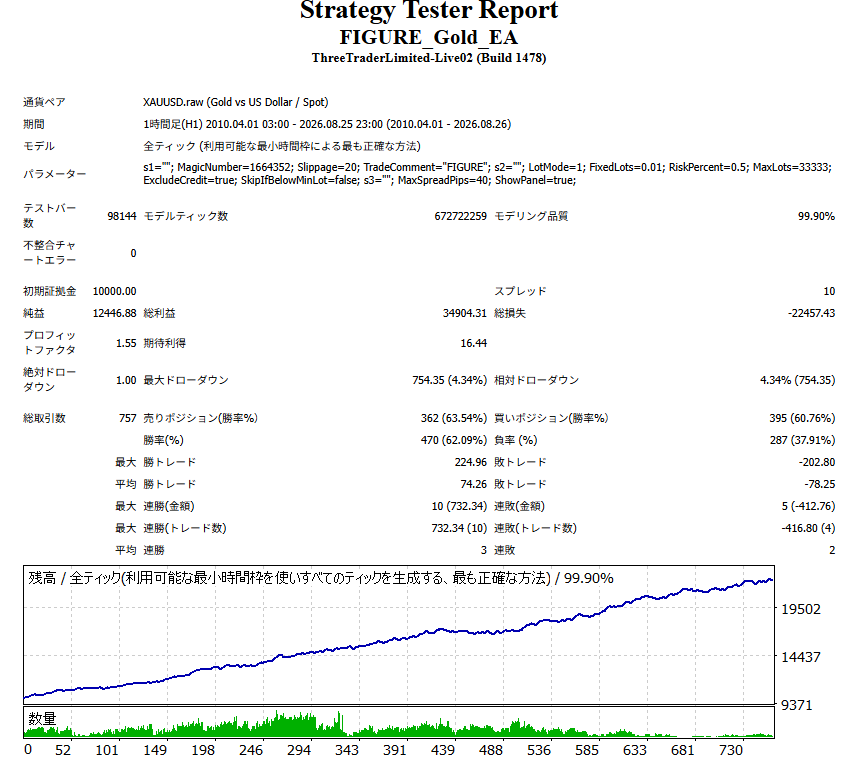
It does best in high-volatility markets where price breaks clearly through specific levels, but over the 16-year backtest it kept comparable results in both halves (2010-2019 and 2020-2026), so it does not depend on a particular market regime.
Unfavorable Market
Because this EA's TP/SL are linked to ATR, in low-movement phases where volatility has dropped sharply the spread becomes relatively heavy.
To counter this, it has a built-in mechanism that automatically skips orders when the take-profit width falls below a set level relative to the spread.
In low-volatility periods trade frequency drops and it can look as if it has stopped; this is by design.
Recommended Operation
[Account]
A tight-spread account is recommended.
Results deteriorate on wide-spread accounts.

[Lot settings]
Start with LotMode=0 (fixed lot) at 0.01 to get a feel for the range of moves and the size of losses.
Once comfortable, switch to LotMode=1 (risk rate) with RiskPercent=0.5 as a guide. It adjusts automatically as your balance changes.

[Using with other EAs]
Being single-position and low-frequency, it is easy to run alongside other EAs.
Make sure magic numbers do not overlap.

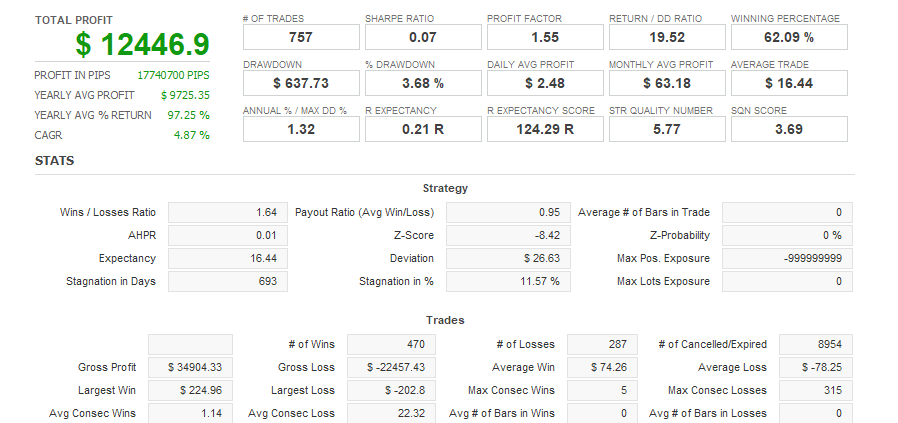
EA Backtest Analysis

Win Rate62.00%
Quant Analyzer 1
Backtest
Quant Analyzer 2
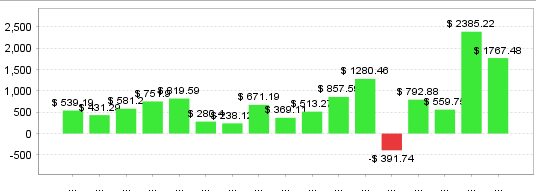
Yearly trade data
×

There are no reviews yet.

“FigureGold” Leave a review for


For product inquiries,
please contact the store.

* You can check the confirmation and reply after the inquiry from "Inquiries" in My Account.

Popular Products
Shopping Cart
ALL FREE

Want to use this EA
for free?

The same performance as the paid version, at zero cost.
Same performanceIdentical logic to the paid version
200+ EAsAll available for free
Results publishedForward test results are public
Done in 30 secondsSign up with just an email
Start for free →
Already have an account? Log in
Scroll to Top