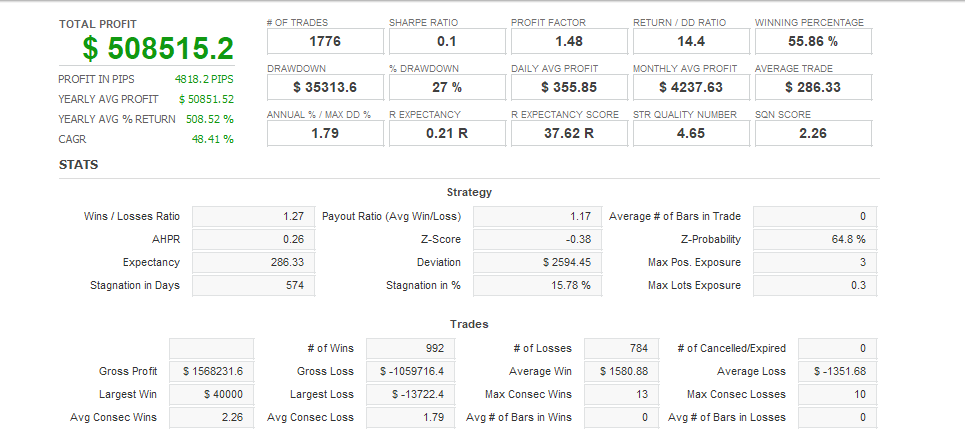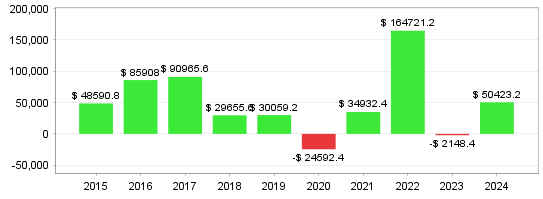





Combining anomalies and technical analysis! A highly functional EA aimed at achieving stable profits with USDJPY ■ About Goto+Bi Tech USDJPY "Goto+Bi Tech USDJPY" is a highly accurate automated trading EA designed specifically for the US Dollar/Japanese Yen (USDJPY). This EA utilizes mid-price anomalies (price trends observed around the time of the USD/JPY mid-price decision at 9:55 AM) and combines them with multiple technical analysis logics to achieve stable profits and low drawdowns that are difficult for discretionary traders to replicate. ■ EA Features• Specialized for USDJPY: Logic optimized for the characteristics of the currency pair ・Mid-price anomaly x technical analysis: Combining time advantage and technical analysis ・Low drawdown design: Operational logic focused on risk management ・Compound interest support: Lot adjustments are possible as funds increase ■ Backtest Results (Period: 2015-2024 | Spread 20) ♢ Fixed lot (0.1 lot) 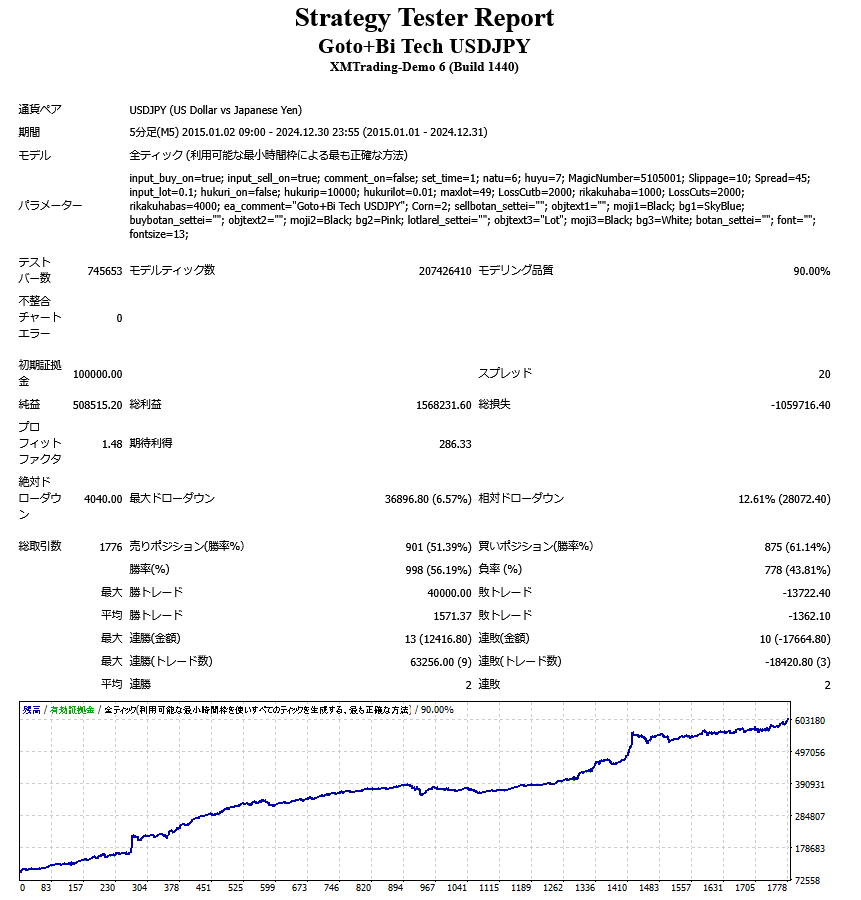 • Initial margin: 100,000 yen ・Net profit: 508,515 yen ・Total assets: 608,515 yen ・Profit factor: 1.48 ♢ Compound interest operation (starting with 0.1 lot)
 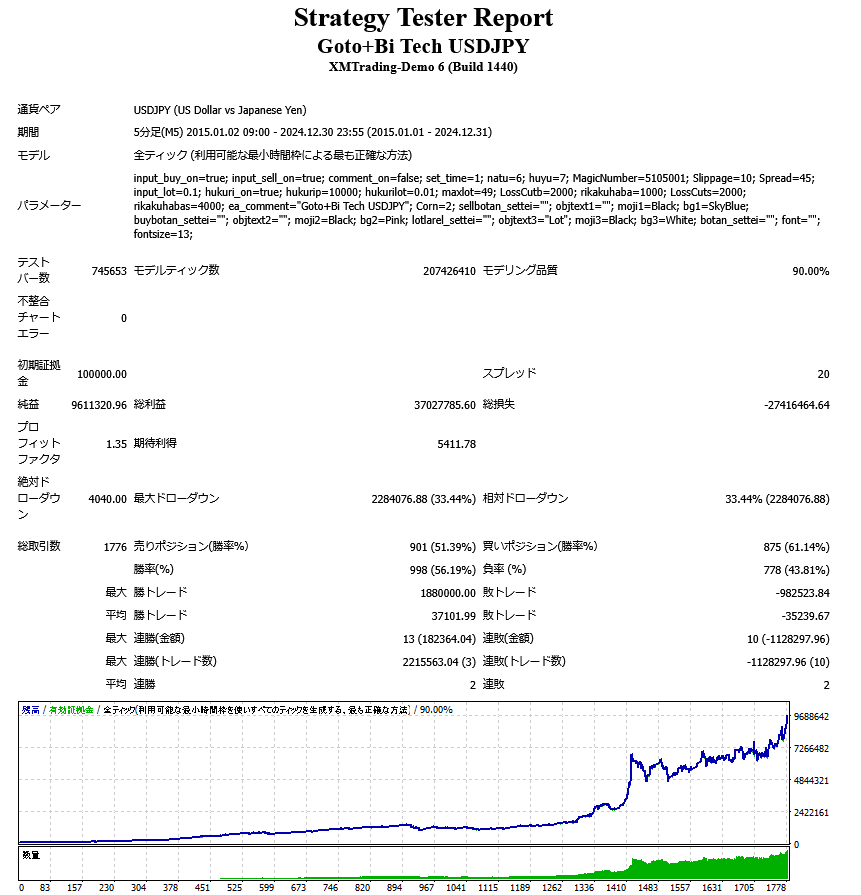 • Initial margin: 100,000 yen ・Net profit: 9,611,320 yen ・Total assets: 9,711,320 yen ・Profit factor: 1.35 ■ Recommended operating conditions• Recommended currency pair: USDJPY ・Time frame: M5 (5-minute frame) ・Lot setting: Adjustable according to initial capital (both fixed and compound interest supported) ・Recommended margin: 10,000 yen or more for 0.01 lot fixed, 0.1 lot for 100,000 yen or more for compound interest (for standard account) ・Broker to use: A broker with narrow spreads and high execution power is recommended ・Compatible platform: MT4 ■ Notes• This EA does not guarantee future profits. ・Performance may fluctuate depending on market conditions. ■Display on chart
 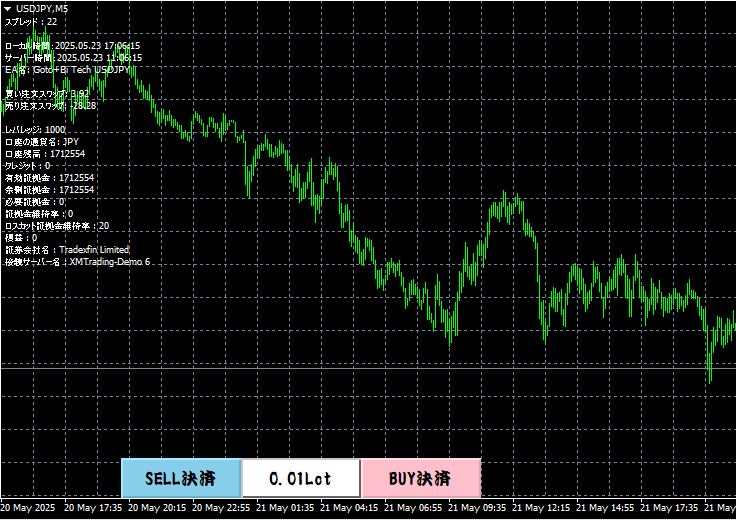 If you set the display of account information to true, you can display account information such as spreads and swap points in the upper left. In the lower left, a button that displays the set trading lot number and a settlement button that allows you to manually close a position with one click are displayed. ■ Parameter setting items
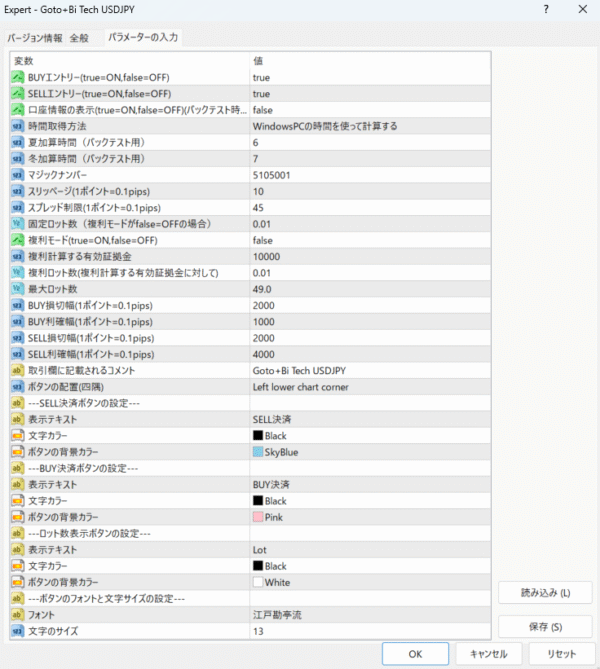
 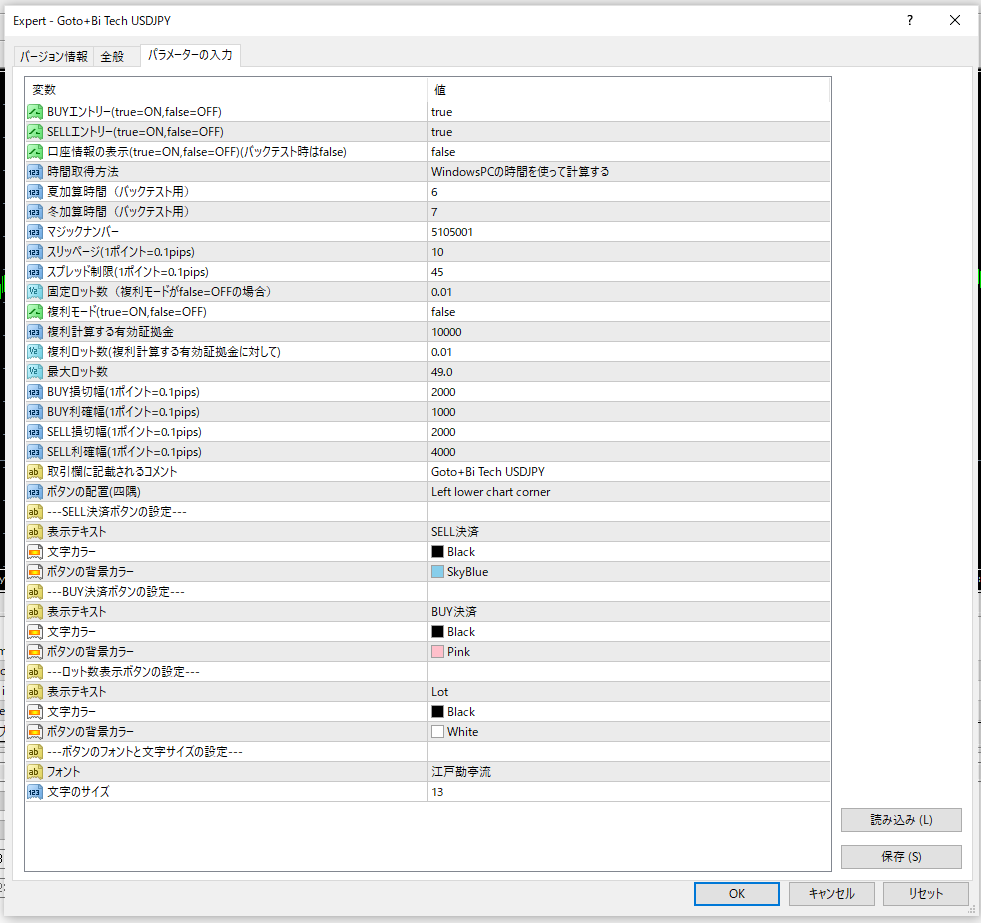 //BUY entry (true=ON, false=OFF) Set to true to enter a BUY. Set to false to not enter a BUY. //SELL entry (true=ON, false=OFF) Set to true to enter a SELL. Set to false to not enter a SELL. //Display account information (true=ON, false=OFF) (Set to false when backtesting) Set to true to display account information in the upper left corner of the chart. Set to false when backtesting to speed up the process. //Time acquisition method Calculate using the time on a Windows PC = Use when actually running. Use the time calculated by the EA (for backtesting) = Use when calculating and testing daylight saving time in backtesting. Server time is fixed at GMT+0 (for backtesting) = Use when backtesting at GMT+0. //Slippage (1 point = 0.1 pips) → Allowable slippage (points) //Spread limit (1 point = 0.1 pips) → Allowable spread (points) //Fixed lot size (if compound interest mode is false = OFF) → Lot size when compound interest mode is false //Compound interest mode (true = ON, false = OFF) → If true, the lot size will be automatically adjusted according to the available margin. //Equity margin for compound interest calculation & number of compound interest lots (for the available margin for compound interest calculation) If you want to operate with compound interest calculated at 0.01 lots against an available margin of 10,000 yen, set the equity margin for compound interest calculation to 10,000 and the number of compound interest lots to 0.01. //Maximum Lot Size → Upper limit of lot size //BUY Stop Loss Width (1 point = 0.1 pips) → Sets the stop loss width for BUY positions (1 pip for 10 positions) //BUY Take Profit Width (1 point = 0.1 pips) → Sets the take profit width for BUY positions //SELL Stop Loss Width (1 point = 0.1 pips) → Sets the stop loss width for SELL positions (1 pip for 10 positions) //SELL Take Profit Width (1 point = 0.1 pips) → Sets the take profit width for SELL positions //Comment to be displayed in the transaction field → The comment you set will be displayed in the transaction field. //Button Placement (Corner) → You can set the button position to the top left, top right, bottom left, or bottom right. ・Left upper chart corner = top left ・Right upper chart corner = top right ・Left lower chart corner = bottom left ・Right lower chart corner = bottom right //—SELL Settlement Button Settings— You can change the display text, text color, and button color of the SELL settlement button. //—BUY payment button settings— You can change the display text, text color, and button color of the BUY payment button. //—Lot number display button settings— You can change the display text, text color, and button color of the lot number display button. //—Button font and font size settings— You can change the font and font size of the button text.
Total Profit
-1467