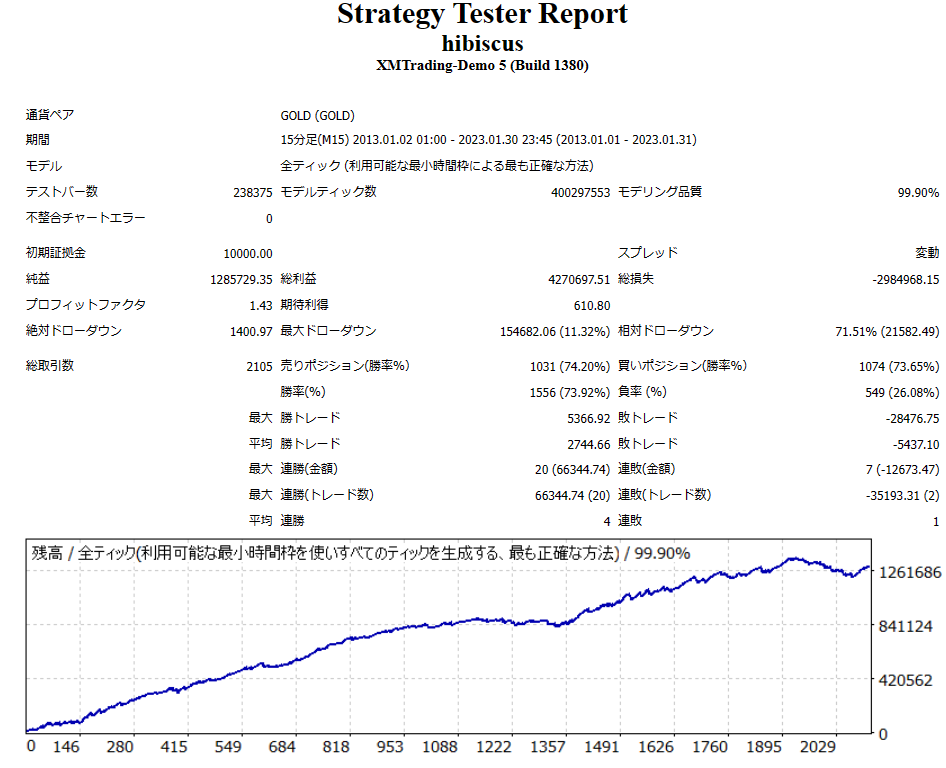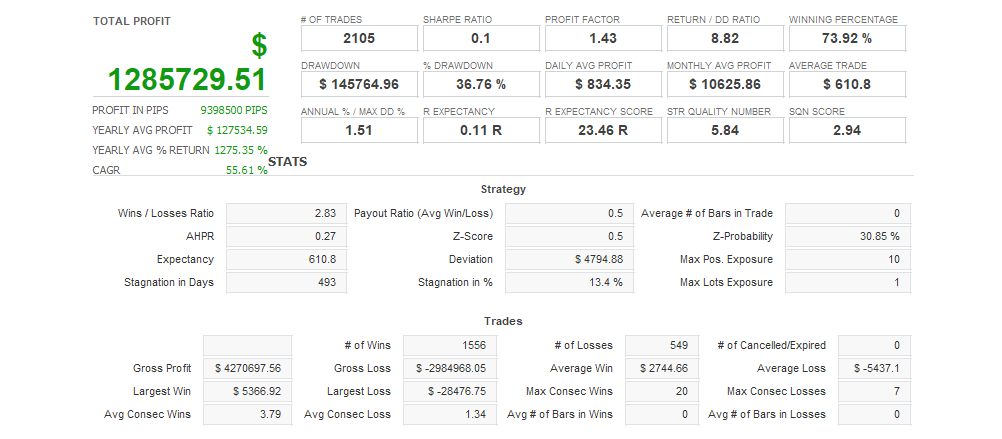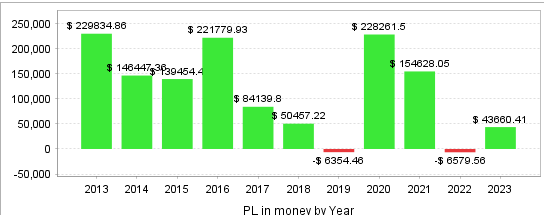





HIBISCUS EA with stop loss exclusively for GOLD opens positions according to trend callbacks. Each order has a stop loss set, and you can also increase your position at a certain distance. It also has a function to automatically increase your position when you make an overall profit. When you open a position and hold it for a certain period of time, there are five exit conditions if you do not make a profit, and if any of the conditions are met, all orders are closed. Most exit conditions are profitable, but in some cases, a hard stop loss may occur. I will briefly explain the main logic of HIBISCUS EA.
- Conditions for increasing order volume:
- If the number of recent consecutive losses is more than a certain number, increase the order amount.
- Conditions for opening a position:
- Spreads are within a certain range
- Use various indicators (highest and lowest prices, etc.) to determine entry points
- Exit conditions:
- Close your positions after a certain amount of time has passed
- Close the position if the profit reaches a certain target value
- Use technical indicators such as Bollinger Bands and moving averages to close positions
It also has additional entry and forced closure functions. The conditions for additional entry and forced closure are also set taking into account profits and technical indicators. Account type Lot number Recommended margin Micro 0.01 100 yen Standard 0.01 10,000 yen
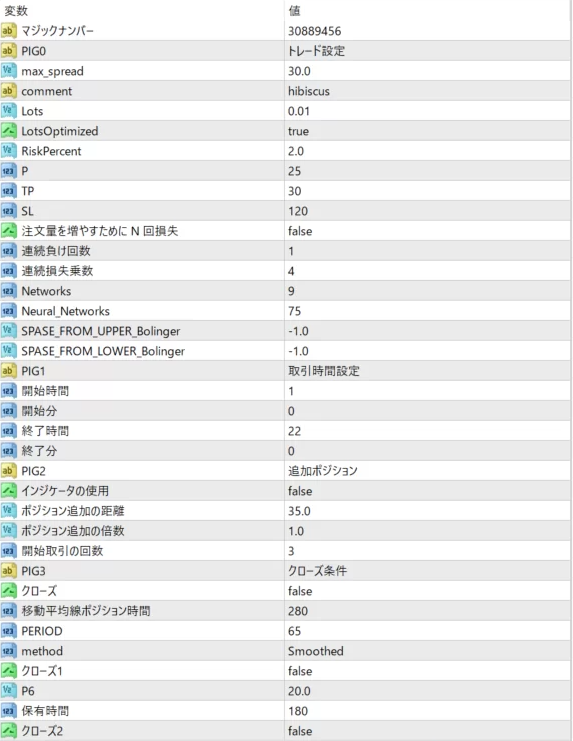
- max_spread: Maximum allowed spread (if the spread exceeds this value the trade will not be executed).
- comment: Any comment associated with the order.
- Lots: The number of lots used in one transaction.
- LotsOptimized: Flag to optimize lot sizes (TRUE/FALSE).
- RiskPercent: How much of your capital you are willing to put at risk, expressed as a percentage.
- P, TP, SL: Specify the number of points for Take Profit (TP) and Stop Loss (SL), as well as the period of the Moving Average (P).
- n losses to increase order size: Specifies whether to increase the order size after consecutive losses.
- Consecutive Loss Count, Consecutive Loss Multiplier: Specifies the percentage increase in the number of lots when the consecutive losing count is reached.
- Networks, Neural_Networks: These are parameters used in the calculation of various technical indicators.
- SPASE_FROM_UPPER_Bolinger, SPASE_FROM_LOWER_Bolinger: Specifies the space from the upper and lower Bollinger bands.
- StartHour1, StartMinute1, EndHour1, EndMinute1: Specifies the time to start and end trading.
- Use Indicator: Specifies whether to use the indicator (TRUE/FALSE).
- x, y, z: Specify the distance (x) of the order extension, the multiple (y) of the order extension, and the number of opening trades (z).
- Close, Close1, Close2: These parameters set the conditions for closing the trade.
- Moving average position time, PERIOD, method: Sets the moving average line and its calculation method.
- P6, Hold Time: Sets the hold time and its parameters (P6).