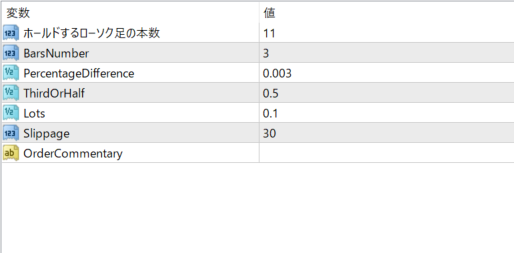
A spike is defined as a bar that closed higher than the previous BarsNumber bars, PercentageDifference higher than the previous bar, and in the lower ThirdOrHalf part of its length. In case of a bullish signal, everything reverses. The position remains open until the Hold bar passes or an opposite signal is received. If a new signal in the same direction is received, the position timer is reset and no new position is opened. Hold (default = 11) — number of bars to hold the open position. BarsNumber (default = 3) — number of previous bars to check for entry condition analysis. PercentageDifference (default = 0.003) — required percentage difference with the previous bar. ThirdOrHalf (default = 0.5) — the bar being checked must close at the bottom/bottom of the previous bar. This value determines that part. For example, 0.5 means the bottom/top half, 0.33 means the bottom/top third, etc. Lots (default = 0.1) — volume of the deal. Slippage (default = 30) — acceptable price slippage (in points). Magic (default = 173923183) — order magic number for filtering positions opened by this EA. Used only in MT4.
Frequently Asked Questions
Can I use the EA right after purchase?
Yes. The EA file (.ex4/.ex5) becomes available for download from your account page immediately after payment completes.
Does it support MT4 or MT5?
Platform compatibility varies by product. Please check the "Supported Platform" field on each product page. Many EAs support both MT4 and MT5.
Can I try EAs on a demo account?
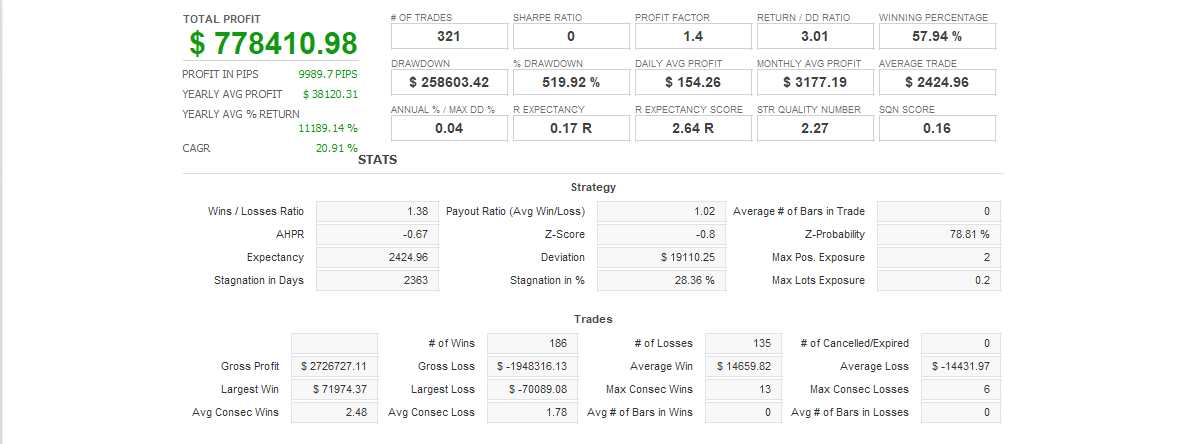
Most EAs do not support running on demo accounts. To help you decide before purchase, every EA's backtest results are shown in the "Backtest" tab and forward test performance in the "Performance" tab on each product page.
What is the recommended margin or lot size?
Recommended settings are listed for each EA in the "Product Details" section of its product page. Excessive lot sizing can cause catastrophic losses at maximum drawdown.
Can I change my licensed account?
After purchase, go to "Licensed Account Switch" on My Page and enter the MT4/MT5 account number you want to bind. The change applies immediately. You can change once per 24 hours.
Are refunds or returns available?
Due to the nature of digital products, we generally cannot refund or accept returns after the authentication code has been issued. However, if the EA itself has a critical defect that prevents operation and the fault lies with us, we will handle the case individually. Please contact us via the inquiry page.
Do backtest results match live performance?
Backtest results are theoretical values based on historical data, while forward tests reflect live environment performance. Systre publishes forward test data for every EA on its product page so you can verify live performance before purchase. Spread and execution delays typically cause some divergence between backtest and live results.