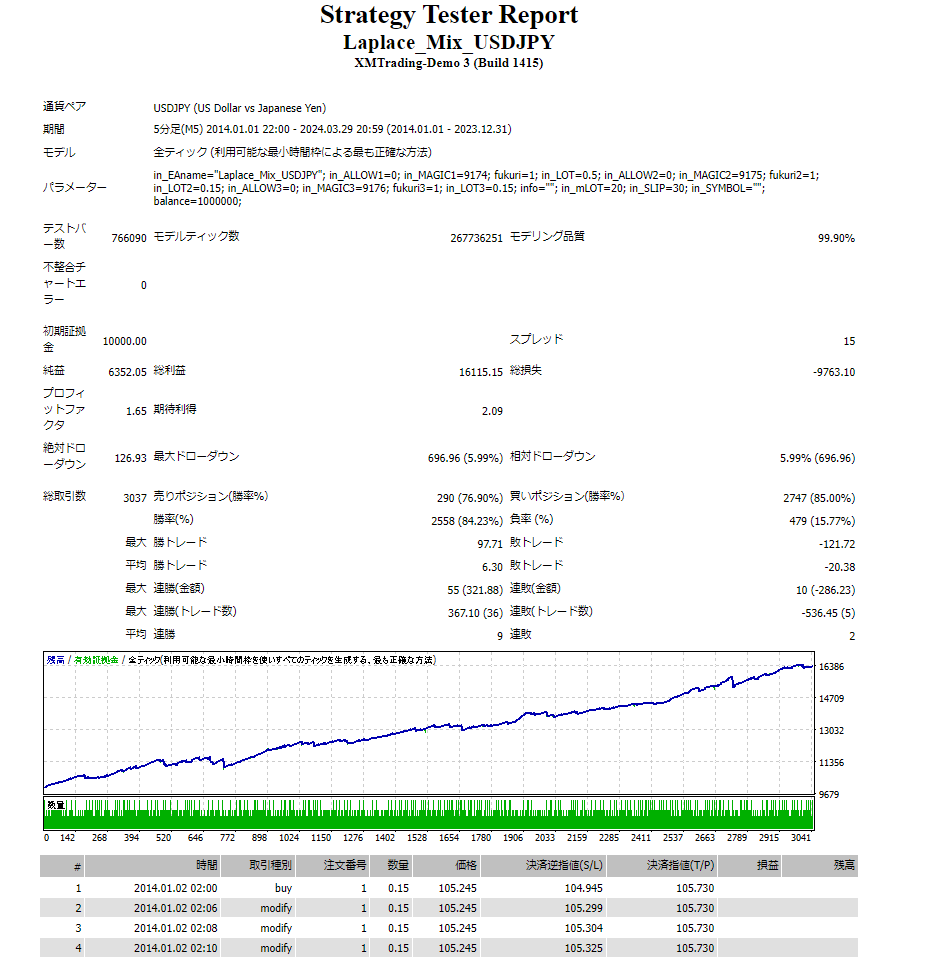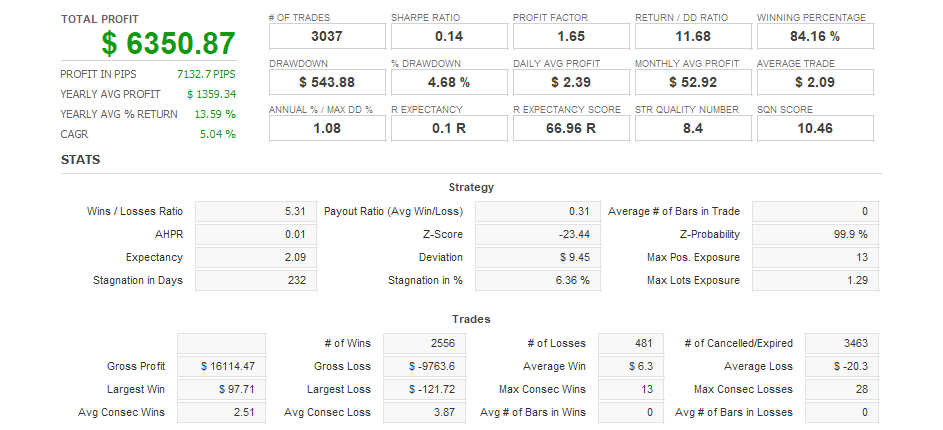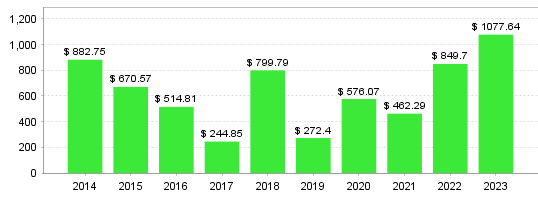



Thank you for considering this EA. This EA contains three logics. It was created with the intention of increasing profits while suppressing DD by using multiple logics. Please use it as one of your portfolios. Logic Overview
- Make a long entry from midnight Japan time on Gotoh day to the Tokyo mid-price.
- On Goto Day, the initial lot will be divided into five parts under internal control and entered.
- There will be no entry on Goto Day, which is Saturday.
- When the price breaks through the high or low point of a few days, you enter in that direction.
- If a trend reversal or temporary recovery is expected at each time point, we will enter a contrarian trade.
Parameter Description ■ Basic Settings
- EA Name The text you enter will be displayed in the upper right corner of the chart. This is a function to make it easier to see which EA you are using. If you do not need it, leave it blank and nothing will be displayed.
- Logic 1 (Goto day mid-price long) Allow: Enter long toward the Tokyo mid-price on the Goto day. Do not allow: Do not enter.
- Lot setting Simple interest: Always enter with the same lot. Compound interest: The number of lots will change depending on the account balance.
- The initial lot value is 0.5. Please enter 0.1 or more. If it is less than 0.1, the split will not be possible and the set lot will be exceeded.
- Logic2 (Breakout) Allow: Enter when the high or low price of the last few days is broken. Do not allow: Do not enter.
- Logic 3 (contrarian trading) Allow: Enters at each time point with a contrarian trade. Not allowed: Does not enter.
- Maximum Lot Please enter the maximum lot for each broker. If the lot exceeds the lot set here due to compound interest operation, it will be forcibly adjusted to the maximum lot.
- If your currency pair is followed by specific characters for your broker, enter the characters here.
- Margin per lot When using compound interest , you can set how much per lot. Example: If you enter 1,000,000 Balance: 1,000,000 yen → 1 lot: 500,000 yen → 0.5 lot: 2,000,000 yen → 2 lots Example: If you enter 500,000 Balance: 1,000,000 yen → 2 lots: 500,000 yen → 1 lot: 2,000,000 yen → 4 lots
This EA does not guarantee profits. Please use it at your own risk and with sufficient risk management.
Frequently Asked Questions
Can I use the EA right after purchase?
Yes. The EA file (.ex4/.ex5) becomes available for download from your account page immediately after payment completes.
Does it support MT4 or MT5?
Platform compatibility varies by product. Please check the "Supported Platform" field on each product page. Many EAs support both MT4 and MT5.
Can I try EAs on a demo account?
Most EAs do not support running on demo accounts. To help you decide before purchase, every EA's backtest results are shown in the "Backtest" tab and forward test performance in the "Performance" tab on each product page.
What is the recommended margin or lot size?
Recommended settings are listed for each EA in the "Product Details" section of its product page. Excessive lot sizing can cause catastrophic losses at maximum drawdown.
Can I change my licensed account?
After purchase, go to "Licensed Account Switch" on My Page and enter the MT4/MT5 account number you want to bind. The change applies immediately. You can change once per 24 hours.
Are refunds or returns available?
Due to the nature of digital products, we generally cannot refund or accept returns after the authentication code has been issued. However, if the EA itself has a critical defect that prevents operation and the fault lies with us, we will handle the case individually. Please contact us via the inquiry page.
Do backtest results match live performance?
Backtest results are theoretical values based on historical data, while forward tests reflect live environment performance. Systre publishes forward test data for every EA on its product page so you can verify live performance before purchase. Spread and execution delays typically cause some divergence between backtest and live results.