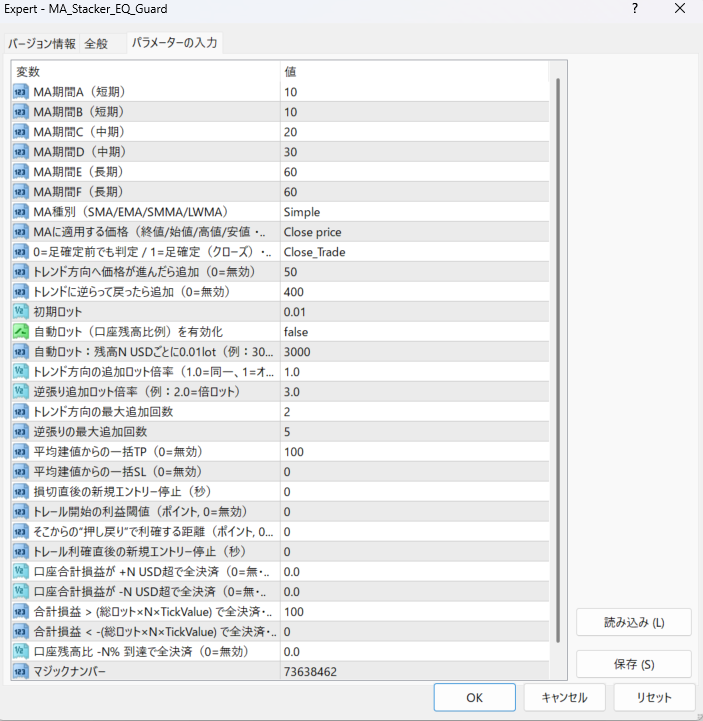
MA_Stacker_EQ_Guard is a high-risk, high-return automated trading EA that uses a trend determination method that combines six moving averages and an exit strategy based on the average market price.
It is equipped with trend-following entries, counter-trend additional entries, batch TP/SL from the average opening price, and even a forced close function based on the account balance (EQ Guard). The "balance between offense and defense" that is difficult to achieve manually has been fully automated.
-
Entry condition : When six moving averages are aligned in the same direction. Trend strength is also determined by the sorting filter.
-
Exit strategy : Take profit/stop loss from average opening price, trailing, lump-sum settlement at MA cross.
-
Funds management : You can set cuts based on total profit/loss USD, lot ratio, and balance ratio.
-
Additional positions : Control trend/counter trend in units of points. Lot multiplier and upper limit of number of times can be set in detail.
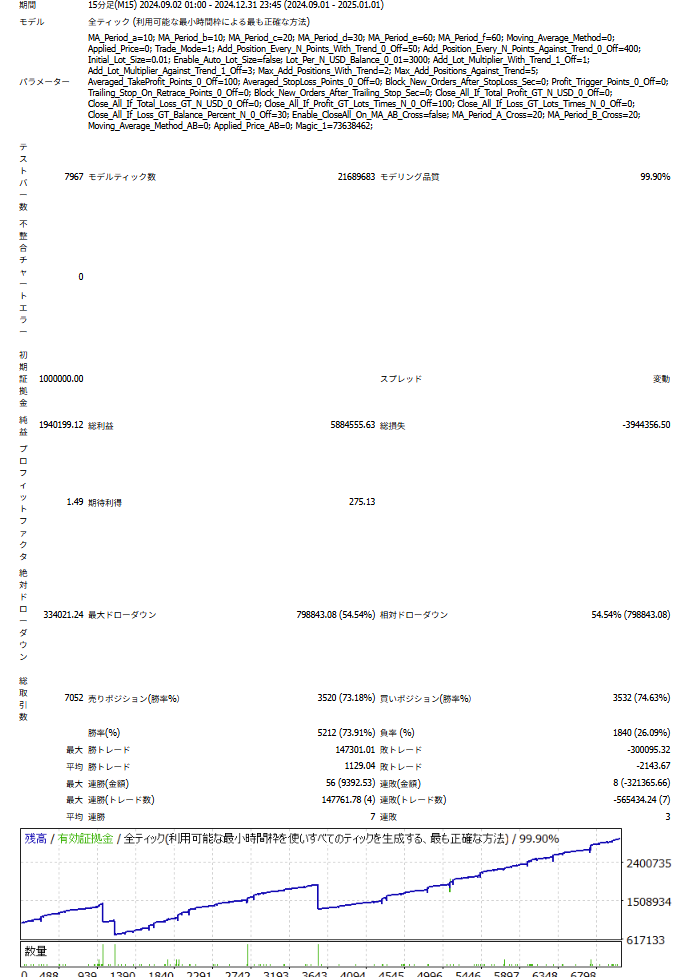
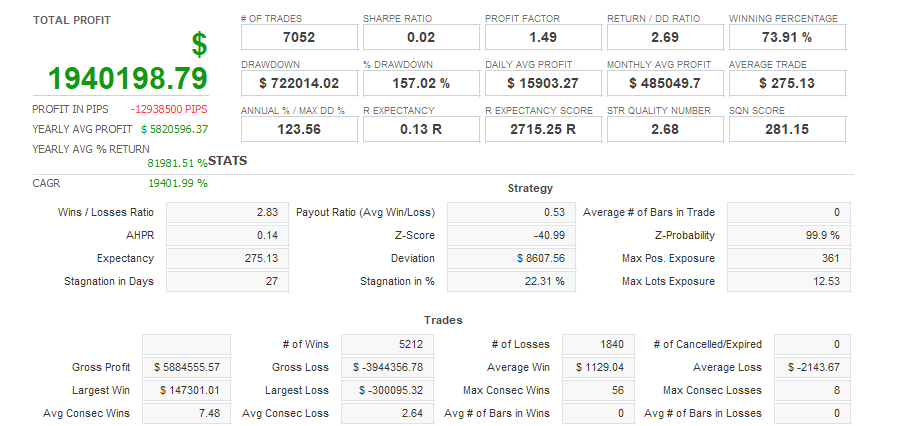
This EA is designed to be aggressive and explosive , and depending on the settings, monthly profits of 200% are possible .
However, there are also risks involved. Be sure to set a stop loss (SL) or balance cut percentage before operating .
There is no stop loss set by default, so careful money management is the key to success.
Frequently Asked Questions
Can I use the EA right after purchase?
Yes. The EA file (.ex4/.ex5) becomes available for download from your account page immediately after payment completes.
Does it support MT4 or MT5?
Platform compatibility varies by product. Please check the "Supported Platform" field on each product page. Many EAs support both MT4 and MT5.
Can I try EAs on a demo account?
Most EAs do not support running on demo accounts. To help you decide before purchase, every EA's backtest results are shown in the "Backtest" tab and forward test performance in the "Performance" tab on each product page.
What is the recommended margin or lot size?
Recommended settings are listed for each EA in the "Product Details" section of its product page. Excessive lot sizing can cause catastrophic losses at maximum drawdown.
Can I change my licensed account?
After purchase, go to "Licensed Account Switch" on My Page and enter the MT4/MT5 account number you want to bind. The change applies immediately. You can change once per 24 hours.
Are refunds or returns available?
Due to the nature of digital products, we generally cannot refund or accept returns after the authentication code has been issued. However, if the EA itself has a critical defect that prevents operation and the fault lies with us, we will handle the case individually. Please contact us via the inquiry page.
Do backtest results match live performance?
Backtest results are theoretical values based on historical data, while forward tests reflect live environment performance. Systre publishes forward test data for every EA on its product page so you can verify live performance before purchase. Spread and execution delays typically cause some divergence between backtest and live results.