Swift Range Breaker
Release date 2025-04-29
Automated Trading EA Strategy Tags , , ,
6
Listed Products

Swift Range Breaker

6

Identify the range and do not miss the momentary break. High-precision scalping EA for EURUSD

Currency Pair
EURUSD
Trade Type
Scalping
Timeframe
M15
Max Positions
1 Positions
Max Stop Loss
750
Hedge
No

¥22,000

? There is no difference in EA performance between the free and paid versions.
The free version requires a deposit into an eligible account opened through sys-tre.com, and verification of that account.
See How to Use for details.
✅ Added to cart!

Forward Test

Demo ForwardData Period: 2024-12-30 – 2026-09-01 / Last Closed Trade: 2026-09-01
3.6
C
Profitability56 / 100
Stability37 / 100
Reliability57 / 100
Total Profit
1453
Max Drawdown
767
PF
1.17
Win Rate
46.85%
Total Trades : 143
Max Positions : 1
Monthly Avg Trades : 7.0
Expected Value : 10.16
Recovery Factor : 2.14
No open positions at this time.
Trade History
Close Time Type Close Price Symbol Lot Size Profit/Loss

Buy vs Sell Trade Ratio

Buy vs Sell Profit/Loss

Entries by Time of Day

Performance Scorecard

P/L Calendar

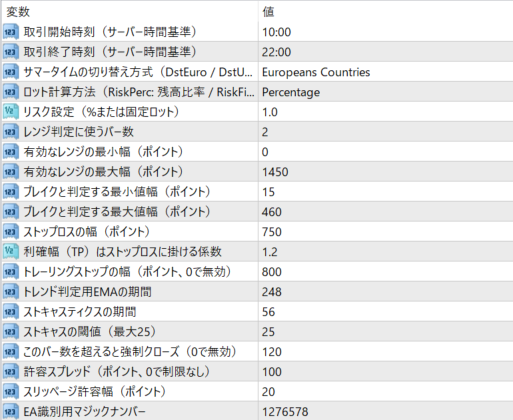
Parameter Name Description iStartTrade Specify the start time of trading (based on server time). Example: H10M00 (London market opening time). iEndTrade Specify the end time of trading (based on server time). Example: H22M00 (until the NY market is active). iSwitchDST Select the daylight saving time switching method. You can choose from DstEuro (European method), DstUSA (US method), and DstNo (no switching). iPosRiskBy Specify the lot calculation method. Select RiskPerc (percentage of margin) or RiskFixLot (fixed lot number). iPosRisk Specify the risk ratio (%) or fixed lot number according to the method selected in iPosRiskBy. Example: 1.0 = 1%. iTradeRange Number of candlesticks used to determine breakout. Please specify 2 or more. iMinRange Minimum range width (points) for entry. Ranges smaller than this will not be traded. iMaxRange Maximum range width (points) for entry. Ranges exceeding this will be ignored. iMinBrkRangeThe minimum price range (points) required to determine a breakout. iMaxBrkRangeThe maximum price range (points) to be considered a break. Any movement larger than this will be ignored. iStopLossThe stop loss range of the position (points). This is a guideline for stop loss. iTPfactorThe coefficient for automatically calculating the profit take value (TP) multiplied by the stop loss range. For example, if 1.2, TP is 1.2 times SL. iTrailStopThe trailing stop range (points). Specifying 0 will disable it. iTrendPeriodThe calculation period of the EMA to determine the trend direction. The larger it is, the more it follows the long-term trend. iOverPeriodThe calculation period of the stochastic oscillator. Measures the overheating of the market. iOverLevelsThe overheating threshold of the stochastic (judging overbought/oversold). Can be set up to 25. iBarsCloseThe limit on the time a position is held (number of bars). If this value is exceeded, the position will be closed. Disabled with 0. iMaxSpreadThe maximum allowable spread at the time of entry (points). If the specified value is exceeded, the order will be postponed. iSlippage Slippage allowance (points) when placing an order. Limits slippage even in times of intense price movement. MagicNumber Magic number to identify EA. Please set it so that it does not overlap with other EAs.

Frequently Asked Questions

Can I use the EA right after purchase?
Yes. The EA file (.ex4/.ex5) becomes available for download from your account page immediately after payment completes.
Does it support MT4 or MT5?
Platform compatibility varies by product. Please check the "Supported Platform" field on each product page. Many EAs support both MT4 and MT5.
Can I try EAs on a demo account?
Most EAs do not support running on demo accounts. To help you decide before purchase, every EA's backtest results are shown in the "Backtest" tab and forward test performance in the "Performance" tab on each product page.
What is the recommended margin or lot size?
Recommended settings are listed for each EA in the "Product Details" section of its product page. Excessive lot sizing can cause catastrophic losses at maximum drawdown.
Can I change my licensed account?
After purchase, go to "Licensed Account Switch" on My Page and enter the MT4/MT5 account number you want to bind. The change applies immediately. You can change once per 24 hours.
Are refunds or returns available?
Due to the nature of digital products, we generally cannot refund or accept returns after the authentication code has been issued. However, if the EA itself has a critical defect that prevents operation and the fault lies with us, we will handle the case individually. Please contact us via the inquiry page.
Do backtest results match live performance?
Backtest results are theoretical values based on historical data, while forward tests reflect live environment performance. SYSTEMTRADE.COM publishes forward test data for every EA on its product page so you can verify live performance before purchase. Spread and execution delays typically cause some divergence between backtest and live results.
Parameters
Parameters
Trading Info

Recommended Fund: 100

Expected Monthly Return: 5%

This data is based on a 0.01 lot size. Actual performance may vary depending on your lot size.
Entry Condition
Operates from 10:00 to 22:00 London time (daylight saving time). ・Determines the range from the past few candlesticks and enters when the range is broken. ・Determines the trend direction based on the slope of the EMA (Exponential Moving Average) and the position of the stochastics.
Close Condition
・Closes when the EMA crosses or the stochastics crosses the overbought or oversold zone in the opposite direction to the entry direction. ・Closes when the position is held for more than the set number of bars. ・Trailing stop function available (can be turned on/off in settings).
Favorable Market
・Time periods from European time to the first half of New York time when there is active price movement ・A market breakout from a range ・When a short-term trend occurs
Unfavorable Market
・Spread widening immediately after the announcement of an index, etc. ・Strong trend market with price movements that are too biased in one direction (including false starts after the break) ・Noisy break with low volatility
Avoid Trading Timing
・After New York time on Fridays (due to low liquidity and instability) ・Before and after the release of important economic indicators (FOMC, employment statistics, etc.) ・Times when spreads tend to widen (around midnight server time, etc.)
Recommended Operation
・Currency pair: EURUSD only (1 minute chart) ・Securities company: Recommended overseas FX brokers with low spreads and high contract power ・Operating hours: London to early NY (around 17:00 to 6:00 Japan time) ・Risk setting: It is safe to operate with a risk of 1.0% or less against the margin.

EA Backtest Analysis

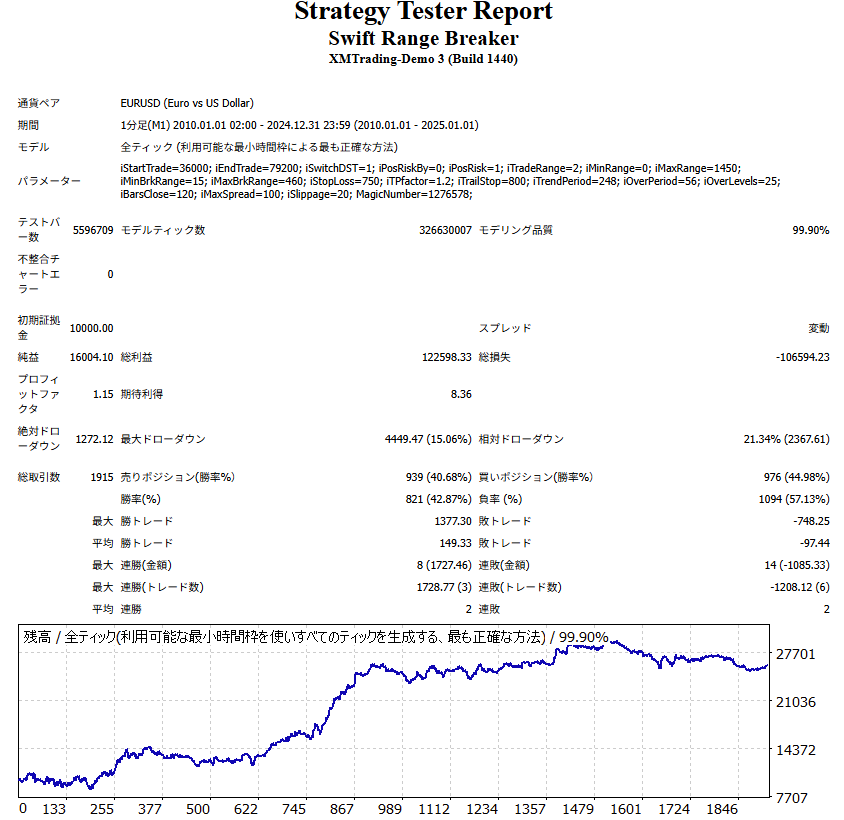
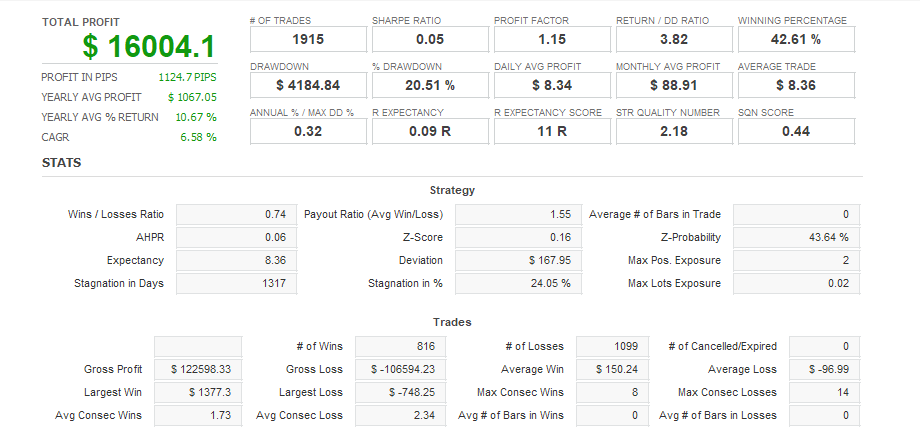
Win Rate42.00%
Quant Analyzer 1
Backtest
Quant Analyzer 2
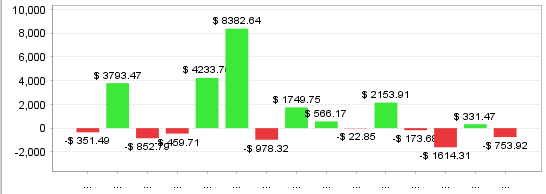
Yearly trade data
×

There are no reviews yet.

“Swift Range Breaker” Leave a review for


For product inquiries,
please contact the store.

* You can check the confirmation and reply after the inquiry from "Inquiries" in My Account.

Popular Products
Shopping Cart
ALL FREE

Want to use this EA
for free?

The same performance as the paid version, at zero cost.
Same performanceIdentical logic to the paid version
200+ EAsAll available for free
Results publishedForward test results are public
Done in 30 secondsSign up with just an email
Start for free
Already have an account? Log in
Scroll to Top