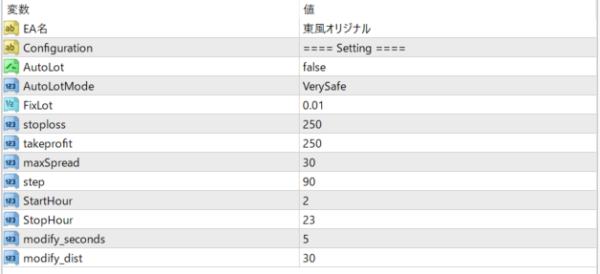




Feature 1: Customizable parameters One of the attractions of "Tohoku Original" is that the parameters can be customized in a wide range. You can finely adjust the maximum spread, step, trading start time, and end time to suit your trading style and the market. You can also adjust orders in seconds. This allows you to create more advanced strategies. Feature 2: Automatic lot adjustment Another feature is automatic lot adjustment by the "AutoLot" function. When this function is turned on, "Tohoku Original" automatically calculates the optimal lot number and reflects it in the transaction. This allows you to pursue maximum profit while properly managing risk. magicnumber This is a transaction identifier that distinguishes your order from other people's orders. Set your own special number. AutoLot This is a parameter that switches automatic lot size adjustment on and off. If set to True, the lot size will be automatically adjusted. param_unit This parameter adjusts the order delay time. You can finely control the timing of your order by selecting the number of seconds. AutoLotMode This sets the mode of automatic lot size adjustment. Options range from Expert to VerySafe, which helps with risk management. FixLot sets the fixed lot size that will be applied if AutoLot is false. stoploss, takeprofit These set the price levels for stop loss and take profit. Set appropriate values to suit your EA's trading strategy. maxSpread Sets the maximum spread at which to trade. This allows you to skip a trade if the trading cost is too high. step This sets the minimum distance in points between the order price and the current price. The higher this value, the less likely your order will be filled. StartHour, StopHour These set the time to start and stop trading. This allows you to trade only during certain market hours.
Total Profit
-8762