A trend-following program for the 15-minute chart (M15), combining UT Bot (an ATR-based trend-following indicator) and a moving average (EMA).
It builds up profits steadily, little by little.
[Main features]
Trend detection with multiple indicators (UT Bot + EMA)
Combining the ATR-based “UT Bot” signal with the “EMA”, it enters in the direction of the trend.
The sensitivity of UT Bot can be set independently for Long and Short.
Flexible exit algorithms
Trailing stop mode: The stop loss is raised or lowered step by step, based on the lowest low / highest high of a set number of past bars.
Fixed TP/SL mode: Fixed take profit and stop loss based on a width in pips that you set are also supported.
Maximum number of open positions (default 4): The number of positions can be set.
Lot size: The lot size can be set. As your account balance grows, we recommend raising the lot size.
Break-even (moving the stop to the entry price): Once a certain unrealized profit is reached, the SL is automatically moved to the entry price (plus a secured profit).
Maximum holding time limit: A time limit function automatically closes positions once the set time has elapsed.
Advanced risk management and safety measures
3 money management patterns: Choose from “account equity ratio %”, “fixed lot” and “fixed loss amount (a specified amount)”.
Spread limit: Prevents new entries during sudden moves or low liquidity when the spread exceeds the set value.
Friday entry restriction: Restricts entries from Friday evening in Japan time (JST) onward, reducing the risk of holding over the weekend.
Automatic application of the broker’s stop level: It checks each broker’s StopLevel and FreezeLevel and automatically adjusts the SL/TP values so that no errors occur.
Robust error handling
When a requote (price change) or a communication error occurs, it automatically retries up to 3 times.
The broker’s order return codes are converted into text and written to the log.
Frequently Asked Questions
Can I use the EA right after purchase?
Yes. The EA file (.ex4/.ex5) becomes available for download from your account page immediately after payment completes.
Does it support MT4 or MT5?
Platform compatibility varies by product. Please check the "Supported Platform" field on each product page. Many EAs support both MT4 and MT5.
Can I try EAs on a demo account?
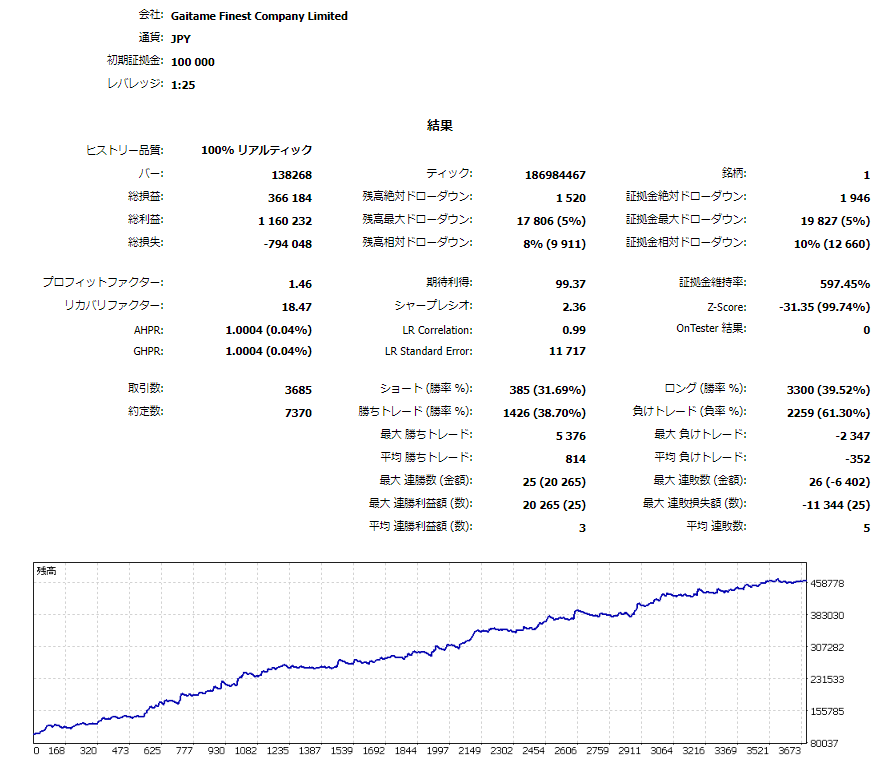
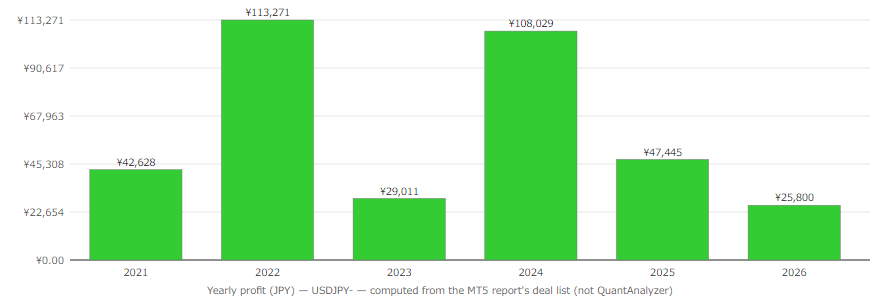
Most EAs do not support running on demo accounts. To help you decide before purchase, every EA's backtest results are shown in the "Backtest" tab and forward test performance in the "Performance" tab on each product page.
What is the recommended margin or lot size?
Recommended settings are listed for each EA in the "Product Details" section of its product page. Excessive lot sizing can cause catastrophic losses at maximum drawdown.
Can I change my licensed account?
After purchase, go to "Licensed Account Switch" on My Page and enter the MT4/MT5 account number you want to bind. The change applies immediately. You can change once per 24 hours.
Are refunds or returns available?
Due to the nature of digital products, we generally cannot refund or accept returns after the authentication code has been issued. However, if the EA itself has a critical defect that prevents operation and the fault lies with us, we will handle the case individually. Please contact us via the inquiry page.
Do backtest results match live performance?
Backtest results are theoretical values based on historical data, while forward tests reflect live environment performance. Systre publishes forward test data for every EA on its product page so you can verify live performance before purchase. Spread and execution delays typically cause some divergence between backtest and live results.
| Platform | MT5 |
|---|
| Leverage | 25:1 |
|---|
| GMT Setting | Automatic internal adjustment |
|---|
| Spread | 0.5 to 1.0 pips or less recommended |
|---|
| Account Type | No specific account type required |
|---|
| Tested Brokers | Gaitame Finest |
|---|
* Verification info provided by the seller. May differ from current specs due to broker changes.