
what-is-systemtrade-comは、“I’m interested in FX automated trading, but I don’t know where to start…”
“It seems complicated, and I can’t program…”
Many people share these concerns…
Many people share these concerns. However, the truth is that by using “fully automated” tools (EAs) that trade 24/7, you can start professional-level trading even with zero knowledge.
SYSTEMTRADE.COM offers high-performance EAs for free, making it easy for beginners to start automated trading.
what-is-systemtrade-com What is SYSTEMTRADE.COM
SYSTEMTRADE.COM is an automated trading (EA) marketplace that launched in 2023. With over 150 EAs compatible with MT4 and MT5, it’s widely used by everyone from beginners to professional traders.
The three main features are:
- Unlimited access to high-performance EAs even with the free version
- Reliable evaluation based on forward test results
- Not just EAs, but also indicators and FX books
As a unique “automated trading specialized platform,” it’s gaining attention today.
SYSTEMTRADE.COM allows you to use high-performance EAs for free.
You can easily start automated trading without programming.
Diverse Trading Strategy Lineup
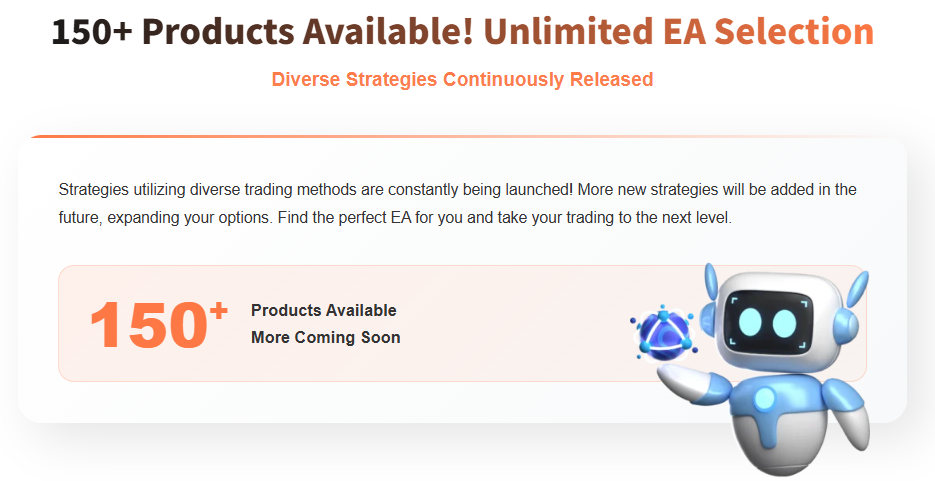
We provide EAs with various trading strategies and indicators to meet different user needs and trading styles. A wide range of options is available.
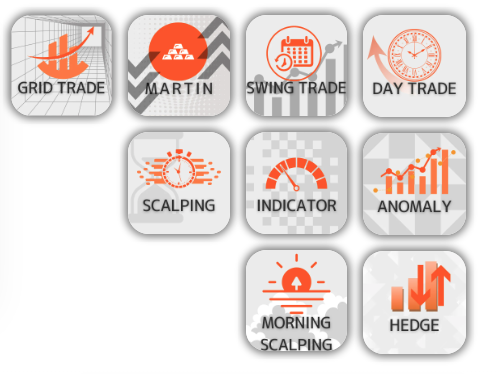
We publish backtest and forward test results for all products.

what-is-systemtrade-com SYSTEMTRADE.COM EA Rankings

The EA Rankings on SYSTEMTRADE.COM evaluate and rank high-performance EAs based on forward test results.
Here, we comprehensively assess various indicators such as profit rate, win rate, and profit factor based on EAs’ past performance, publishing the top 100 EAs in ranking format.
Ranking Indicators
Cumulative Profit: An indicator showing the total profit gained by the EA. High cumulative profit indicates an EA that has generated profits over a long period.
Win Rate: Represents the percentage of winning trades out of all trades. EAs with high win rates are expected to deliver stable performance.
Profit Factor: Represents the ratio of profit to loss. A value above 1.0 means the EA is profitable, and the higher the number, the better the profit efficiency relative to risk.
3-month, 6-month, and cumulative rankings: You can compare not only short-term performance but also long-term performance.
How to Use the Rankings
EA rankings can be used as reference material when considering future investment strategies based on past performance. This feature allows you to compare various indicators and find EAs that match your investment style.
what-is-systemtrade-com Features of SYSTEMTRADE.COM EAs
SYSTEMTRADE.COM offers EAs in two types: Free and Premium versions.
Each version has some differences in usable accounts and features, but there’s no difference in performance. Below, we’ll explain the differences between the Free and Premium versions in detail.
Free Version Features
The Free version can only be used with FX companies and account types specified by SYSTEMTRADE.COM.
You need to open an account with a specified FX company and complete account verification from the My Account page.
You can freely use EAs for verified accounts.
There’s no difference in performance or logic between Free and Premium EAs – you can use the same EAs, but there are restrictions on usable accounts.
- Use EAs for free
- After opening an account with an FX company specified by SYSTEMTRADE.COM, you can use EAs after verification
- Account usage is limited to specified FX companies
Premium Version Features
With the Premium version, users can use EAs with accounts from any FX company of their choice.
Since there are no account restrictions, more flexible trading is possible.
Additionally, purchasing the Premium version doesn’t require membership registration, and you can use EAs immediately with the account specified at purchase.
You can also change your account once per month, allowing you to try more diverse trading strategies.
- Use EAs with any FX company/account
- Account changes possible once per month
- High flexibility to try various trading strategies
Getting Started with SYSTEMTRADE.COM [From Registration to Account Opening]
Anyone can easily start in 3 steps! Use proven EAs for free!
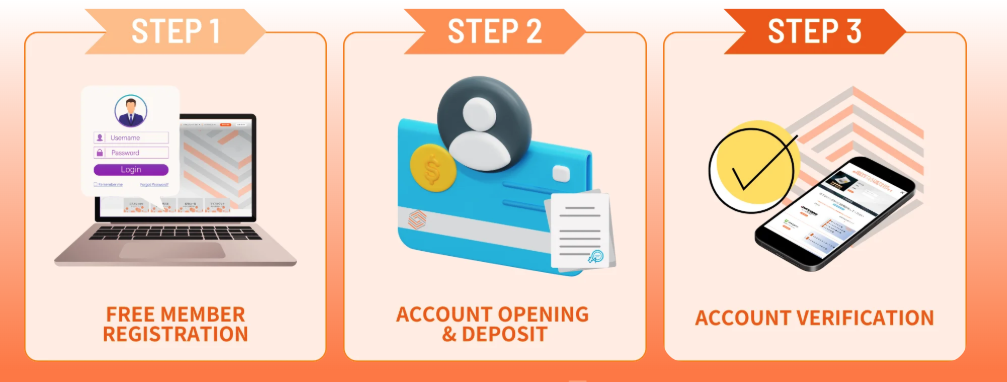
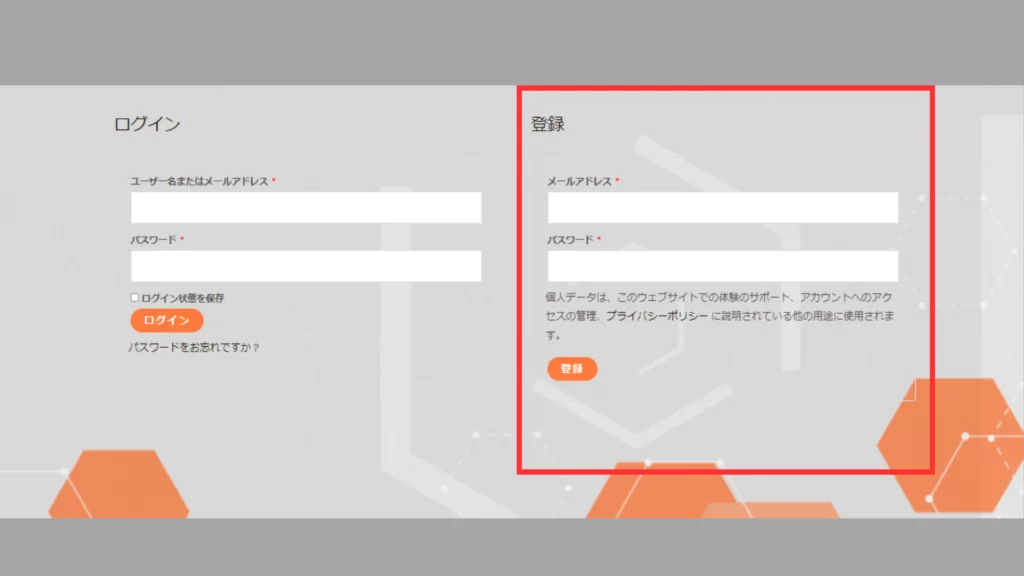
Enter Required Information
Go to My Account, enter the required information in the red boxes, and click the [Register] button.
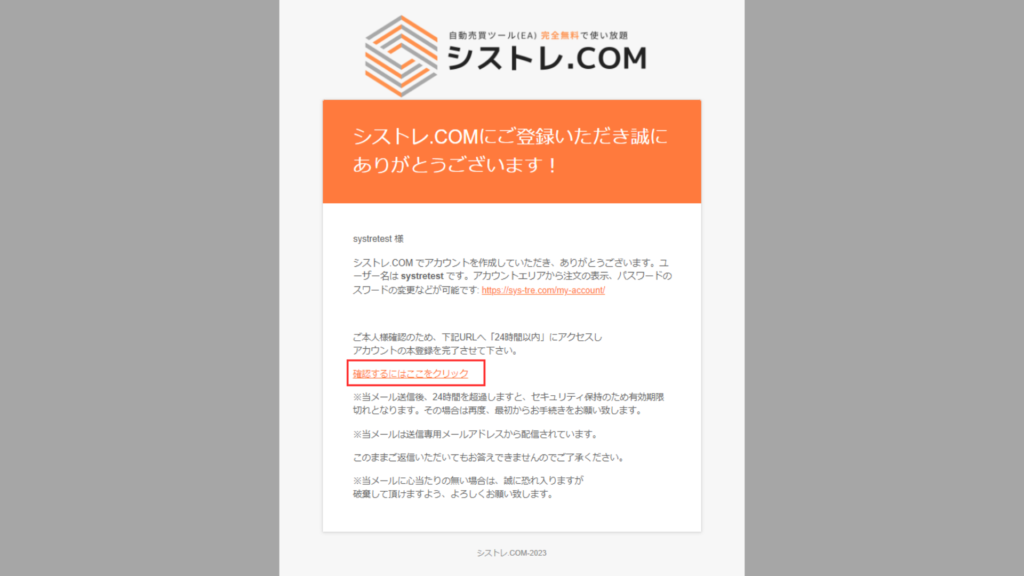
Email Address Verification
A confirmation email will be sent to your registered email address. Click”Click here to confirm” in the email body to proceed.
You can use EAs for free only with accounts opened through links posted on our service.
Click here for the FX company list
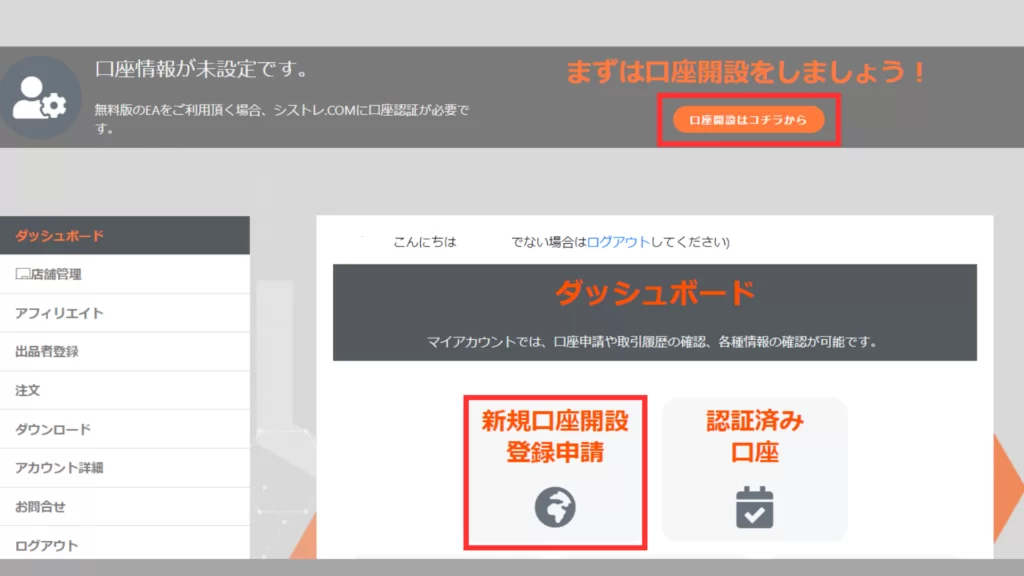
Account Application Form
Click New Account Opening Registration Application from the My Account dashboard.
Account Verification
Select the FX company where you opened your account from the dropdown, enter your account number, and click the application button.
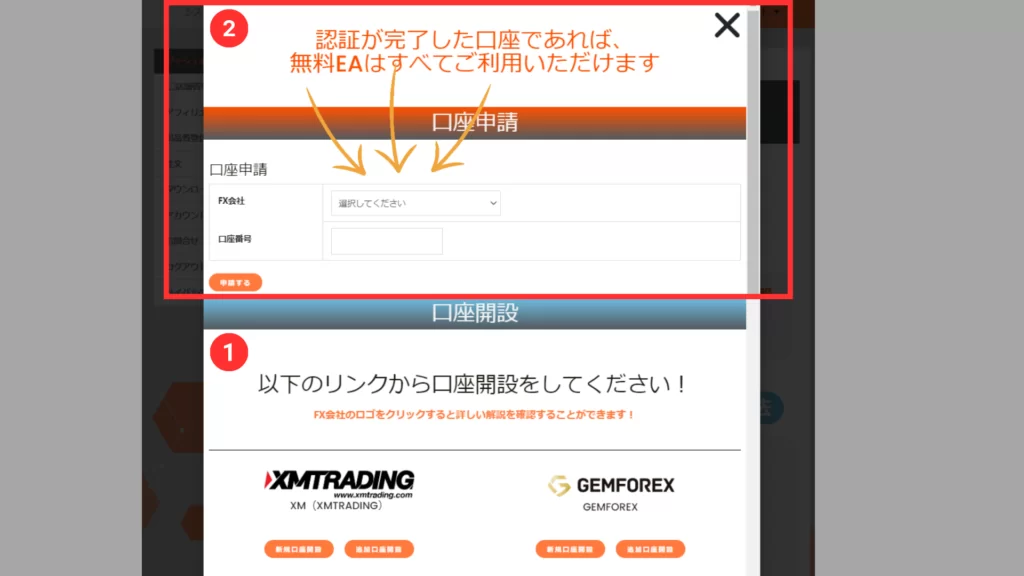
Once verification is complete, all EAs can be used for free!
How to Use SYSTEMTRADE.COM EAs [From Download to Setup]
Free Version
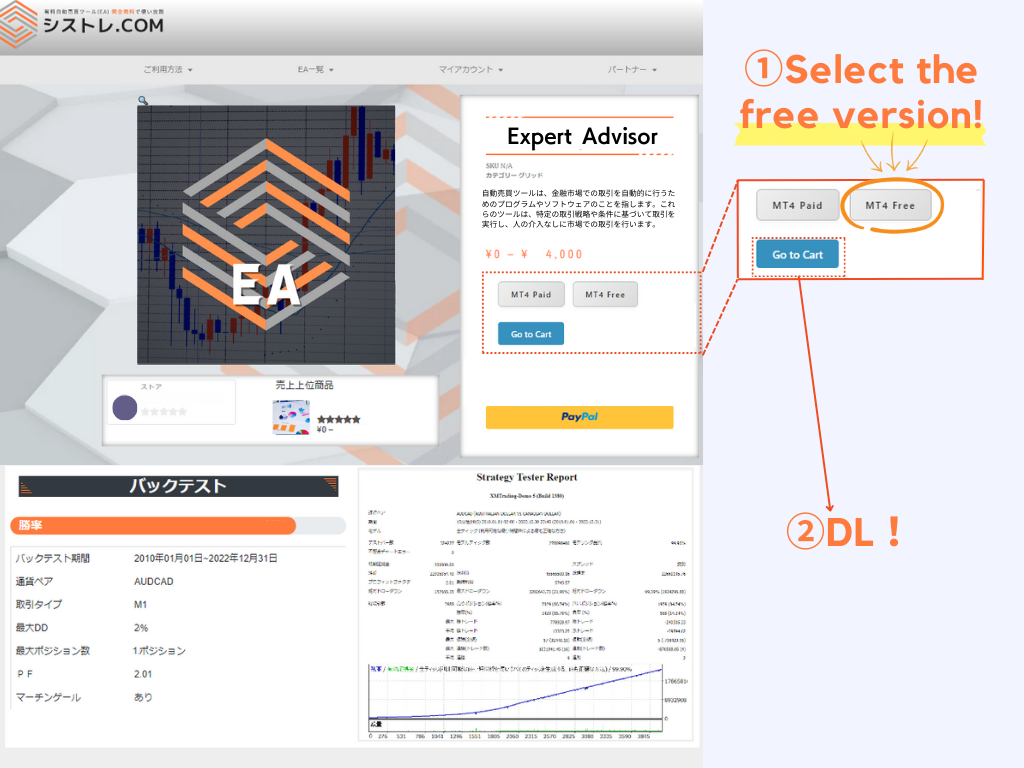
Account application is required from My Page. Multiple account registrations are possible.
Premium Version
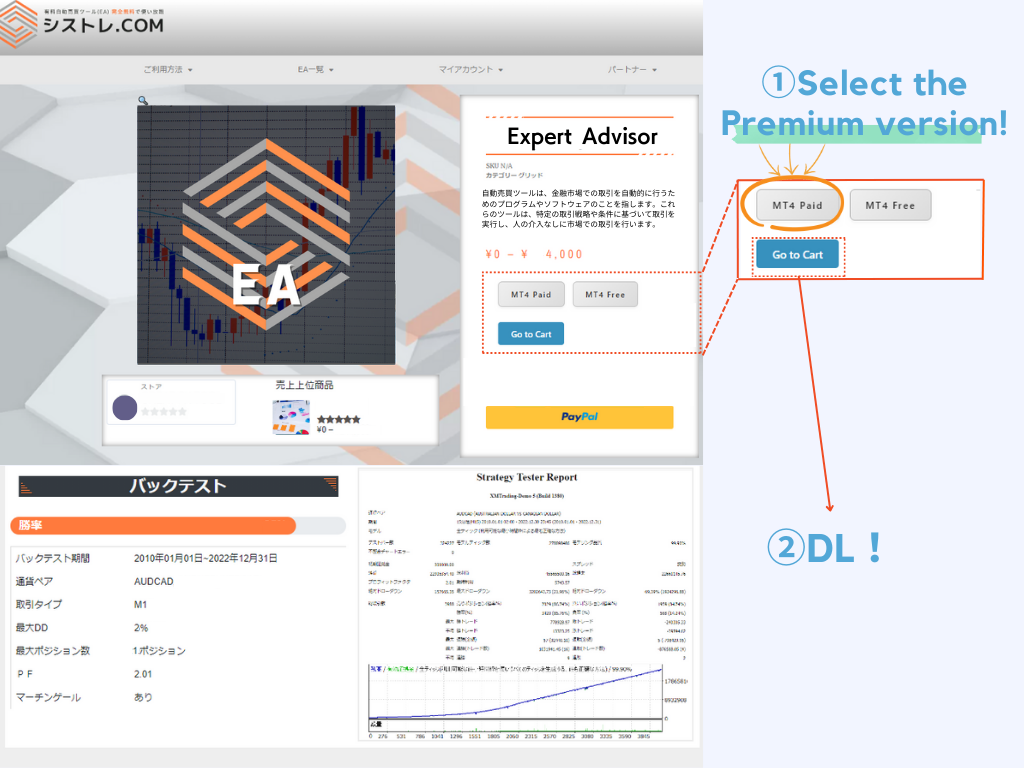
Purchase/use is possible without membership registration. Account changes can be applied from My Page.
Click here for the EA list page
Please download MT4/MT5 from your opened FX company.
- MT4
- MT5
-1.webp)










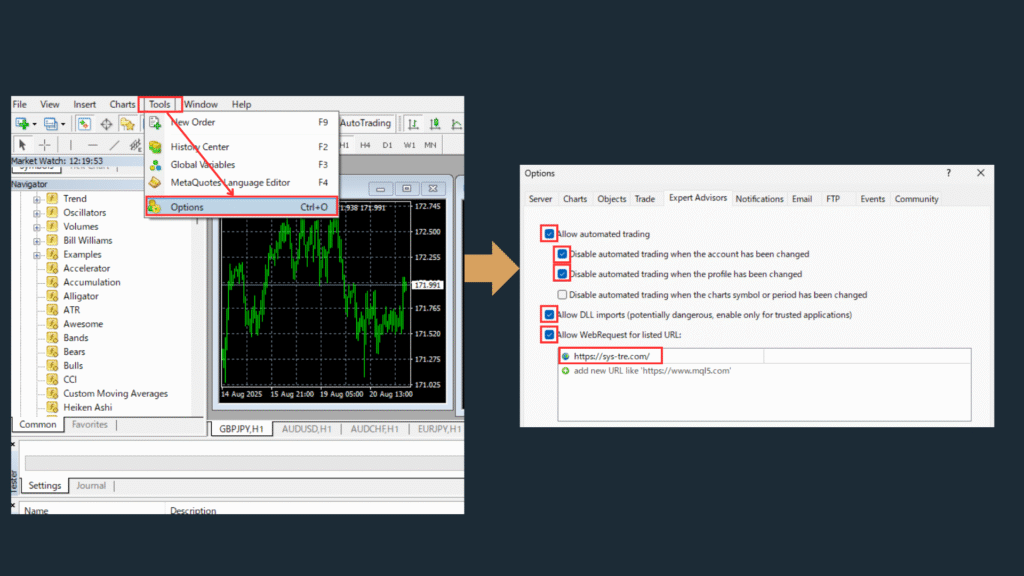
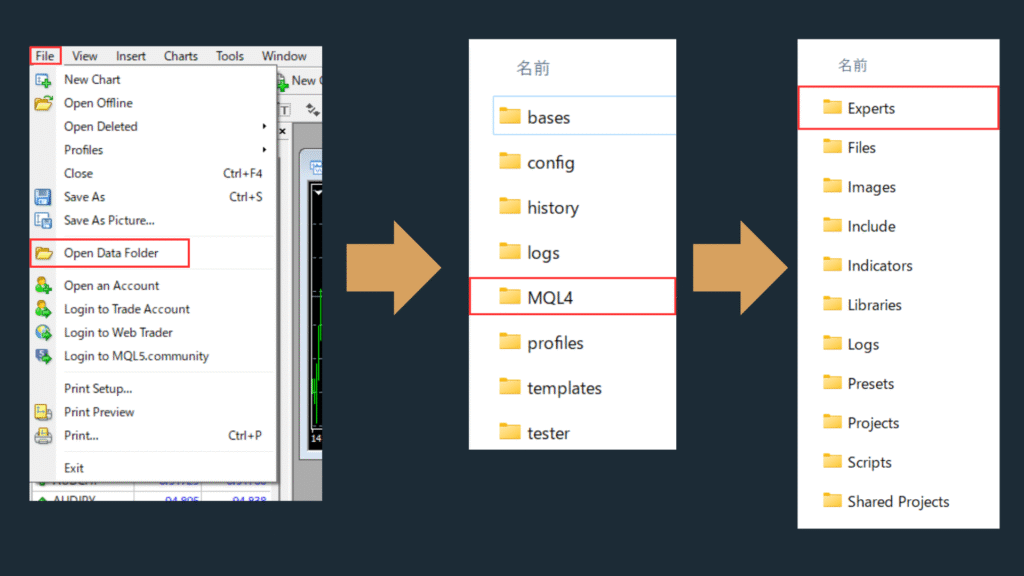
①EAをMT4/MT5内に移動
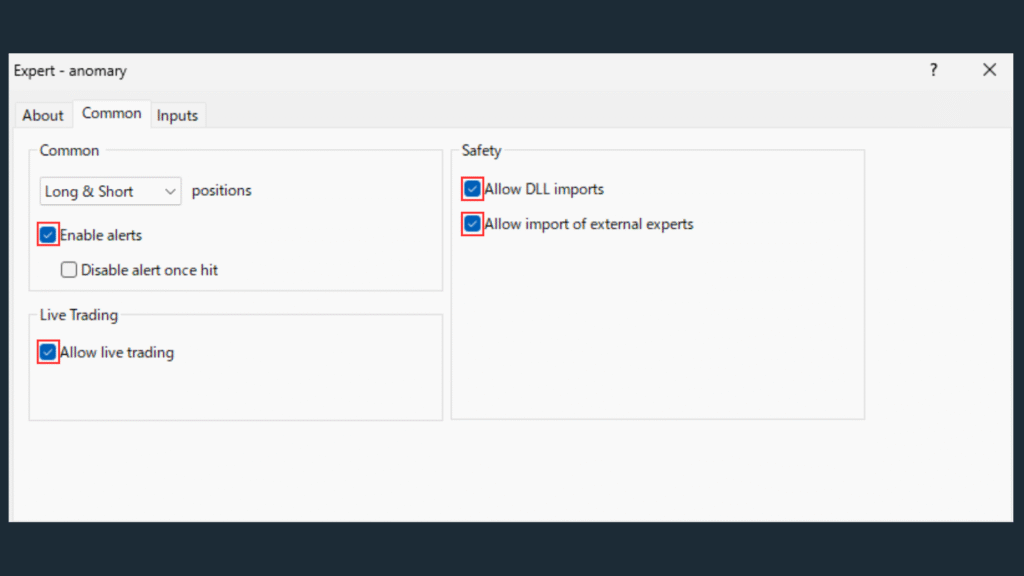
②EAのパラメータを設定
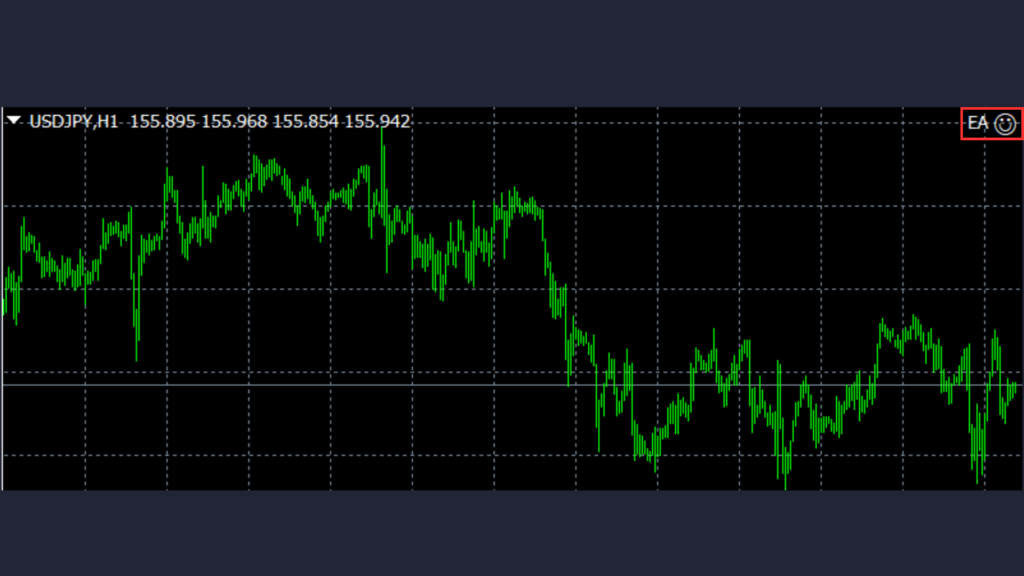
③正常な稼働を確認します。
- ① Move EA into MT4/MT5
- ② Set EA parameters
- ③ Confirm normal operation
Summary
SYSTEMTRADE.COM offers free MT4/MT5 EA downloads with verified backtesting data. Use the EA Rankings to compare performance, register for free, and install your EA following the setup steps in this guide. Multiple EAs can run simultaneously, and the platform supports most major brokers. If an EA underperforms, review the backtesting conditions and switch to demo mode before adjusting settings.
Frequently Asked Questions about SYSTEMTRADE.COM
What is SYSTEMTRADE.COM?
SYSTEMTRADE.COM is a free EA (Expert Advisor) distribution platform for MT4 and MT5. It provides verified backtesting data, performance rankings, and download links for automated trading systems. Traders can compare EA performance before downloading and use them on any supported broker.
How do I start using EAs on SYSTEMTRADE.COM?
Register for a free account, browse the EA Rankings to find an EA matching your strategy, download the EA file, and install it in MT4/MT5 following the setup instructions. Always test on a demo account first before running on a live account.
Are the EAs on SYSTEMTRADE.COM really free?
Yes. All EAs listed on SYSTEMTRADE.COM are free to download and use. There are no hidden fees or subscriptions. The platform is funded through broker affiliate partnerships, so EAs remain free for individual traders.
What brokers are supported?
Most major FX brokers that provide MT4 or MT5 platforms are supported. The specific broker compatibility varies by EA. Check the detail page for each EA to find recommended brokers. Brokers with low spreads and fast execution are generally preferred for automated trading.
Can I use multiple EAs simultaneously?
Yes. MT4 and MT5 allow multiple EAs to run on different currency pairs and timeframes at the same time. Running too many EAs simultaneously may increase drawdown risk, so it is recommended to manage overall exposure and set appropriate lot sizes for each EA.
What should I do if an EA stops performing as expected?
First check if the EA is still enabled and that automated trading is active in MT4/MT5. Review the Experts log for error messages. If the EA was profitable in backtesting but not in live trading, compare the live spread and execution conditions with the backtesting parameters. Switching to demo mode temporarily can help isolate the issue.





⚠ リスクに関する注意事項
本記事は情報提供を目的としており、特定の金融商品の売買を推奨するものではありません。FX取引はレバレッジ取引の特性上、預託した証拠金以上の損失が生じる可能性があります。取引の際は、ご自身の判断と責任において行ってください。詳しくは特定商取引法に基づく表記をご確認ください。





この記事を書いた人

関連記事
-
 FXアフィリエイトで月10万円稼ぐ!初期報酬+継続収入を実現する完全ガイド
 -
【2024年7月版】マーチンEAランキング1位!IMPACT
-
【2024年9月版】デイトレEAランキング1位!K_Kewl_USDJPY_SC
-
【2024年7月版】グリッドEAランキング1位!X-Pert
-
【2024年7月版】ヘッジEAランキング1位!Massive Engine EA
-
【2024年7月版】朝スキャEAランキング1位!Sunrise_scalper_pro
-
【2024年7月版】スイングEAランキング1位!Kotukotu-EX
-
【2024年8月版】アノマリーEAランキング1位!QuinTrade 510