
Mode d'emploi

💫
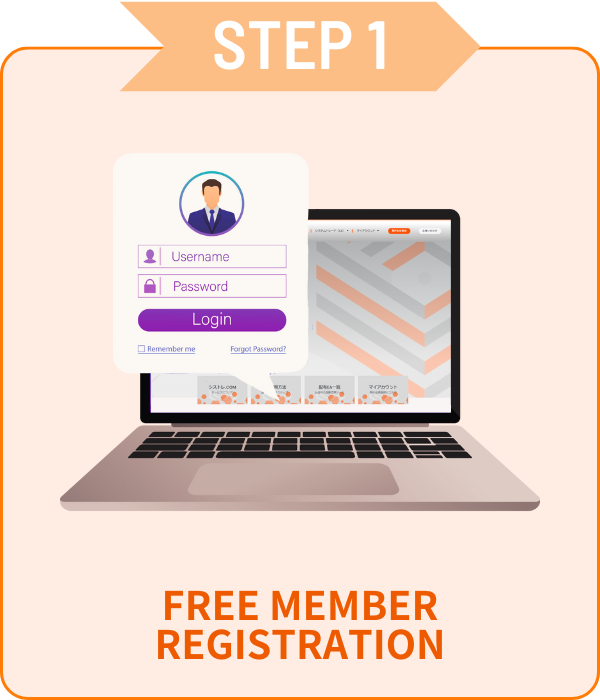
Version gratuite en seulement3etapes simples!
Acces illimite aux EA premium gratuitement!

Inscription

 Seulement email et mot de passe!

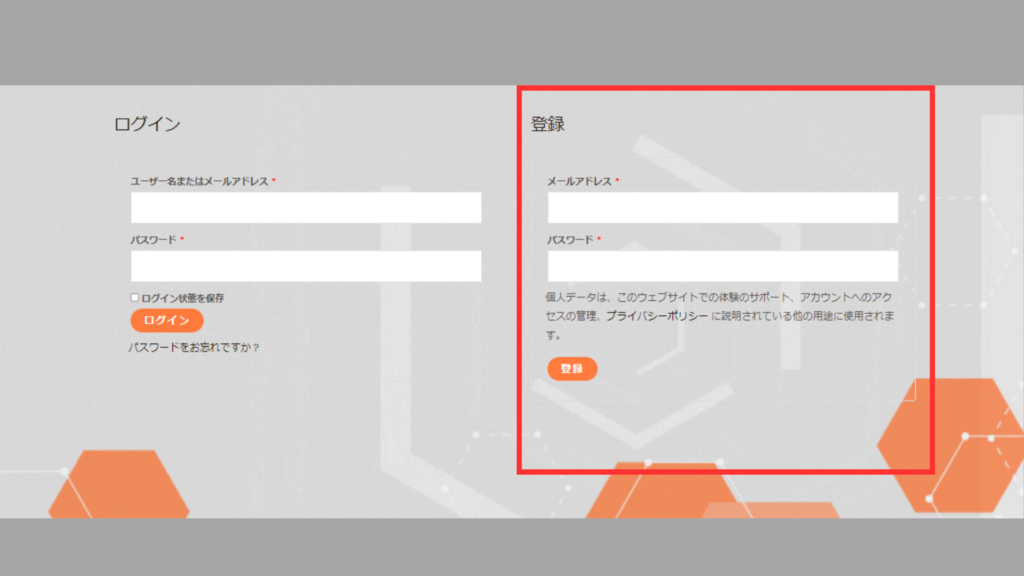
01Formulaire de demande de compte

 Allez dans Mon compte, entrez les informations dans le cadre rouge,<br>puis cliquez sur [Inscription].

02Vérification du compte

シストレ.COM

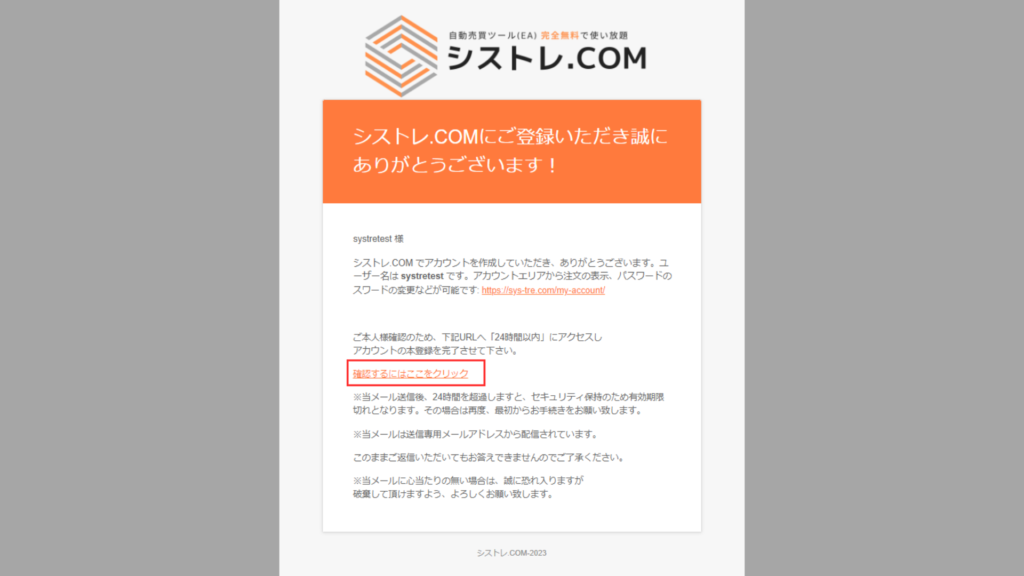
Un e-mail de confirmation sera envoyé à votre adresse e-mail enregistrée.Veuillez cliquer sur "Cliquez ici" dans l'e-mail pour vérifier. 

Ouvrir un compte

 Choisissez votre courtier préféré et ouvrez un compte !


 Les EA gratuits ne sont disponibles que pour les comptes ouverts via nos liens.Les versions payantes n.ont pas de restrictions de compte.

available_axiory
available_axiory
TITANのロゴ
利用可能口座_TITAN
利用可能口座_Exness

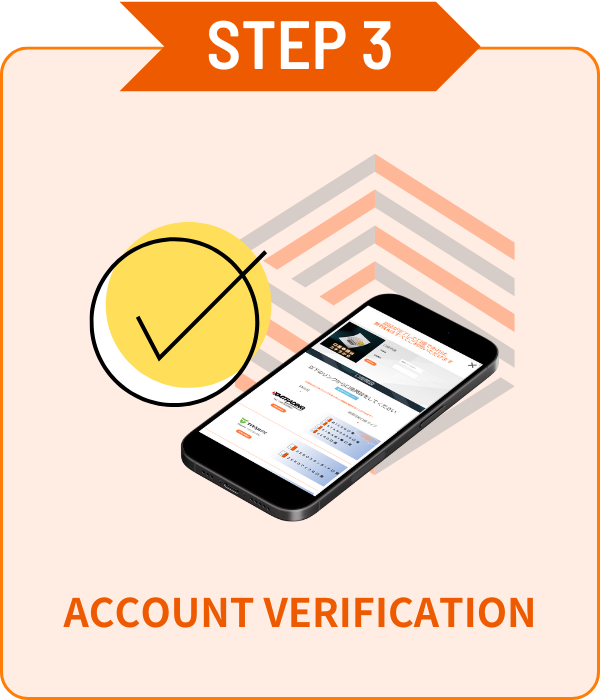
Vérification du compte

 Vérification de compte facile sur la page Mon compte !

01Formulaire de demande de compte

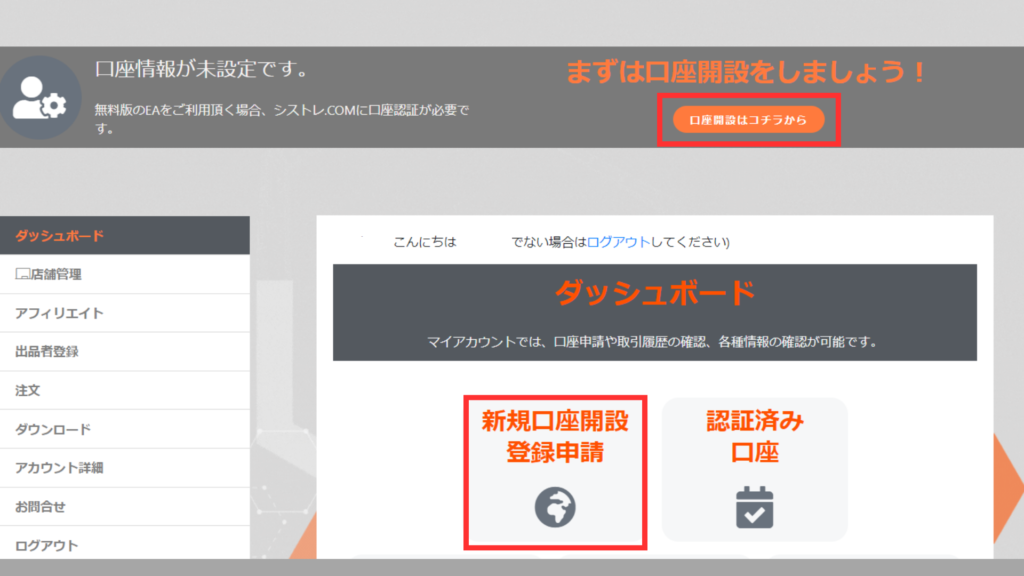
 Cliquez sur [Nouvelle inscription] depuis le tableau de bord [Mon compte].

02Vérification du compte

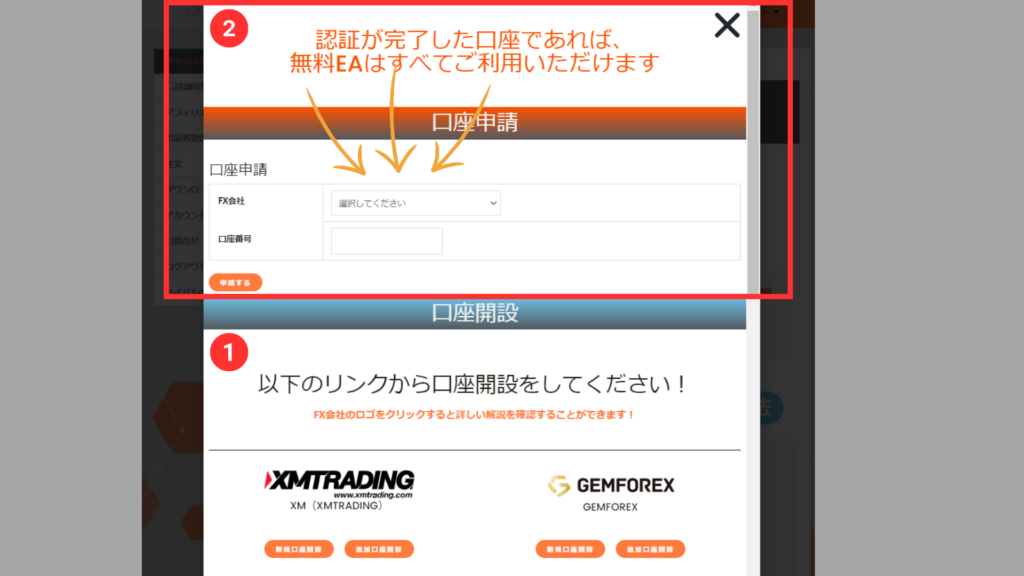
 Sélectionnez le courtier dans le menu, entrez votre numéro de compte et cliquez sur Appliquer.

*La vérification du compte peut prendre quelques jours.
*Si vous avez un compte ouvert en dehors de notre site, veuillez ouvrir un compte supplémentaire depuis STEP2.


ALL FREE!

Avec un compte vérifié,
tous les EA sont gratuits !

Comment télécharger les produits

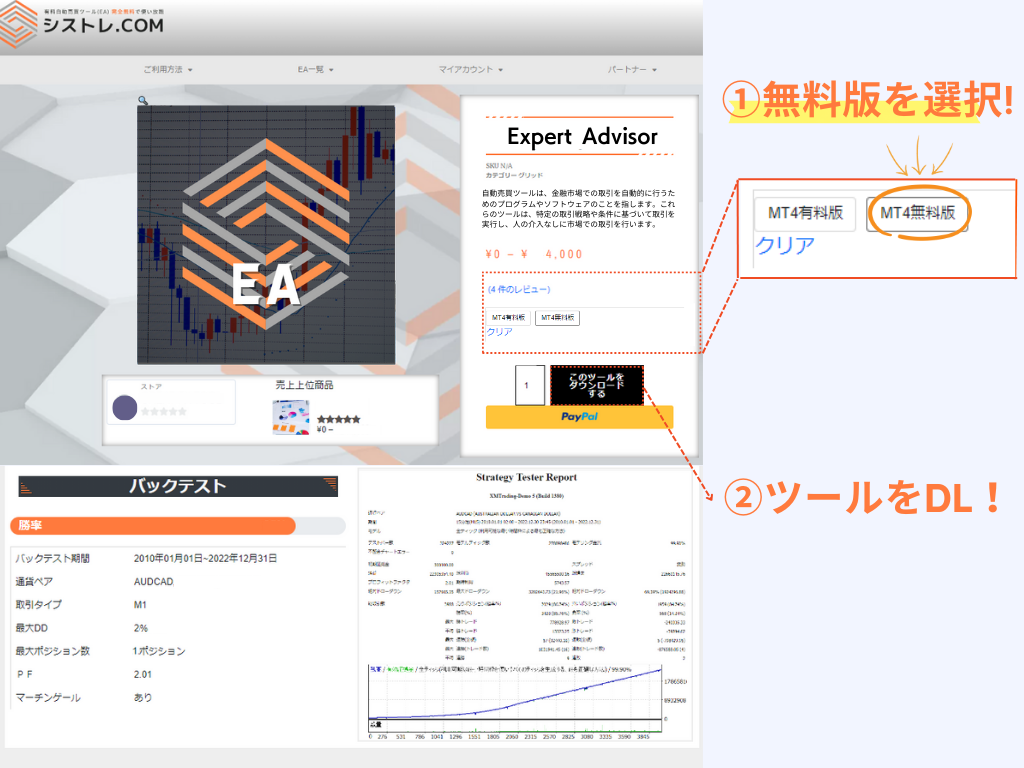
Version gratuite
Version gratuite

Demande de compte requise depuis Ma Page.
Plusieurs comptes peuvent être enregistrés.

*Seuls les comptes ouverts via nos liens sont éligibles.

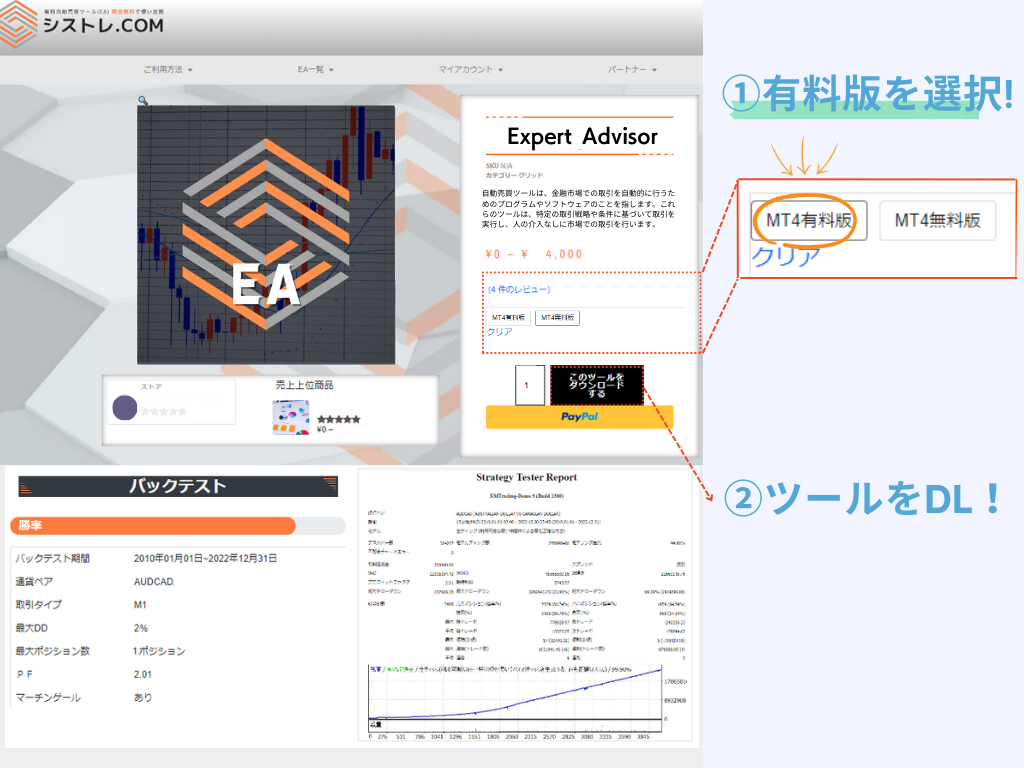
Version payante
Version payante

Achetez et utilisez sans inscription.
Les changements de compte peuvent être demandés depuis Ma Page.
*Le compte peut être changé une fois par semaine.

Différence entre version payante et gratuite

La différence entre les versions payante et gratuite est la restriction de compte.
Les deux versions ont les mêmes performances et logique.

Version Gratuite
0€

Compte ouvert via notre service

Acces illimite avec compte verifie
  • Compatible MetaTrader4/5
  • EA Illimites
  • Comptes Illimites
  • Re-telechargement Disponible
  • Fonction Backtest
  • Pas de Compte Demo
  • Restriction de Compte
Utilisez avec votre compte prefere
  • Compatible MetaTrader4/5
  • Pas de Restriction Broker
  • Changement de Compte Disponible
  • Re-telechargement Disponible
  • Fonction Backtest
  • Compte Demo OK

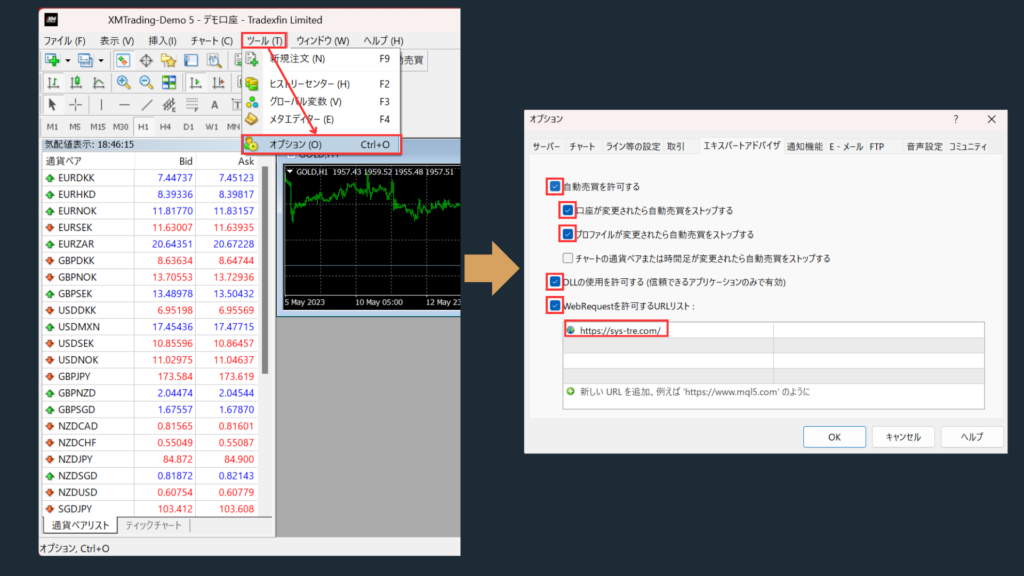
Paramètres EA

Autoriser WebRequest

  • Veuillez ajouter https://sys-tre.com/ a la liste des URL autorisees WebRequest.

Cochez "Autoriser le trading automatique".

 Cochez "Autoriser les imports DLL (applications de confiance uniquement)".

 ↓Copiez ce qui suit dans la liste URL!↓

				
					https://sys-tre.com/


Meta Trader

Les EA telecharges peuvent commencer le trading automatique en les configurant sur la plateforme de trading!

MT4 EA設定方法
MT4 EA設定方法

Questions fréquentes

It’s a website where you can use FX tools and automated trading tools developed by Japanese engineers completely free of charge!

For more details, click here! ▼
What is SYSTEMTRADE.com?

We offer high-performance EAs that have passed strict screening and are currently being forward-tested! At SYSTEMTRADE.com, you’ll find a wide variety of tools, including commercially available paid EAs and independently developed ones, tailored to different trading styles and currency pairs. 👉 Browse All EAs Here

Because SYSTEMTRADE.com receives compensation from partner FX brokers.

When you use a free EA, you’re required to open an account with a designated FX broker. As you trade, the broker pays a commission to the EA provider based on your trading volume. This system allows you to access high-quality tools without any direct cost.

The key difference is whether or not the account is tied to a specific broker. With the Free version, you can use our tools by opening an account with one of the FX brokers specified by SYSTEMTRADE.com and verifying it via your My Account page. Once verified, you’ll have full access for that account. The Premium version allows you to use the tools with any broker or account type of your choice, as specified at the time of purchase. ※ No membership registration is required to purchase the Premium version.
There is no difference in the performance or logic of the EA itself. The only difference between the Free and Premium versions is whether the EA is restricted to a specific broker account. Both versions provide access to the same EA with identical functionality.
There is no limit to the number of EAs you can use. As long as your account is verified, you can use as many Free EAs as you like—no restrictions. Click here to view the full list of available EAs.
You can switch the account linked to your Premium version up to once per week. If you wish to do so, please contact us.
We use it solely for managing product sales operations. Your information will never be made public on the site or shared with any third parties. Your personal details will also not be disclosed to the stores or sellers offering the products.

Data is updated on the site in real time whenever the EA makes a trade.

Check out the Popular EA Rankings here.

Please contact the vendor’s store directly.

You can reach out to each vendor store via: Menu > Vendor Store > Contact Us.
After sending your inquiry, you can communicate with the store in a chat format from My Account > Inquiries.

List of Vendor Stores

There is no limit to the number of accounts you can register.
As long as the accounts were opened through SYSTEMTRADE.com, you can register an unlimited number of them.
Once an account is approved, you can use the free version of the EA without any restrictions.

Please check your MT4 settings.

Please review STEP 5 in the following link: “Setting up the Expert Advisor.”
Go to [Tools] → [Options] → and add https://sys-tre.com/ to the list of allowed URLs under WebRequest.

If this does not resolve the issue, kindly contact our customer support team for assistance.

About MT4 setup instructions

We recommend using the paid version.

The free version can only be used with accounts created on SYSTEMTRADE.com.
If you already have an existing account, the EAs purchased with the paid version will be available for use.

We recommend using the paid version The free version is only available for accounts created through SYSTEMTRADE.com. If you already have an existing account, EAs purchased with the paid version can be used on it.

If you already have an account, please open an additional account.

For detailed instructions on how to open an account with each FX broker, please refer to the list of brokers below:

List of Partner Brokers

You can switch your account from My Account > Switch Paid Plan Account. Please note that account switches are limited to once per week.

 Le trading FX offre des opportunités de profit mais peut entraîner des pertes inférieures à votre investissement initial.

 Les performances passées des EA sont données à titre indicatif et ne garantissent pas les résultats futurs.

SYSTEMTRADE.COM

 Pour toute question sur les services SYSTEMTRADE.COM, veuillez nous contacter depuis cette page.

Nous vous contacterons généralement à votre adresse e-mail enregistrée dans quelques jours.

Nous contacter

    We will reply to the email address you entered within a few business days.

    Shopping Cart
    Scroll to Top