
Как пользоваться

💫
Бесплатная версия всего за3простых шага!
Неограниченный доступ к премиум EA бесплатно!

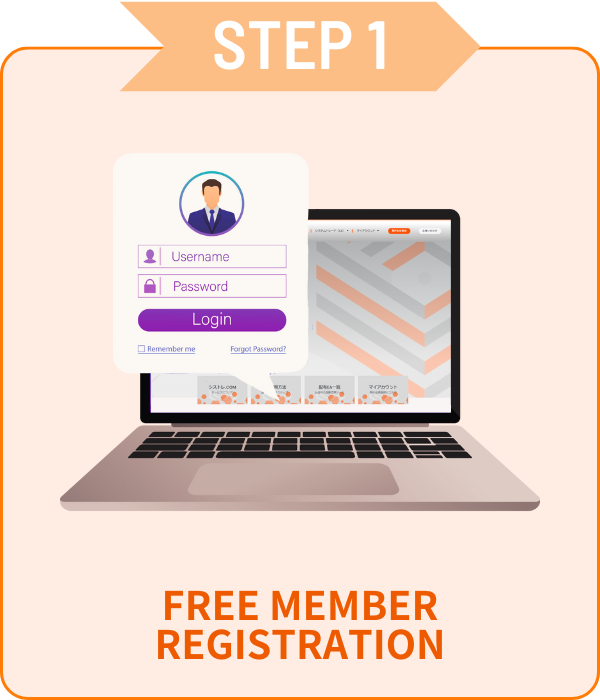
Регистрация

 Только email и пароль!

01Форма заявки на счёт

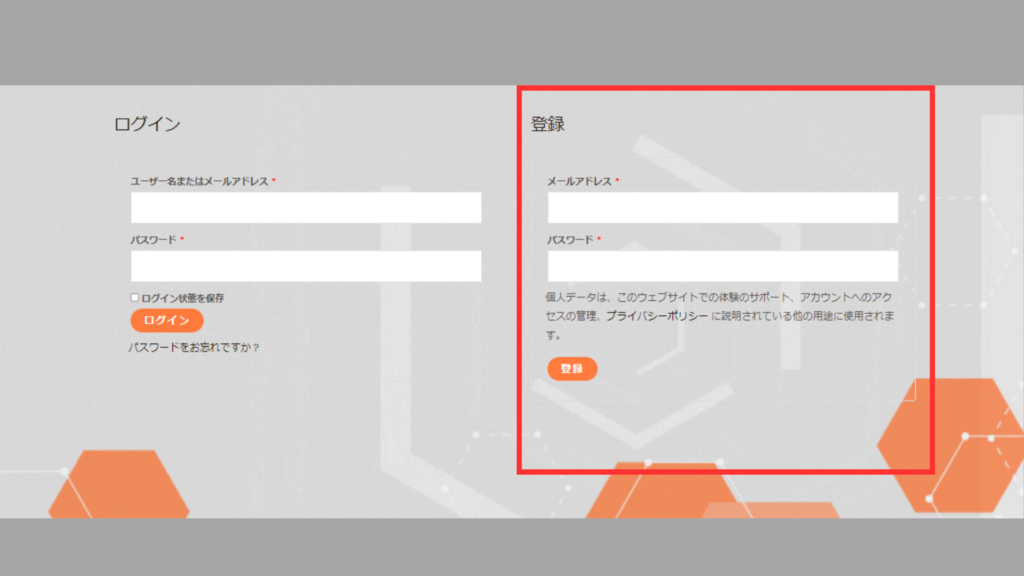
 Перейдите в Мой аккаунт, введите данные в красной рамке<br>и нажмите [Регистрация].

02Верификация счёта

シストレ.COM

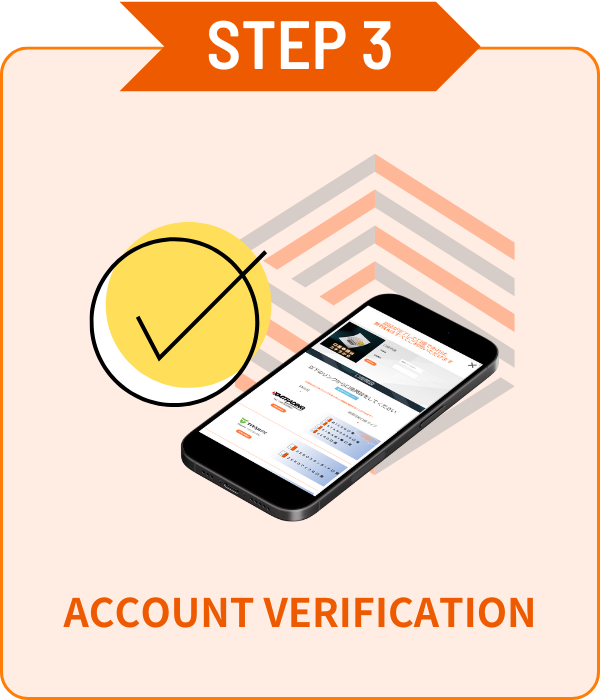
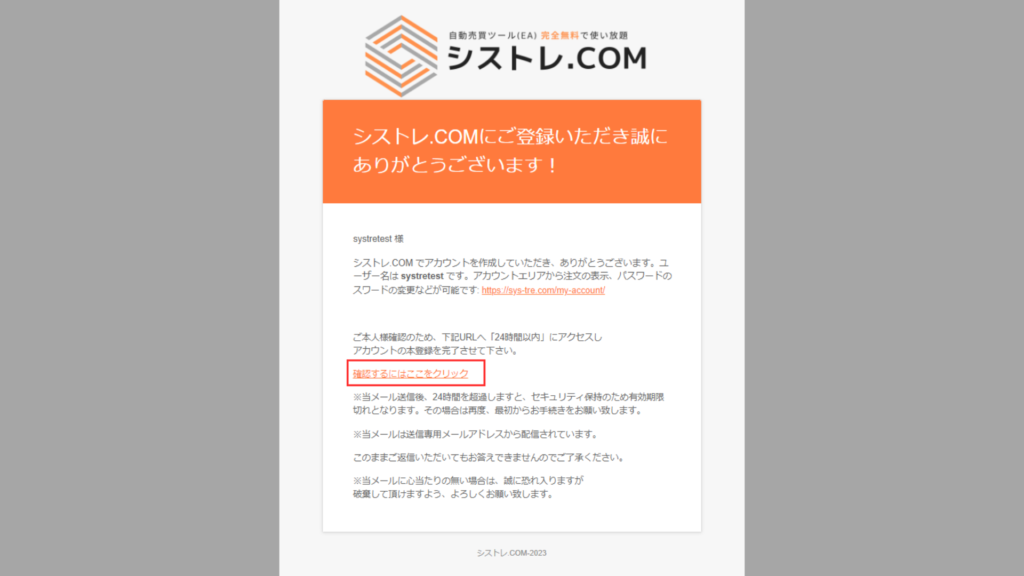
Письмо с подтверждением будет отправлено на ваш зарегистрированный адрес электронной почты.Пожалуйста, нажмите "Нажмите здесь" в письме для подтверждения. 

Открыть счёт

 Выберите любимого брокера и откройте счёт!


 Бесплатные EA доступны только для счетов, открытых по нашим ссылкам.Платные версии не имеют ограничений по счетам.

available_axiory
available_axiory
TITANのロゴ
利用可能口座_TITAN
利用可能口座_Exness

Верификация счёта

 Простая верификация счёта на странице Мой аккаунт!

01Форма заявки на счёт

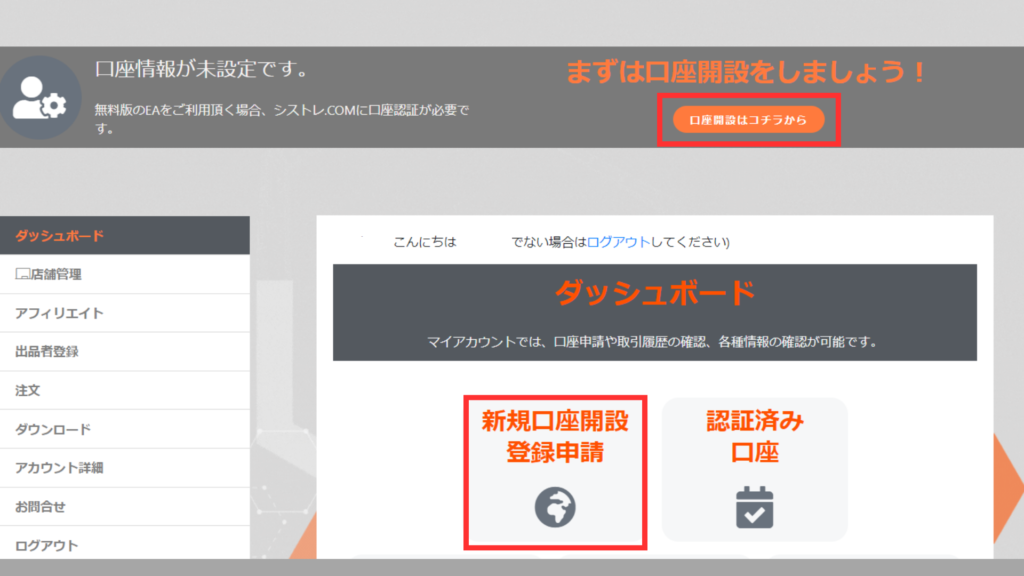
 Нажмите [Регистрация нового счёта] в панели [Мой аккаунт].

02Верификация счёта

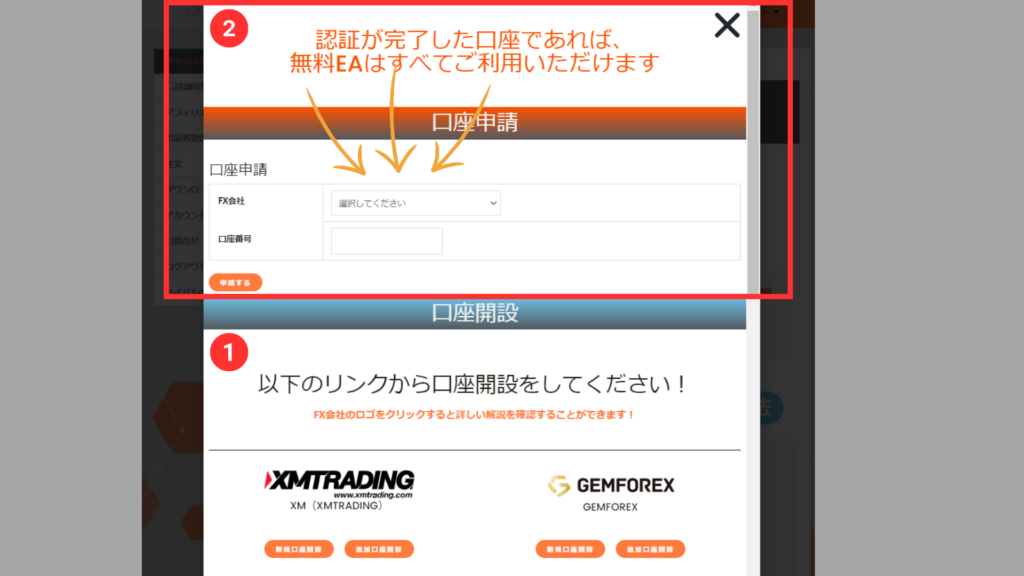
 Выберите брокера из списка, введите номер счёта и нажмите кнопку подачи заявки.

*Верификация счёта может занять несколько дней.
*Если у вас есть счёт, открытый вне нашего сайта, откройте дополнительный счёт с ШАГ2.


ALL FREE!

С верифицированным счётом
все EA бесплатны!

Как скачать продукты

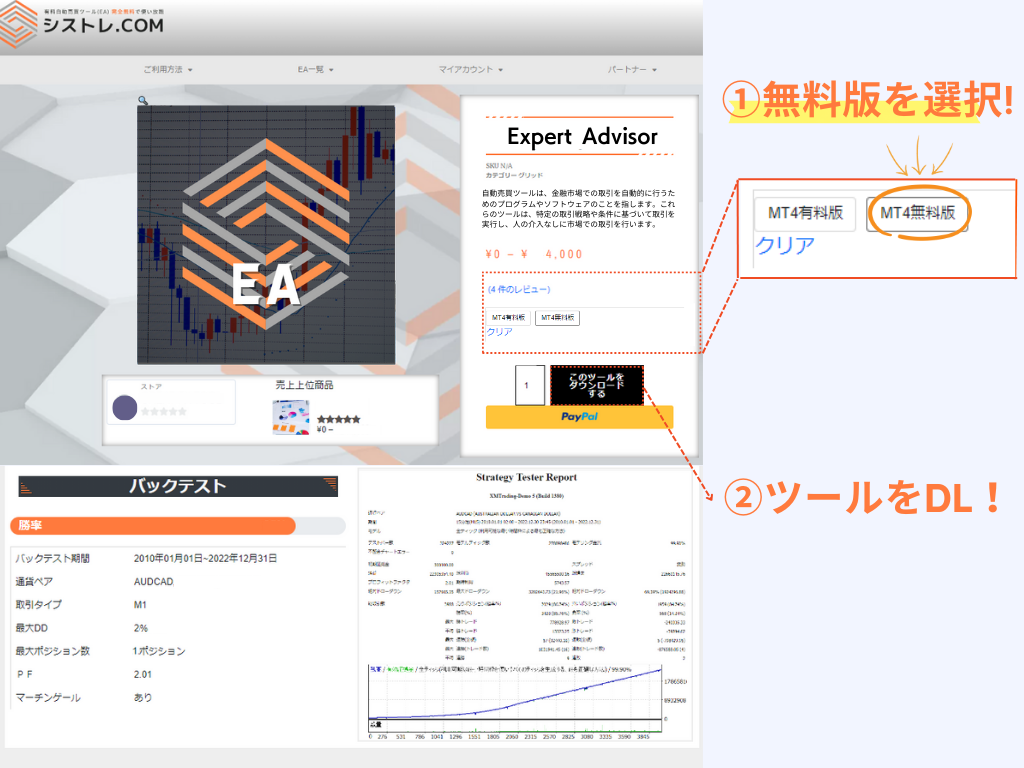
Бесплатная версия
Бесплатная версия

Требуется заявка на счёт из Моей страницы.
Можно зарегистрировать несколько счетов.

*Только счета, открытые по нашим ссылкам.

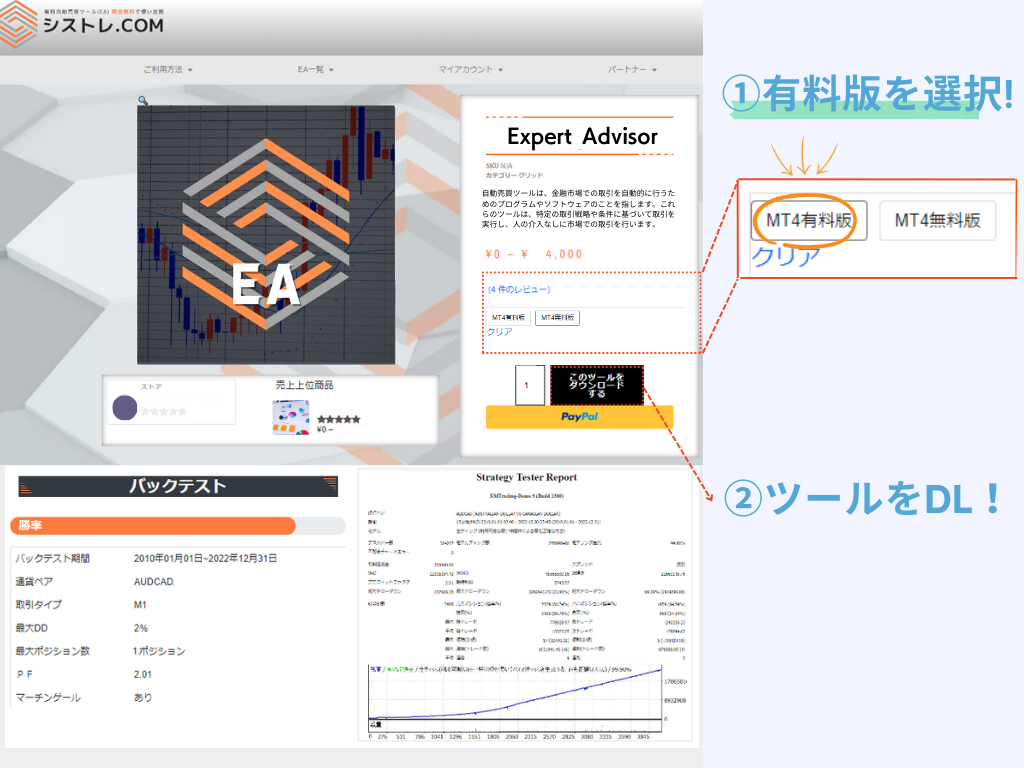
Платная версия
Платная версия

Покупка и использование без регистрации.
Изменение счёта можно запросить из Моей страницы.
*Счёт можно менять раз в неделю.

Разница между платной и бесплатной версией

Разница между платной и бесплатной версией — ограничение счёта.
Обе версии имеют одинаковую производительность и логику.

Бесплатная версия
₽0

Счёт, открытый через наш сервис

Неограниченный доступ с верифицированным счётом
  • Совместимость с MetaTrader4/5
  • Неограниченные EA
  • Неограниченные счета
  • Повторная загрузка доступна
  • Функция бэктеста
  • Нет демо-счёта
  • Ограничение счёта
Используйте с предпочитаемым счётом
  • Совместимость с MetaTrader4/5
  • Без ограничений брокера
  • Смена счёта доступна
  • Повторная загрузка доступна
  • Функция бэктеста
  • Демо-счёт OK

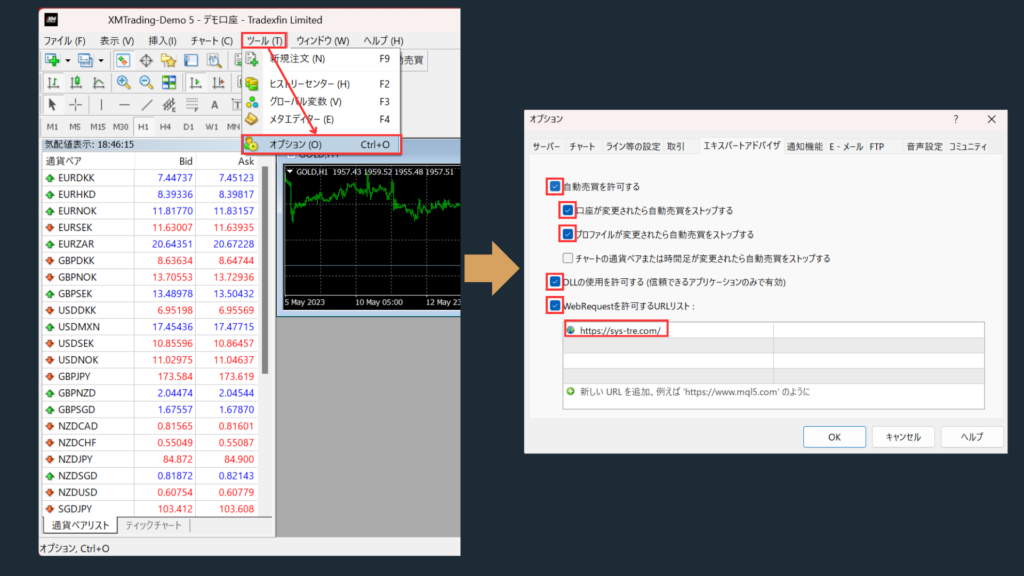
Настройки EA

Разрешить WebRequest

  • Пожалуйста, добавьте https://sys-tre.com/ в список разрешенных URL WebRequest.

Отметьте "Разрешить автоматическую торговлю".

 Отметьте "Разрешить импорт DLL (только для доверенных приложений)".

 ↓Скопируйте в список URL!↓

				
					https://sys-tre.com/


Meta Trader

Скачанные EA могут начать автоматическую торговлю после настройки на торговой платформе!

MT4 EA設定方法
MT4 EA設定方法

Часто задаваемые вопросы

It’s a website where you can use FX tools and automated trading tools developed by Japanese engineers completely free of charge!

For more details, click here! ▼
What is SYSTEMTRADE.com?

We offer high-performance EAs that have passed strict screening and are currently being forward-tested! At SYSTEMTRADE.com, you’ll find a wide variety of tools, including commercially available paid EAs and independently developed ones, tailored to different trading styles and currency pairs. 👉 Browse All EAs Here

Because SYSTEMTRADE.com receives compensation from partner FX brokers.

When you use a free EA, you’re required to open an account with a designated FX broker. As you trade, the broker pays a commission to the EA provider based on your trading volume. This system allows you to access high-quality tools without any direct cost.

The key difference is whether or not the account is tied to a specific broker. With the Free version, you can use our tools by opening an account with one of the FX brokers specified by SYSTEMTRADE.com and verifying it via your My Account page. Once verified, you’ll have full access for that account. The Premium version allows you to use the tools with any broker or account type of your choice, as specified at the time of purchase. ※ No membership registration is required to purchase the Premium version.
There is no difference in the performance or logic of the EA itself. The only difference between the Free and Premium versions is whether the EA is restricted to a specific broker account. Both versions provide access to the same EA with identical functionality.
There is no limit to the number of EAs you can use. As long as your account is verified, you can use as many Free EAs as you like—no restrictions. Click here to view the full list of available EAs.
You can switch the account linked to your Premium version up to once per week. If you wish to do so, please contact us.
We use it solely for managing product sales operations. Your information will never be made public on the site or shared with any third parties. Your personal details will also not be disclosed to the stores or sellers offering the products.

Data is updated on the site in real time whenever the EA makes a trade.

Check out the Popular EA Rankings here.

Please contact the vendor’s store directly.

You can reach out to each vendor store via: Menu > Vendor Store > Contact Us.
After sending your inquiry, you can communicate with the store in a chat format from My Account > Inquiries.

List of Vendor Stores

There is no limit to the number of accounts you can register.
As long as the accounts were opened through SYSTEMTRADE.com, you can register an unlimited number of them.
Once an account is approved, you can use the free version of the EA without any restrictions.

Please check your MT4 settings.

Please review STEP 5 in the following link: “Setting up the Expert Advisor.”
Go to [Tools] → [Options] → and add https://sys-tre.com/ to the list of allowed URLs under WebRequest.

If this does not resolve the issue, kindly contact our customer support team for assistance.

About MT4 setup instructions

We recommend using the paid version.

The free version can only be used with accounts created on SYSTEMTRADE.com.
If you already have an existing account, the EAs purchased with the paid version will be available for use.

We recommend using the paid version The free version is only available for accounts created through SYSTEMTRADE.com. If you already have an existing account, EAs purchased with the paid version can be used on it.

If you already have an account, please open an additional account.

For detailed instructions on how to open an account with each FX broker, please refer to the list of brokers below:

List of Partner Brokers

You can switch your account from My Account > Switch Paid Plan Account. Please note that account switches are limited to once per week.

 Торговля FX предлагает возможности для прибыли, но также может привести к убыткам ниже начальных инвестиций.

 Прошлые результаты EA предоставлены только для справки и не гарантируют будущих результатов.

SYSTEMTRADE.COM

 По вопросам о услугах SYSTEMTRADE.COM свяжитесь с нами через эту страницу.

Обычно мы свяжемся с вами по зарегистрированной электронной почте в течение нескольких дней.

Связаться с нами

    We will reply to the email address you entered within a few business days.

    Shopping Cart
    Scroll to Top