


TopScaner
Store
Release date 2025-02-09
Automated Trading EA Strategy Tag
59
Store
Listed Products

TopScaner

59

Aim for stable profits! Choose from three strategies to make your trading more efficient.

Currency Pair
AUDCAD
Trade Type
Grid
Timeframe
M1
Max Positions
50 Positions
Max Stop Loss
0
Hedge
No

¥39,000

? There is no difference in EA performance between the free and paid versions.
The free version requires a deposit into an eligible account opened through sys-tre.com, and verification of that account.
See How to Use for details.
✅ Added to cart!

Forward Test

Demo ForwardData Period: 2024-12-23 – 2026-08-18 / Last Closed Trade: 2026-08-18
4.7
B
Profitability84 / 100
Stability83 / 100
Reliability58 / 100
Total Profit
44 353
Max Drawdown
5219
PF
2.83
Win Rate
79.31%
Total Trades : 290
Max Positions : 50
Monthly Avg Trades : 14.1
Expected Value : 152.94
Recovery Factor : 8.50
Current Open Positions
Entry Time Type Symbol Lot Size Floating P/L
2026-08-27 SELL AUDCAD 0.01 511.00
2026-08-24 SELL AUDCAD 0.01 -64.00
2026-08-21 SELL AUDCAD 0.01 -637.00
2026-08-19 SELL AUDCAD 0.01 -1209.00
Trade History
Close Time Type Close Price Symbol Lot Size Profit/Loss

Buy vs Sell Trade Ratio

Buy vs Sell Profit/Loss

Entries by Time of Day

Performance Scorecard

P/L Calendar

TopScaner is a grid-trading type FX automated trading EA (Expert Advisor). It targets stable profits! Choose from three strategies to make your trading more efficient.

Trading Strategy

Grid trading is a trading method that involves placing positions at fixed price intervals to profit from market fluctuations. It has the advantage of being less dependent on predicting the direction of the trend.

Features of TopScanner

  • Automatically convert market fluctuations into profit opportunities.
  • Free automated trading system

sys-tre offers TopScanner for free. Simply install it on MT4 and you can immediately try automated trading.

Related Pages

Frequently Asked Questions

Can I use the EA right after purchase?
Yes. The EA file (.ex4/.ex5) becomes available for download from your account page immediately after payment completes.
Does it support MT4 or MT5?
Platform compatibility varies by product. Please check the "Supported Platform" field on each product page. Many EAs support both MT4 and MT5.
Can I try EAs on a demo account?
Most EAs do not support running on demo accounts. To help you decide before purchase, every EA's backtest results are shown in the "Backtest" tab and forward test performance in the "Performance" tab on each product page.
What is the recommended margin or lot size?
Recommended settings are listed for each EA in the "Product Details" section of its product page. Excessive lot sizing can cause catastrophic losses at maximum drawdown.
Can I change my licensed account?
After purchase, go to "Licensed Account Switch" on My Page and enter the MT4/MT5 account number you want to bind. The change applies immediately. You can change once per 24 hours.
Are refunds or returns available?
Due to the nature of digital products, we generally cannot refund or accept returns after the authentication code has been issued. However, if the EA itself has a critical defect that prevents operation and the fault lies with us, we will handle the case individually. Please contact us via the inquiry page.
Do backtest results match live performance?
Backtest results are theoretical values based on historical data, while forward tests reflect live environment performance. SYSTEMTRADE.COM publishes forward test data for every EA on its product page so you can verify live performance before purchase. Spread and execution delays typically cause some divergence between backtest and live results.
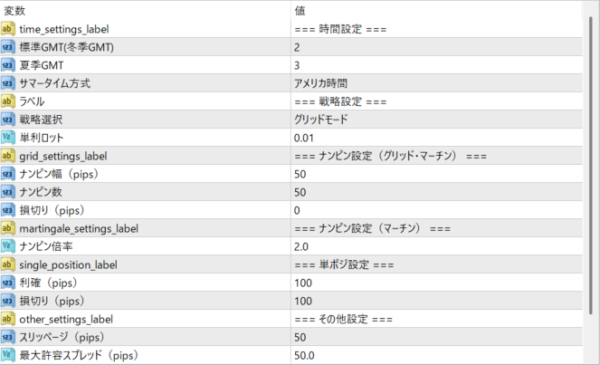
Parameters
Parameters
Trading Info

Recommended Fund: 500

Expected Monthly Return: 7%

This data is based on a 0.01 lot size. Actual performance may vary depending on your lot size.
Entry Condition
Single position mode: If you judge there is a high probability of profit, you enter a single position. Grid mode: By taking multiple positions simultaneously at specified intervals, you aim to make a profit while spreading out the risk. Martingale mode: If a loss occurs in each position, increase the lot size and enter the next one, ultimately making a profit.
Close Condition
TP (Take Profit): Closes the position when the set profit margin is reached. SL (Stop Loss): Closes the position when the set loss margin is reached to minimize losses.
Favorable Market
It is effective in markets where trends are unstable.
Unfavorable Market
Important economic indicators: Markets can become unstable during periods of high volatility such as when economic indicators are released. In such cases, trading should be avoided.

EA Backtest Analysis

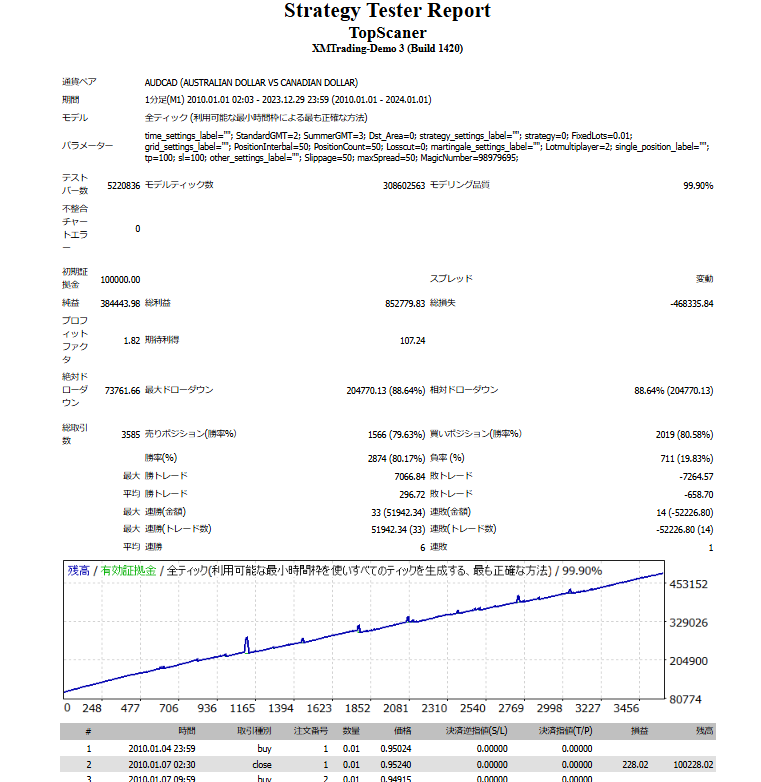
Win Rate80.00%
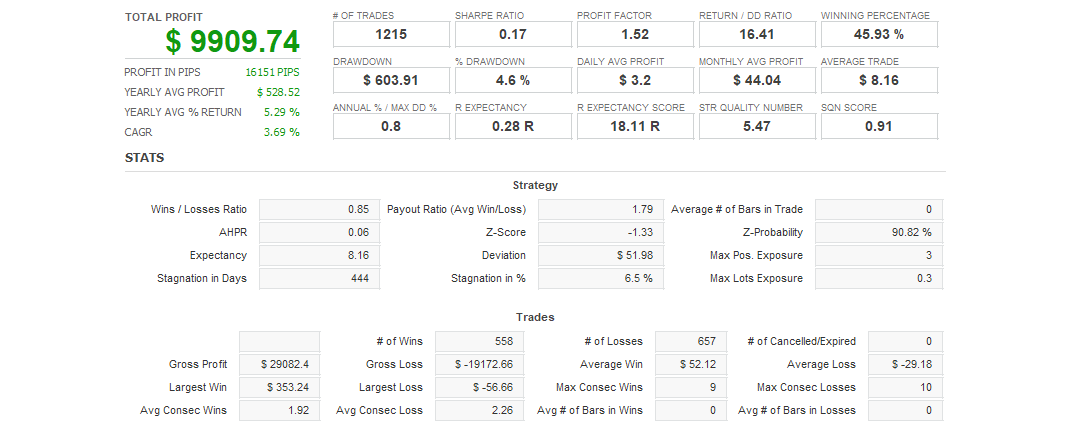
Quant Analyzer 1
Backtest
Quant Analyzer 2
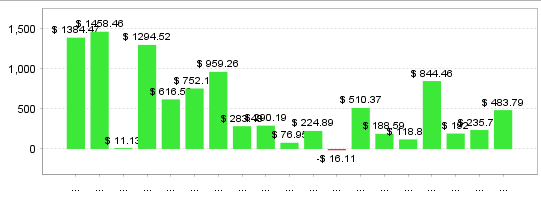
Yearly trade data
×

There are no reviews yet.

“TopScaner” Leave a review for


For product inquiries,
please contact the store.

* You can check the confirmation and reply after the inquiry from "Inquiries" in My Account.

Popular Products
Shopping Cart
ALL FREE

Want to use this EA
for free?

The same performance as the paid version, at zero cost.
Same performanceIdentical logic to the paid version
200+ EAsAll available for free
Results publishedForward test results are public
Done in 30 secondsSign up with just an email
Start for free
Already have an account? Log in
Scroll to Top