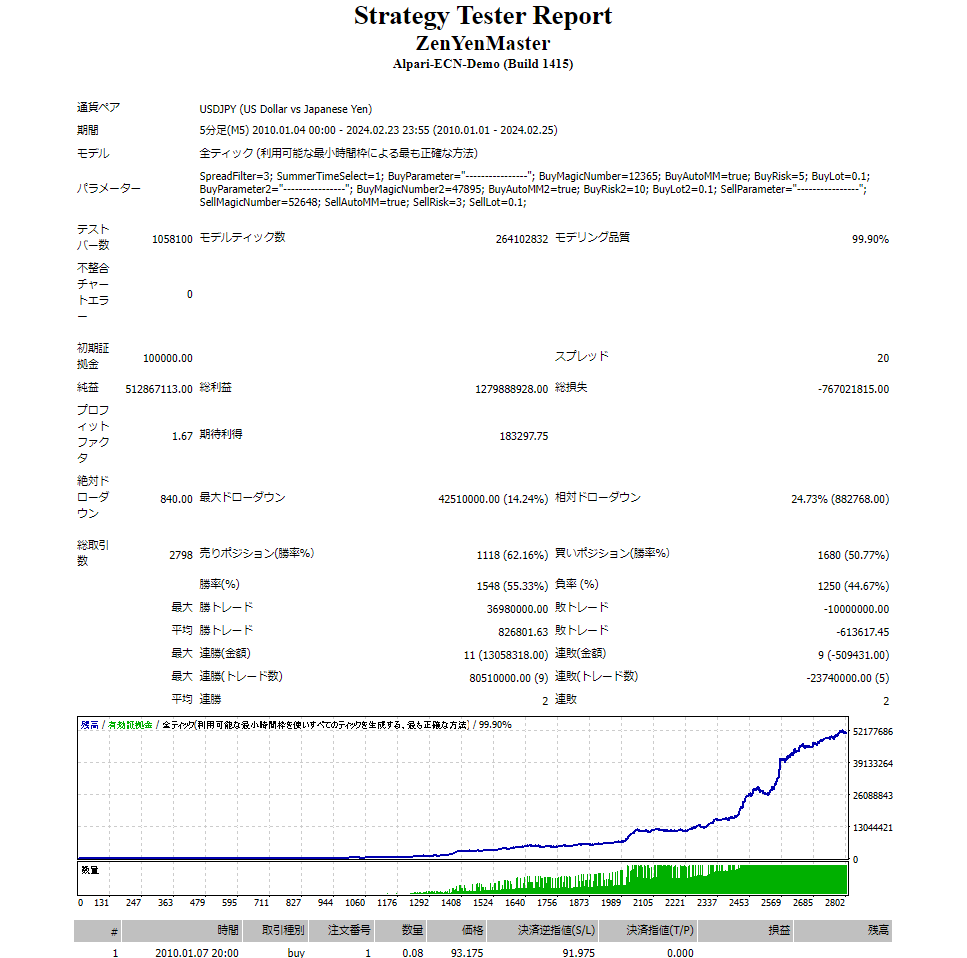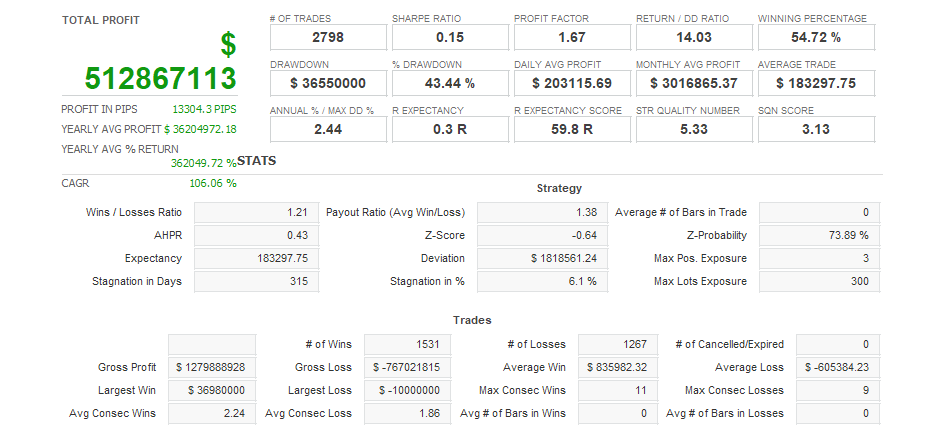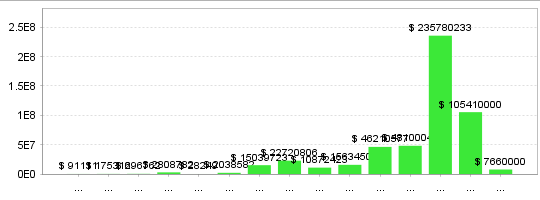



[EA Basic Information ] == … [The logic is two buying patterns and one selling pattern] ▼Buying pattern 1 ⇒ Trade mainly on the 10th to 25th, which are the best days among the Goto days. Trade on Goto days excluding the 5th and 30th. Hold one position at midnight and settle at 9:55. Stop loss is 120 pips. Maximum number of positions: 1 ▼Buying Pattern 2 ⇒ Trade with trend following before the London market opens. ・Enter if you judge the market to be rising 1 hour before the London market opens. ・Entry days are after the 10th and on Gotoh days. ・Trailing and mid-way settlement are available. ・Set SL 100 pips and TP 150 pips at the time of entry. ・Always settle at the London fix. ・Maximum number of positions: 1 ・Position holding time: Maximum of 9 hours ▼ Selling Pattern ① ⇒ Mid-price selling trade from around the middle of the month ・Enter if the most recent market price has risen at 9:55 Japan time ・Enter after the 15th ・Must be settled at 13:30 Japan time ・Trailing and mid-way settlement available ・SL 23 pips set at entry, no TP setting ・Maximum number of positions: 1 ・Position holding time: Maximum 3 hours 35 minutes [About capital amount]• Recommended capital amount: Any amount above the minimum amount is fine, but 100,000 yen or more is recommended.・Minimum capital amount: It is fine if you can enter with 0.01 lots, but you will need 30,000 yen or more. [Points to note] The stop loss range is narrower for selling, so be careful not to increase the risk of a short position too much. We recommend using a broker with a USD/JPY spread of 3 pips or less. [Parameter settings] – Spread Filter If the spread exceeds the entered value, an entry will not be made. • SummerTimeSelect Please select according to the GMT of the FX company you use. *Even though it is the same GMT2/3, there are two patterns for the switching period: US style and UK style GMT2/3 (US) GMT2/3 (UK) GMT0 • BuyMagicNumber: Magic number set for buy positions. The default setting is fine. Just make sure it does not overlap with any other EAs running in the same account. • BuyAutoMM (Buying position: Automatic lot adjustment) true ⇒ Automatically adjusts the lot. false ⇒ Enter at the value set in Lot. • BuyRisk (Buying position: Risk) When AutoMM is true, the lot of the buying position is automatically adjusted so that the percentage of the value set in this parameter becomes the loss cut amount. (Example) If the account balance is 100,000 yen and BuyRisk is set to 5, the lot of the buying position will be automatically adjusted so that the loss cut amount per position becomes 5% of 100,000 yen, or 5,000 yen. • BuyLot (buy position lot) If AutoMM is false, a buy entry will be made with the number of lots specified by this parameter. • SellMagicNumber (cell magic number) Magic number set for sell positions. The default setting is fine. Just make sure it does not overlap with any other EAs running in the same account. • SellAutoMM (Sell position: automatic lot adjustment) true ⇒ Lot adjustment is performed automatically. false ⇒ Enter at the value set in Lot. ・SellRisk (Sell position: risk) When AutoMM is true, the lot of the sell position is automatically adjusted so that the stop loss amount is a percentage of the value set in this parameter. (Example) If the account balance is 100,000 yen and SellRisk is set to 5, the lot of the sell position will be automatically adjusted so that the stop loss amount per position is 5% of 100,000 yen, or 5,000 yen. • SellLot (Sell position: lots) If AutoMM is false, a sell entry will be made in lots equal to the value of this parameter.
Total Profit
727