
Cómo usar

💫
Version gratuita en solo3pasos faciles!
Acceso ilimitado a EAs premium gratis!

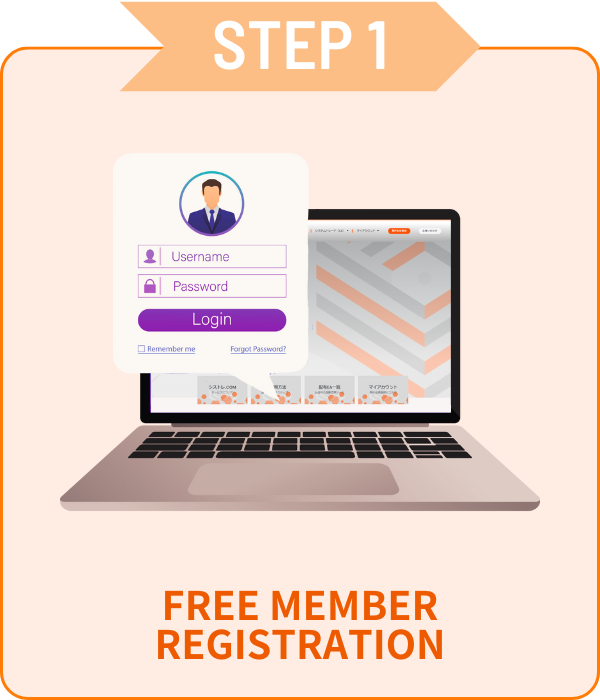
Registro

 ¡Solo email y contraseña!

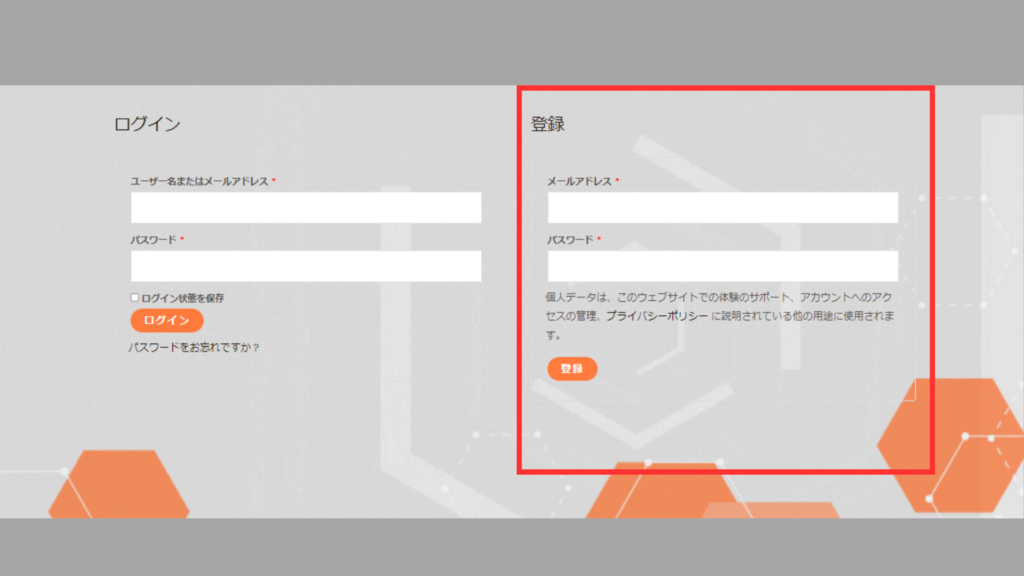
01Formulario de solicitud de cuenta

 Vaya a Mi cuenta, ingrese la información en el recuadro rojo<br>y haga clic en [Registrar].

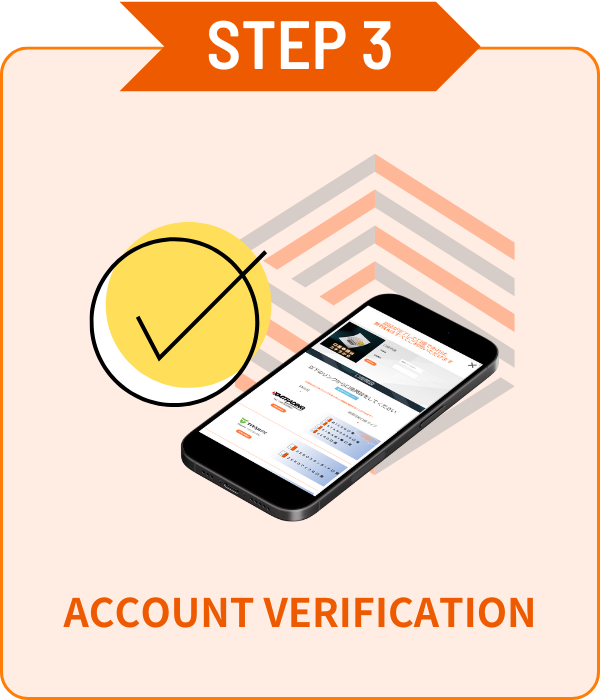
02Verificación de cuenta

シストレ.COM

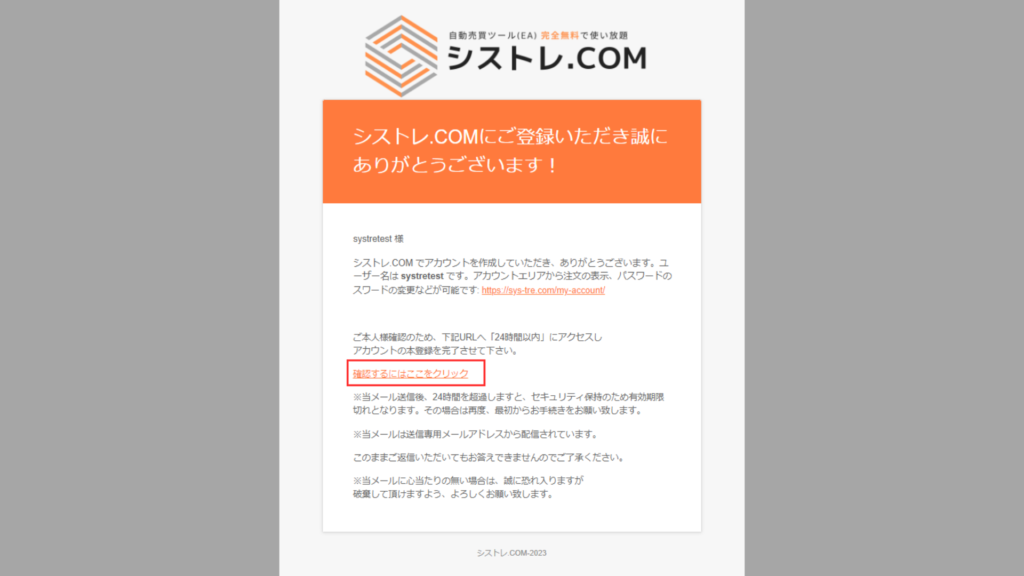
Se enviará un correo de confirmación a su dirección de correo registrada.Haga clic en "Haga clic aquí" en el correo para verificar. 

Abrir cuenta

 ¡Elija su broker favorito y abra una cuenta!


 Los EAs gratuitos solo están disponibles para cuentas abiertas a través de nuestros enlaces.Las versiones de pago no tienen restricciones de cuenta.

available_axiory
available_axiory
TITANのロゴ
利用可能口座_TITAN
利用可能口座_Exness

Verificación de cuenta

 ¡Verificación de cuenta fácil en la página Mi cuenta!

01Formulario de solicitud de cuenta

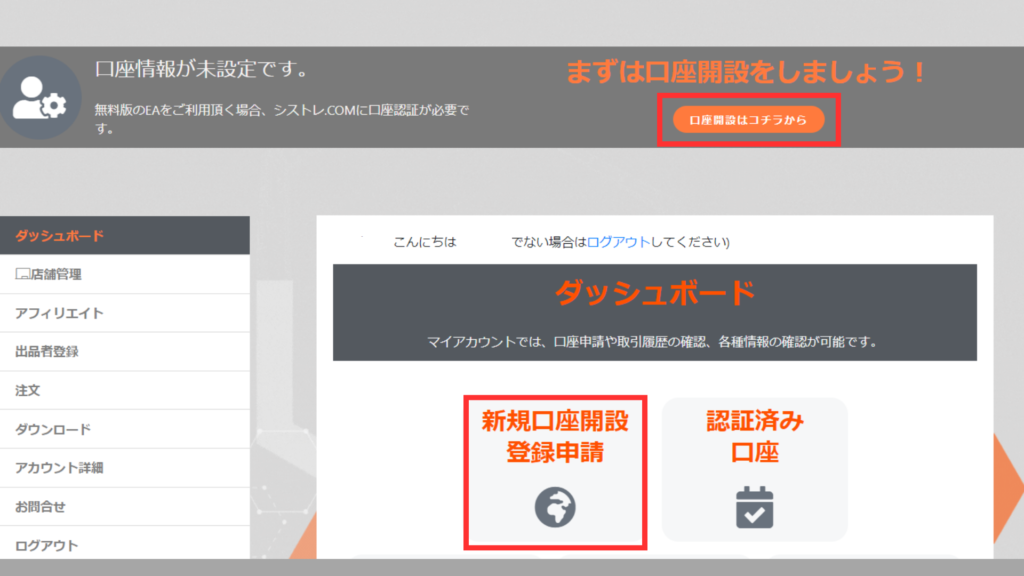
 Haga clic en [Nueva solicitud de cuenta] desde el panel de [Mi cuenta].

02Verificación de cuenta

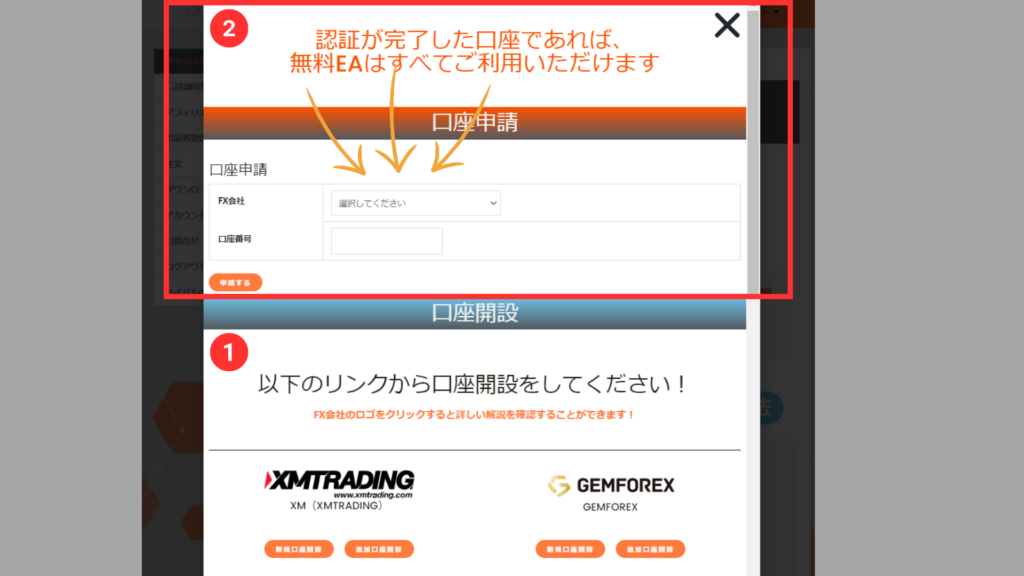
 Seleccione el broker del menú, ingrese su número de cuenta y haga clic en Solicitar.

*La verificación de cuenta puede tardar unos días.
*Si tiene una cuenta abierta fuera de nuestro sitio, abra una cuenta adicional desde el PASO2.


ALL FREE!

Con una cuenta verificada,
¡todos los EAs son gratis!

Cómo descargar productos

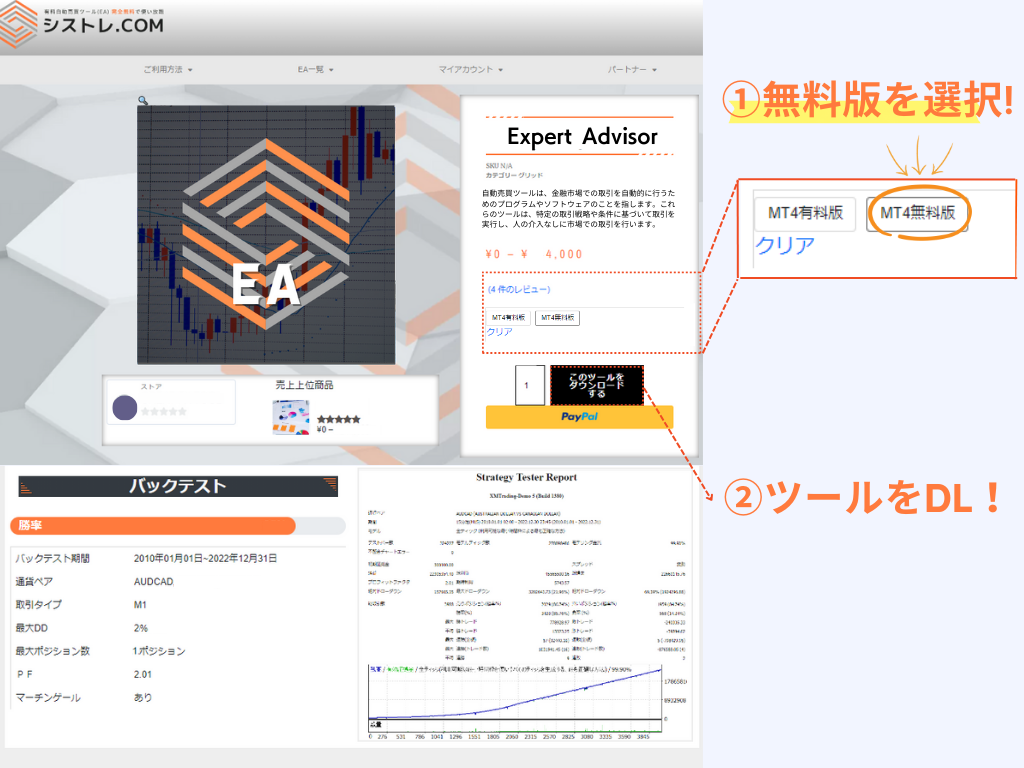
Versión gratuita
Versión gratuita

Se requiere solicitud de cuenta desde Mi Página.
Se pueden registrar múltiples cuentas.

*Solo cuentas abiertas a través de nuestros enlaces son elegibles.

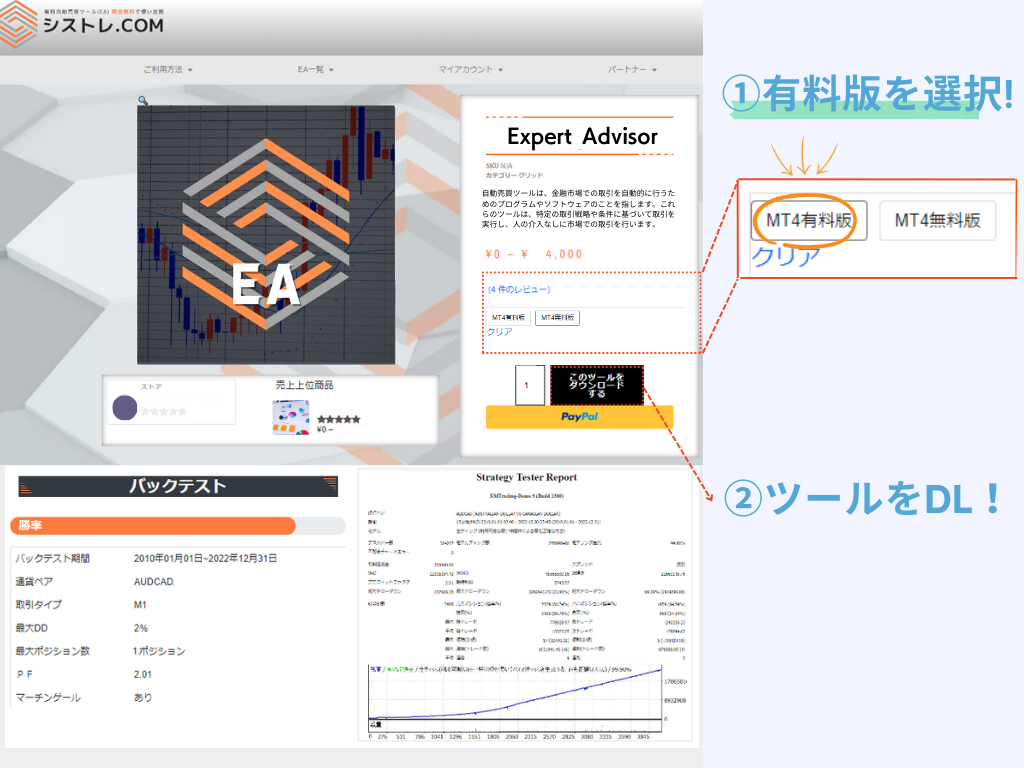
Versión de pago
Versión de pago

Compre y use sin registro.
Los cambios de cuenta se pueden solicitar desde Mi Página.
*La cuenta se puede cambiar una vez por semana.

Diferencia entre versión de pago y gratuita

La diferencia entre las versiones de pago y gratuita es la restricción de cuenta.
Ambas versiones tienen el mismo rendimiento y lógica.

Version Gratuita
€0

Cuenta abierta a traves de nuestro servicio

Acceso ilimitado con cuenta verificada
  • Compatible con MetaTrader4/5
  • EA Ilimitados
  • Cuentas Ilimitadas
  • Re-descarga Disponible
  • Funcion Backtest
  • Sin Cuenta Demo
  • Restriccion de Cuenta
Use con su cuenta preferida
  • Compatible con MetaTrader4/5
  • Sin Restriccion de Broker
  • Cambio de Cuenta Disponible
  • Re-descarga Disponible
  • Funcion Backtest
  • Cuenta Demo OK

Configuración de EA

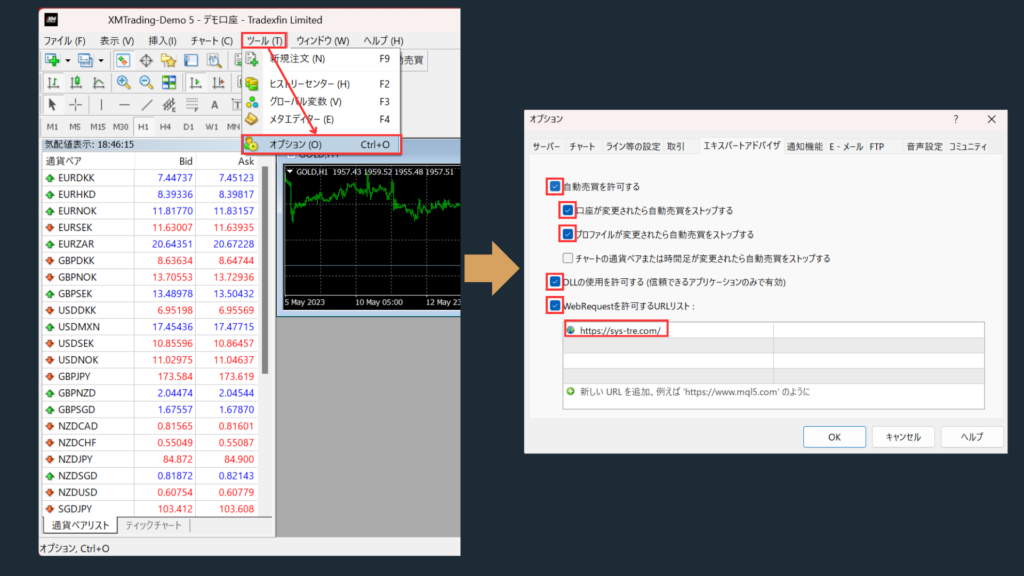
Permitir WebRequest

  • Por favor agregue https://sys-tre.com/ a la lista de URLs permitidas de WebRequest.

Marque "Permitir trading automático".

 Marque "Permitir importaciones DLL (solo aplicaciones confiables)".

 ↓Copie lo siguiente a la lista de URL!↓

				
					https://sys-tre.com/


Meta Trader

Los EA descargados pueden comenzar el trading automatico configurandolos en la plataforma de trading!

MT4 EA設定方法
MT4 EA設定方法

Preguntas frecuentes

It’s a website where you can use FX tools and automated trading tools developed by Japanese engineers completely free of charge!

For more details, click here! ▼
What is SYSTEMTRADE.com?

We offer high-performance EAs that have passed strict screening and are currently being forward-tested! At SYSTEMTRADE.com, you’ll find a wide variety of tools, including commercially available paid EAs and independently developed ones, tailored to different trading styles and currency pairs. 👉 Browse All EAs Here

Because SYSTEMTRADE.com receives compensation from partner FX brokers.

When you use a free EA, you’re required to open an account with a designated FX broker. As you trade, the broker pays a commission to the EA provider based on your trading volume. This system allows you to access high-quality tools without any direct cost.

The key difference is whether or not the account is tied to a specific broker. With the Free version, you can use our tools by opening an account with one of the FX brokers specified by SYSTEMTRADE.com and verifying it via your My Account page. Once verified, you’ll have full access for that account. The Premium version allows you to use the tools with any broker or account type of your choice, as specified at the time of purchase. ※ No membership registration is required to purchase the Premium version.
There is no difference in the performance or logic of the EA itself. The only difference between the Free and Premium versions is whether the EA is restricted to a specific broker account. Both versions provide access to the same EA with identical functionality.
There is no limit to the number of EAs you can use. As long as your account is verified, you can use as many Free EAs as you like—no restrictions. Click here to view the full list of available EAs.
You can switch the account linked to your Premium version up to once per week. If you wish to do so, please contact us.
We use it solely for managing product sales operations. Your information will never be made public on the site or shared with any third parties. Your personal details will also not be disclosed to the stores or sellers offering the products.

Data is updated on the site in real time whenever the EA makes a trade.

Check out the Popular EA Rankings here.

Please contact the vendor’s store directly.

You can reach out to each vendor store via: Menu > Vendor Store > Contact Us.
After sending your inquiry, you can communicate with the store in a chat format from My Account > Inquiries.

List of Vendor Stores

There is no limit to the number of accounts you can register.
As long as the accounts were opened through SYSTEMTRADE.com, you can register an unlimited number of them.
Once an account is approved, you can use the free version of the EA without any restrictions.

Please check your MT4 settings.

Please review STEP 5 in the following link: “Setting up the Expert Advisor.”
Go to [Tools] → [Options] → and add https://sys-tre.com/ to the list of allowed URLs under WebRequest.

If this does not resolve the issue, kindly contact our customer support team for assistance.

About MT4 setup instructions

We recommend using the paid version.

The free version can only be used with accounts created on SYSTEMTRADE.com.
If you already have an existing account, the EAs purchased with the paid version will be available for use.

We recommend using the paid version The free version is only available for accounts created through SYSTEMTRADE.com. If you already have an existing account, EAs purchased with the paid version can be used on it.

If you already have an account, please open an additional account.

For detailed instructions on how to open an account with each FX broker, please refer to the list of brokers below:

List of Partner Brokers

You can switch your account from My Account > Switch Paid Plan Account. Please note that account switches are limited to once per week.

 El trading FX ofrece oportunidades de ganancias pero también puede resultar en pérdidas por debajo de su inversión inicial.

 El rendimiento pasado de EA es solo referencial y no garantiza resultados futuros.

SYSTEMTRADE.COM

 Para consultas sobre los servicios de SYSTEMTRADE.COM, contáctenos desde esta página.

Normalmente le contactaremos en su correo registrado dentro de unos días.

Contáctenos

    We will reply to the email address you entered within a few business days.

    Shopping Cart
    Scroll to Top